Computers / Tablets
User Manual for Xiaomi Redmi Pad 2 Pro Tablet
Quick start guide for the Xiaomi Redmi Pad 2 Pro tablet. Learn how to power on, configure, charge, and perform a factory reset.
Table of contents
Quick guide from the manual
This guide provides essential information for setting up and safely using your Xiaomi Redmi Pad 2 Pro tablet. Follow the on-screen instructions during the initial configuration to personalize your device.
Device overview
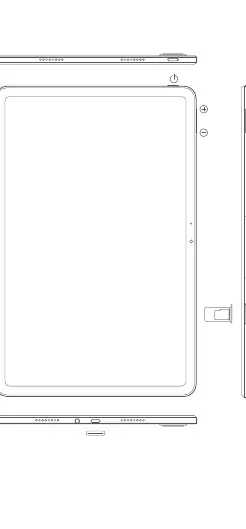
The tablet features a power button for turning the device on and off, volume control buttons (+/-), a USB-C port for charging and data transfer, and a SIM/SD card slot.
Charging instructions
For optimal performance and safety, please follow these charging guidelines:
- Use the included USB cable or a compatible USB-C cable.
- The device supports fast charging with chargers up to 33W.
- Ensure the power adapter is compliant with international safety standards (IEC 60950 or IEC 62368-1).
- Do not charge the device for more than 12 hours.
- Disconnect the adapter from both the device and the power outlet once charging is complete.
Safety precautions
To ensure safe operation, please adhere to the following:
- Operating Temperature: Use the device only within the range of 0°C to 40°C.
- Battery Safety: Do not disassemble, hit, crush, or burn the battery. If the battery appears deformed or damaged, stop using it immediately.
- Environment: Keep the device dry. Avoid using the tablet in high-humidity environments like bathrooms or near explosive atmospheres (e.g., petrol stations).
- Medical Interference: Maintain a minimum distance of 15 cm between the tablet and medical devices like pacemakers.
Factory reset
If you need to erase all local data, you can perform a factory reset:
- Go to Settings.
- Select About tablet.
- Choose Factory reset.
Note: This will erase accounts, contacts, photos, videos, apps, backups, and SD card data.
E-label
To access certification information, go to Settings >About tablet >Certification, or type "Certification" in the settings search bar.
Software updates
Keep your operating system up to date using the built-in software update feature to ensure security and optimal performance.
Manufacturer information
Xiaomi Corporation
Practical help
Common problems
Device will not turn on
Ensure the battery is charged and long-press the power button.
Slow charging
Ensure you are using a charger that supports up to 33W and a compatible USB-C cable.
Need to erase all data
Use the 'Factory reset' option located in Settings > About tablet.
Before use
- Charge the device using a compatible USB-C cable.
- Ensure the power adapter is easily accessible.
- Check that the device is within the operating temperature range (0°C to 40°C).
- Follow the on-screen instructions for initial setup.
Specs in practice
- Operating Temperature
- 0°C to 40°C
- Max Charging Power
- 33W
- SAR Limit (FCC)
- 1.6 W/kg
Images and diagrams
- Power button: Located on the side for turning the device on/off.
- Volume buttons: +/- buttons for volume control.
- USB-C port: Used for charging and data transfer.
- SIM/SD slot: Tray for external cards.
Model compatibility
- Compatible with USB 2.0 or higher chargers.
- Use only authorized accessories compatible with your device.

Manual page author
Emily Carter
User documentation editor
Prepares concise manual descriptions and highlights the most useful setup, operation, and maintenance information for readers.