Mobile / Smartphones
Xiaomi Redmi Note 10S User Guide
Quick start guide for the Xiaomi Redmi Note 10S, covering device setup, SIM card installation, safety information, and warranty details.
Table of contents
Manual images
Jump to the sectionGetting Started
To turn on your Redmi Note 10S, press and hold the power button. Follow the on-screen instructions to complete the initial configuration of your device. The phone comes pre-installed with MIUI, a customized Android-based operating system that provides regular updates and user-friendly features.
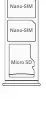
SIM Card Tray
The device features a SIM card tray that supports dual nano-SIM cards and a microSD card. When using both SIM slots, you can designate either card as the primary for data. Please note that dual 4G SIM functionality depends on your telecom operator and region. Only use standard nano-SIM cards to avoid damaging the slot.
Safety and Usage
To ensure safe operation, keep the device away from medical implants by at least 15cm. Use the phone in areas with good signal quality to reduce radiation exposure. It is recommended to use a wireless hands-free system during calls. The operating temperature for this device is between 0°C and 40°C. Do not attempt to disassemble the device yourself, as this may cause damage and void your warranty.
Charging and Maintenance
Charge the device only using the included or Xiaomi-authorized cable and power adapter. Using unauthorized accessories may lead to fire, electric shock, or damage to the device. Always disconnect the battery during disposal and ensure glass surfaces are protected from breakage.
Disposal and Recycling
This product should not be disposed of in municipal waste bins. Please return it to an authorized collection center, recycler, or Xiaomi service center. For assistance with disposal or service, you can contact Xiaomi via their toll-free number 1800 103 6286 or email [email protected].
Warranty Information
The device comes with a limited warranty valid in India. The hardware is covered for 1 year, while original accessories like the battery and charger are covered for 6 months. Warranty service is provided on a carry-in basis at authorized service centers. Before seeking service, ensure you have your model, serial number, and IMEI number ready.
Manufacturer information
Xiaomi Corporation
Practical help
Common problems
Phone does not start or is unable to make calls
Check for hardware defects or contact an authorized service center for diagnostic tests.
Poor contact with SIM cards
Ensure you are using standard nano-SIM cards and that they are correctly seated in the tray.
Battery does not charge or device fails after full charge
Verify you are using the original Xiaomi charger and cable; if the issue persists, visit a service center.
Before use
- Ensure you are using standard nano-SIM cards.
- Charge the device using the provided original adapter.
- Back up all personal data before sending the device for any service.
- Keep the device at least 15cm away from active medical implants.
- Verify the operating temperature is within 0°C - 40°C.
Specs in practice
- SAR Limit (India)
- Specific Absorption Rate limit is 1.6 W/Kg, ensuring radio wave exposure is within safety standards.
- Operating Temperature
- The device is designed to function safely between 0°C and 40°C.
Images and diagrams
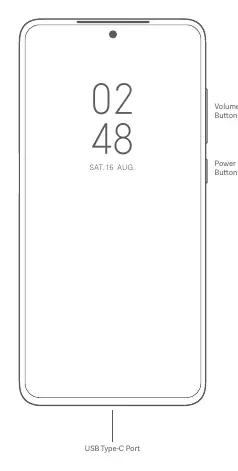
- The device features volume buttons and a power button on the right side.
- The USB Type-C port is located at the bottom center of the device.
- The SIM tray layout accommodates two nano-SIM cards and one microSD card.
Model compatibility
- Warranty is valid only in India.
- VoLTE support is dependent on the telecom operator and region.
- Dual 4G SIM availability varies by region and operator.

Manual page author
David Miller
Documentation analyst
Organizes user manual content into clear summaries, with attention to model details, product context, and everyday usability.