Hvac / Thermostats Controls
XTM 160W Folding Solar Panel Kit
High-efficiency 160W monocrystalline folding solar panel kit with 15A MPPT controller, designed for reliable 12V battery charging in outdoor and 4x4 applications.
Table of contents
Product Overview
The XTM 160W Folding Solar Panel Kit is a portable, high-efficiency monocrystalline solar solution designed to charge most 12V battery types, including Flooded, Gel, AGM, VRLA, and LiFePO4 (Lithium) batteries. The kit includes a 15A MPPT solar charge controller to ensure efficient and safe charging.
Safety and Warnings
- Always wear appropriate Personal Protective Equipment (PPE) such as gloves and eye protection when working near batteries.
- Ensure the charging area is well-ventilated to prevent the buildup of explosive gases.
- Never smoke or use open flames near the battery or charger.
- Do not use the kit if cables or plugs are damaged.
- Do not disassemble the solar panel or the controller.
- Keep the panels away from children and pets.
- Do not place the panels on fabric, leather, or vinyl seats, or in the engine bay.
- Do not walk on, sit on, or place heavy items on the panels.
Installation and Setup
To set up the system, locate a clear, sunlit area free from overhanging branches or heavy shade. Unfold the panels and adjust the support legs to the desired angle. Always face the front side of the panels directly toward the sun. For maximum output, it is recommended to reposition the panels throughout the day to follow the sun's movement.
Connection Order
Follow these steps to ensure safe operation:
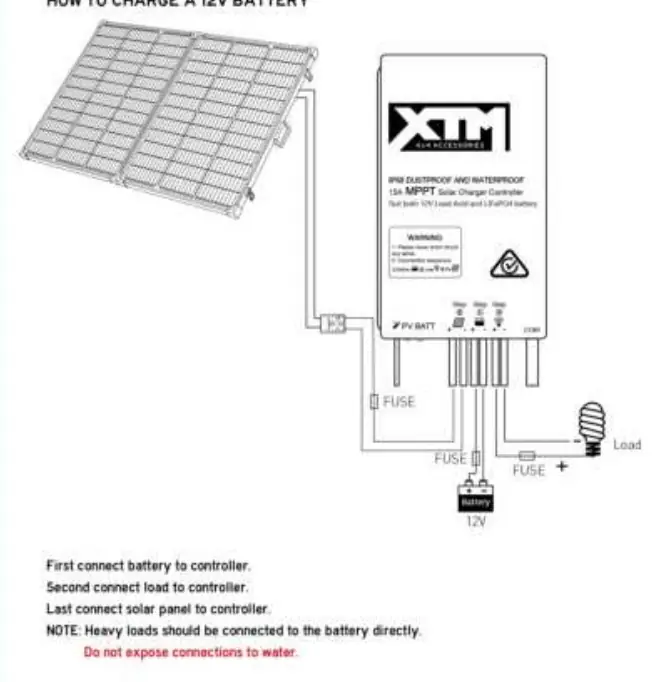
- Battery Connection: Connect the controller to the battery first, ensuring correct polarity (red to positive, black to negative). Install the fuse and verify that the battery LED illuminates.
- Load Connection: Connect any heavy loads directly to the battery, or use the controller's load terminals for smaller devices.
- PV Connection: Finally, connect the solar panel to the controller. Observe the LEDs to confirm correct operation.
Maintenance and Troubleshooting
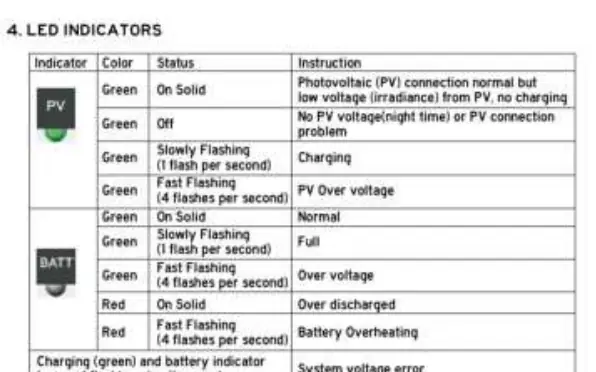
Keep the panel surface clean by removing dust and dirt with a soft brush or microfibre cloth. Do not use high-pressure hoses. If the system fails to charge, check all wire connections for tightness and ensure the battery voltage is above 8.5V. If the controller indicates an error via the LED status lights, consult the troubleshooting table to identify the fault, such as over-voltage, over-discharge, or overheating, and follow the recommended recovery steps.
Related manuals
Related manuals from the same brand or category.

Manual page author
Emily Carter
User documentation editor
Prepares concise manual descriptions and highlights the most useful setup, operation, and maintenance information for readers.