Electronics / Amplifiers Receivers
Yamaha YXZ 1000R Remote Control Vehicle User Guide
Comprehensive user guide for the Yamaha YXZ 1000R remote control vehicle, covering battery installation, operation, steering alignment, and safety instructions.
Table of contents
Product Overview
The Yamaha YXZ 1000R is a high-performance remote control vehicle designed for off-road fun. This package includes the vehicle, a dedicated remote control transmitter, a rechargeable 3.7V 700mAh lithium battery pack for the vehicle, and a USB charging cord. Please note that the transmitter requires 2 x AA 1.5V batteries, which are included in the package.
Getting Started
Before operating the vehicle, ensure all batteries are correctly installed. For the transmitter, open the battery compartment at the bottom, insert two AA batteries observing the correct polarity, and secure the cover with the screw. For the vehicle, use a screwdriver to open the battery compartment, connect the 3.7V lithium battery pack, and close the compartment securely. Always ensure the power switches on both the vehicle and the transmitter are in the OFF position before starting the installation process.
Operation and Steering Alignment
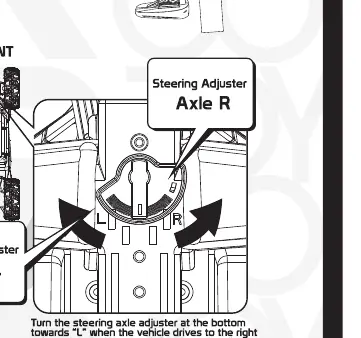
To begin driving, switch both the vehicle and the transmitter to the ON position. The transmitter LED will light up to indicate a successful connection. Use the remote control sticks to move the vehicle forward, backward, or to turn left and right. If you notice the vehicle drifting to one side while driving straight, use the steering adjuster located at the bottom of the vehicle. If the vehicle pulls to the left, adjust the steering towards the R position. If it pulls to the right, adjust it towards the L position to ensure straight-line tracking.
Safety and Maintenance
Safety is paramount when using electronic toys. Always switch off both the vehicle and the transmitter after you have finished playing to preserve battery life. Follow all battery safety guidelines: do not mix old and new batteries, do not mix different types of batteries, and never attempt to recharge non-rechargeable batteries. If the vehicle will not be used for an extended period, remove the batteries to prevent leakage. Keep the vehicle away from water and extreme heat to maintain its performance. If the vehicle stops responding, check the battery levels in both the transmitter and the vehicle first. Dispose of used batteries responsibly according to local regulations.
Manufacturer information
Yamaha
Practical help
Common problems
Vehicle drifts to one side while driving
Use the steering adjuster at the bottom of the vehicle to fine-tune the alignment.
Vehicle does not respond to transmitter
Check if both the vehicle and transmitter are switched ON and ensure batteries are fresh and correctly installed.
Before use
- Ensure vehicle battery is fully charged and connected.
- Install 2 x AA batteries in the transmitter with correct polarity.
- Secure all battery compartment covers with screws.
- Verify both power switches are in the OFF position before setup.
- Check that the steering alignment is centered.
Specs in practice
- Vehicle Battery
- 3.7V 700mAh rechargeable lithium battery pack.
- Transmitter Battery
- Requires 2 x AA 1.5V batteries.
Images and diagrams
- The transmitter diagram shows the ON/OFF switch and battery compartment location.
- The vehicle diagram highlights the battery compartment and the steering adjuster location.
- Remote control instructions illustrate stick movements for forward, backward, and turning.
Model compatibility
- Designed for users aged 6 and older.
- Use only the provided USB charging cord for the vehicle battery.

Manual page author
David Miller
Documentation analyst
Organizes user manual content into clear summaries, with attention to model details, product context, and everyday usability.