Industrial / Air Purifiers
User Manual for Abestorm DecDust 1100/1100IG Industrial Air Purifier
Quick guide for the Abestorm DecDust 1100 and 1100IG industrial air purifiers. Includes installation instructions, filter replacement steps, control panel operation, and troubleshooting.
Table of contents
Manual images
Click an image to enlargeQuick Guide
The Abestorm DecDust 1100/1100IG is an industrial air purifier designed for dust and particle filtration. Before use, ensure the power cord is plugged into a grounded socket. The machine must not be installed outdoors or in areas prone to rain. Maintain at least 2 feet of clearance around the air inlet and outlet for proper airflow. Installation requires two people, especially for ceiling mounting, where the ceiling must support at least 110 lbs.
Product Overview
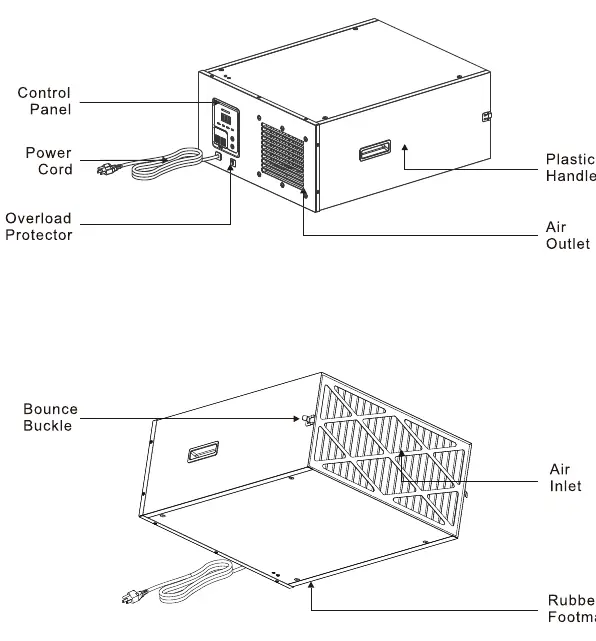
The unit features a control panel, power cord, overload protector, plastic handles, air inlet/outlet, and rubber footmats. The 1100IG model includes an additional Ion Function compared to the standard 1100 model.
Installation
Installation Mode 1 (Ceiling): Fix the hook to the 4 holes at the top of the machine using M4 nuts. Fasten the horn hook to the ceiling. Use the chain sections to adjust the machine balance.
Installation Mode 2 (Wall): Remove the four M4 screws from the top of the machine, install the pendant, and fix the screws. Secure the machine to the wall with the help of another person.
Operation
Control Panel: Use the Power key to turn the machine on/off. The display shows the PM number. Use the Speed key to cycle through Low, Middle, and High wind speeds. The Ionizer switch (1100IG only) toggles the ion function.
Remote Control: Provides the same functions as the control panel, plus Rise/Drop buttons to set the desired PM number (adjustable in increments of 50). The Time button allows setting the timer from 1H to 6H.
Filter Replacement
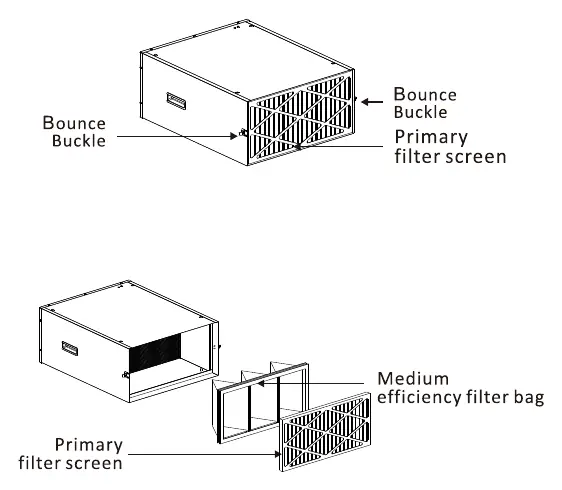
1. Turn off the machine.2. Loosen the bounce buckles on the side of the machine.3. Remove the old filter.4. Install the new filter, ensuring the correct sequence of the primary filter screen and medium efficiency filter bag.
Maintenance and Troubleshooting
Cleaning: If air quality is poor, dust may accumulate near the control panel. Disconnect power, open the cover next to the control panel buttons, and use a brush to clean the area.
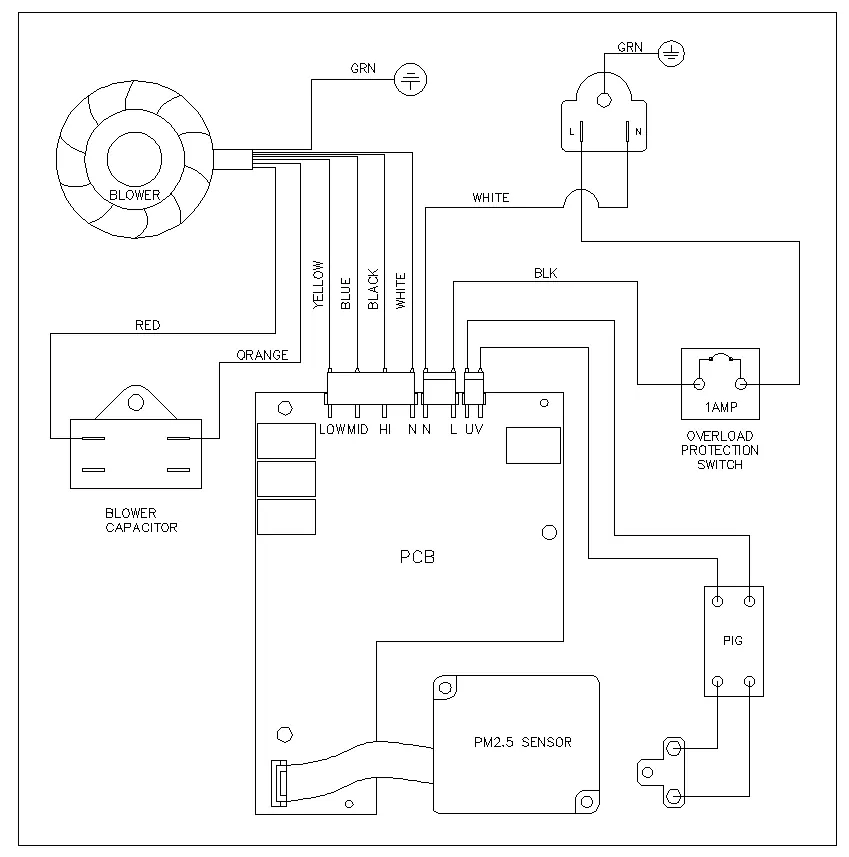
Troubleshooting: If the display shows 000 and the motor stops with a red PM indicator, the PM sensor requires cleaning. If the machine is short-circuited, the overload protector will cut off the circuit. To reset, unplug the machine, press the overload protector button back to its original position, and plug it back in.
Specifications
Both models share the same power requirements (110-120V, 60Hz, 2.18A), noise level (≤66dB), and dimensions (24.6 x 20.1 x 10.6 in). The 1100IG model features an Ion Function, while the 1100 model does not.
Manufacturer information
Abestorm
Practical help
Common problems
Display shows 000, motor stops, and PM indicator is red
This indicates a problem with the PM sensor. Perform maintenance and cleaning.
Machine stops working suddenly
Check the overload protector. Unplug the machine, press the overload protector button back to its original position, and restart.
Air quality warning light is red
This indicates bad air quality in the room; ensure the unit is running at an appropriate speed.
Before use
- Ensure the power cord is plugged into a grounded socket.
- Verify that the filter is installed before running the machine.
- Maintain at least 2 feet of clearance around the air inlet and outlet.
- If ceiling mounting, ensure the ceiling load capacity is greater than 110 lbs.
- Ensure installation is performed by two people.
Specs in practice
- Ion Function
- Available on 1100IG model only
Images and diagrams
- Control Panel: Displays PM number and allows control of speed, power, and ionizer.
- Installation: Shows ceiling hanging and wall mounting methods using M4 screws.
- Filter Replacement: Illustrates the use of bounce buckles to access and replace filters.
Model compatibility
- 1100IG model includes Ion Function; 1100 model does not.
- Use only Abestorm approved accessories to avoid invalidating the warranty.

Manual page author
Emily Carter
User documentation editor
Prepares concise manual descriptions and highlights the most useful setup, operation, and maintenance information for readers.