Power / Batteries & Chargers
User Manual for Ambrane Capsule 10K Power Bank
Quick guide for the Ambrane Capsule 10K Power Bank. Learn how to charge your devices, recharge the power bank, use the LED torch, and understand safety precautions.
Table of contents
Quick Guide from the Manual
The Ambrane Capsule 10K is a portable power bank designed to charge mobile devices. Always charge the power bank fully before its first use. Use the provided or a compatible USB cable to connect your device to the output ports for charging.
Operating Instructions
To charge your mobile device, connect it to one of the output ports. Some models may start charging automatically, while others require pressing the power button.
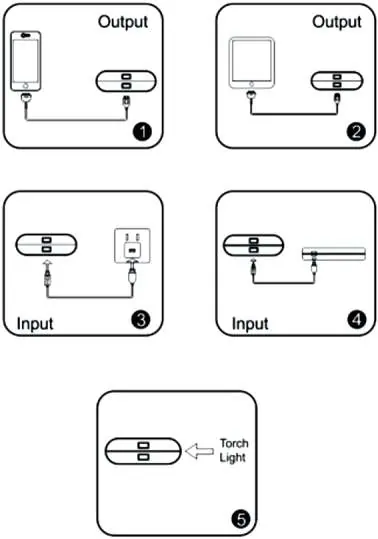
To charge the power bank itself, connect it to a 5V power source using a Micro USB cable.
Torch Light: To turn the torch on or off, simply press the power button twice.
LED Indicators
The LED lights indicate the battery level during charging and discharging:
- 0-25%: One LED blinking
- 25-50%: One LED ON, second blinking
- 50-75%: Two LEDs ON, third blinking
- 75-100%: Three LEDs ON, fourth blinking
- Fully Charged: All four LEDs ON
Safety and Maintenance
- Keep the power bank away from heat, direct sunlight, and humidity.
- Do not disassemble, crush, or puncture the device.
- If the device gets wet or damaged, do not use it.
- Charge the power bank at least once every three months if not in use.
- Prolonged use may cause the device to feel warm, which is normal.
Practical help
Common problems
Power bank not charging devices
Check if the cable is connected properly and ensure the device is compatible with 5V output.
Power bank feels hot
It is normal for the device to feel warm during charging. If it becomes excessively hot, unplug it immediately.
LEDs not indicating charge
Ensure the power source is active and the cable is securely connected to the input port.
Before use
- Charge the power bank fully before first use.
- Use the original charging cable or a high-quality compatible cable.
- Ensure the power source is 5V.
- Keep the device away from extreme temperatures.
Specs in practice
- LED Indicators
- Visual feedback showing remaining battery percentage (0-100%).
Images and diagrams
- Fig 1 & 2: Shows connecting devices to output ports.
- Fig 3 & 4: Shows connecting the power bank to a power source for input charging.
- Fig 5: Shows double-pressing the power button to activate the torch.
Model compatibility
- Compatible with mobile phones, tablets, and Bluetooth speakers.
- Requires 5V input for charging the power bank.

Manual page author
Emily Carter
User documentation editor
Prepares concise manual descriptions and highlights the most useful setup, operation, and maintenance information for readers.