Electronics / USB Hubs & Docking
Vention VWS-J08 10000mAh Power Bank
Quick guide for the Vention VWS-J08 10000mAh Power Bank. Learn how to use the wireless charging feature, understand input/output specifications, and follow safety guidelines for optimal battery health.
Table of contents
Quick Guide
The Vention VWS-J08 is a 10000mAh power bank featuring 45W fast charging and wireless charging capabilities. It includes a built-in folding stand for convenient device viewing while charging. Always ensure the device is kept away from extreme heat and moisture to maintain battery health.
Product Overview
The device features the following components:
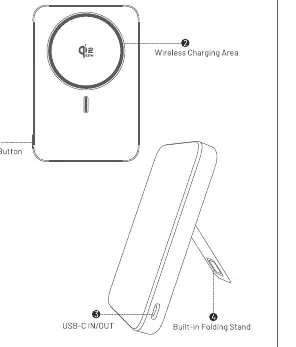
- Power Button: Located on the side/top for activation.
- Wireless Charging Area: The top surface for placing wireless-enabled devices.
- USB-C IN/OUT Port: Used for both charging the power bank and charging external devices.
- Built-in Folding Stand: Allows the power bank to prop up devices.
Specifications
- Model: VWS-J08
- Material: Aluminum Alloy + PC + ABS
- Interface: USB-C
- Capacity: 10000mAh (7.74V/38.7Wh)
- Input (USB-C): 5V=3A; 9V=3A; 12V=2.5A; 15V=2A; 20V=1.5A (30W Max)
- Output (USB-C): 5V=3A; 9V=3A; 12V=3A; 15V=3A; 20V=2.25A (45W Max)
- PPS: 3.3-21.0V 2.15A (45W Max)
- Output (Wireless Charging): 25W/15W/10W/7.5W/5W
- Total Output: 5V=3A (15W Max)
Instructions for Use
Charging Devices:
- Use the built-in USB-C cable or an external cable to connect your device to the power bank.
- The power bank supports simultaneous charging of two devices.
- For wireless charging, place your wireless-enabled device on the wireless charging area.
- The power bank supports 45W PD fast charging and is compatible with iPhone 16 series and later models.
Charging the Power Bank:
- Connect the power bank to a power outlet using a USB-C charger.
- Disconnect the power bank once charging is complete.
Maintenance and Cleaning
- Clean the power bank with a dry, soft cloth.
- Do not use corrosive cleaners.
- Periodically charge and discharge the power bank to maintain battery health.
Safety Tips
- Do not store the power bank above 45°C or in direct sunlight.
- Do not disassemble, repair, or modify the device.
- Do not immerse the power bank in water or expose it to moisture.
- Keep the power bank in a shockproof, moisture-proof bag and away from metal objects like keys or coins to prevent short circuits.
- If the power bank emits smells, behaves unusually, or gets excessively hot, stop using it immediately.
What's in the Box
- 10000mAh Power Bank x 1
- USB-C Cable x 1
- User Manual x 1
Manufacturer information
Vention
Practical help
Common problems
Device gets warm during use
The power bank may warm up during operation; this is normal, but ensure it stays below 45°C and is not in direct sunlight.
Battery health degradation
Do not overcharge the power bank or let it fully deplete. Periodically charge and discharge the unit to maintain battery health.
Device malfunction or smell
If the power bank emits smells, behaves unusually, or gets excessively hot, stop using it immediately and keep it away from fire.
Before use
- Ensure the power bank is fully charged before first use.
- Verify that your device is compatible with USB-C or wireless charging.
- Check that the power bank is free from physical damage.
- Keep the device away from metal objects like keys or coins to prevent short circuits.
Specs in practice
- 45W Max Output
- Supports high-speed PD fast charging for compatible smartphones and tablets.
- 10000mAh Capacity
- The total energy storage capacity of the internal battery.
- Wireless Charging
- Supports up to 15W output for devices that support Qi wireless charging.
Images and diagrams
- 1: Power Button
- 2: Wireless Charging Area
- 3: USB-C IN/OUT Port
- 4: Built-in Folding Stand
Model compatibility
- Supports 45W PD fast charging.
- Compatible with iPhone 16 series and later models.

Manual page author
David Miller
Documentation analyst
Organizes user manual content into clear summaries, with attention to model details, product context, and everyday usability.