Mobile / Smartphones
Apple iPhone 17e Recycler Guide
Professional disassembly and recycling guide for the Apple iPhone 17e, covering safety protocols, component identification, and proper material handling.
Table of contents
About this guide
This guide provides essential information for electronics recycling professionals to safely disassemble the iPhone 17e. The primary objective is to maximize resource recovery from end-of-use electronics while ensuring compliance with all applicable environmental, health, and safety regulations. Procedures described herein are intended exclusively for trained professionals.
Safety considerations
Recyclers must evaluate their workspace to meet ergonomic standards and ensure employee protection. Personal Protective Equipment (PPE) including hand, eye, and foot protection, as well as masks, is required. Special care must be taken with broken OLED displays, which should be stored in appropriate containers to manage associated hazards.
Battery safety
The device contains a lithium-ion polymer battery. To ensure safety during removal and disposal:
- Discharge the battery to below 25 percent before disassembly to reduce the risk of thermal runaway.
- Remove conductive items like jewelry or watches.
- Do not puncture, strike, crush, or bend the battery.
- Avoid exposure to excessive heat or sunlight.
- Use only non-conductive, non-sharp tools.
- Dispose of batteries in accordance with local environmental laws.
Handling a thermal runaway
If a battery begins to smoke, emit sparks, puff out, or make hissing sounds, act immediately. Do not use water or standard fire extinguishers. Smother the device with clean, dry sand. Leave the area if irritation occurs and wait 30 minutes before attempting to handle the device with heat-resistant gloves.
Disassembly instructions
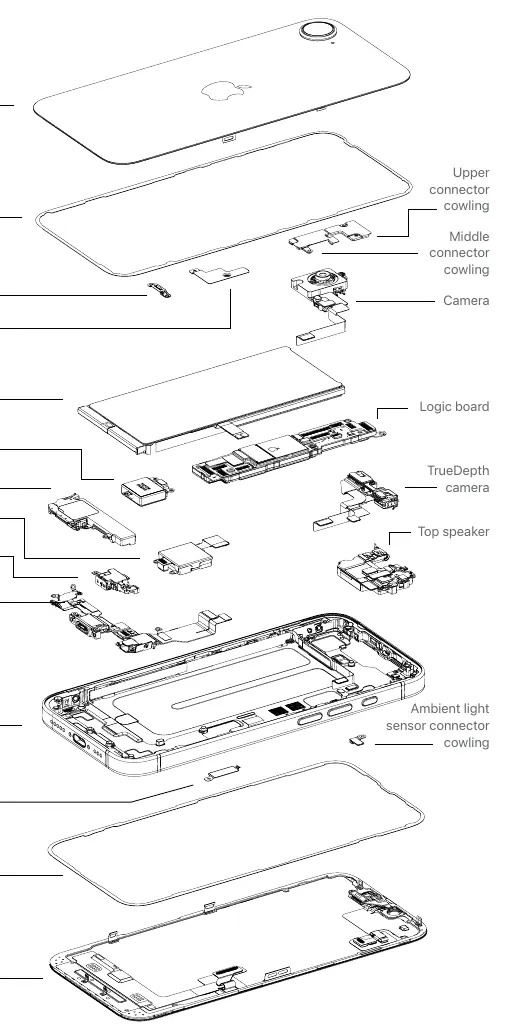
The disassembly process requires a flat-blade screwdriver, a miniature plastic pry bar, and a nail-pulling screwdriver. Follow these steps:
- Remove the USB-C charge cable.
- Separate the back glass from the enclosure using a flat-blade screwdriver.
- Remove the back glass manually.
- Extract the lithium-ion battery using the plastic pry bar.
- Pry off the main logic board with the nail-pulling screwdriver.
- Remove the OLED display by inserting a flat-blade screwdriver into the USB-C connector and prying downward.
All outputs from the disassembly process must be managed and disposed of according to relevant waste management directives.
Related manuals
Related manuals from the same brand or category.
Mobile / Smartphones
Apple iPhone 15 128GB Smartphone Instructions
AppleMobile / Smartphones
Apple iPhone 16 Plus User Guide
AppleGeneral / Other Manuals
Apple MacBook Pro User Guide
AppleDocuments / Warranty Safety
iPhone 16e User Manual and Warranty Information
AppleElectronics / Monitors
iPhone 16e - Technical Specifications
AppleComputers / Keyboards Input
MacBook Pro 16-inch 2019 Teardown
AppleElectronics / Monitors
MacBook Pro (14-inch, M4 Pro or M4 Max, 2024) - Tech Specs
AppleComputers / Tablets
Apple iPad Pro 13-inch (M5) Recycler Guide
Apple
Manual page author
Michael Turner
Technical manual editor
Reviews PDF manuals for structure, safety notes, and practical product details so readers can find the right information quickly.