Home / Security
User Manual for Aqara Smart Video Doorbell G4
Quick guide for the Aqara Smart Video Doorbell G4. Learn about installation, battery setup, wired power connection, app pairing, and troubleshooting for your smart doorbell.
Table of contents
Manual images
Click an image to enlargeQuick guide from the manual
The Aqara Smart Video Doorbell G4 is a smart home security device consisting of an outdoor doorbell and an indoor chime repeater. It supports facial recognition, two-way audio, and tamper alarms. The device can be powered by 6 AA batteries or a 12-24V AC/DC wired power source. It requires the Aqara Home app for full functionality, including custom ringtones and visitor records.
Product overview
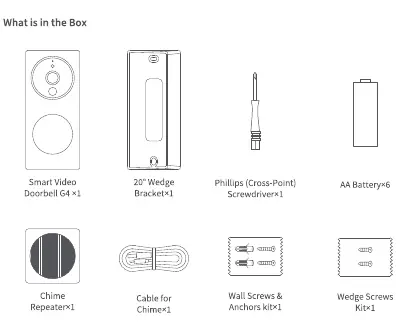
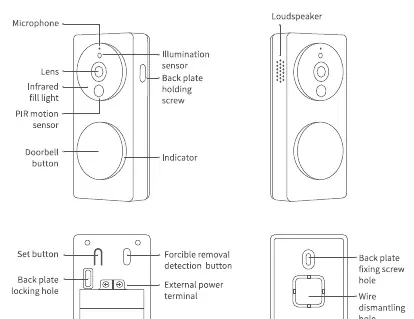
The system includes the doorbell unit and the chime repeater. The doorbell features a camera lens, PIR motion sensor, infrared night vision, and a doorbell button. The chime repeater acts as a hub, provides local storage via a MicroSD card slot, and connects to your Wi-Fi network.
Installation
Before installing, ensure you have downloaded the Aqara Home app and registered an account. The doorbell can be installed on an outdoor wall or door. For metal doors, installation on the adjacent wall is recommended. The chime repeater should be placed within 5 meters of the doorbell and 20 meters of your wireless router.
Power supply options
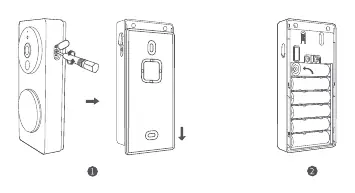
- Battery power: Use 6 AA alkaline batteries. Battery life depends on wake-up frequency (typically 3-4 months).
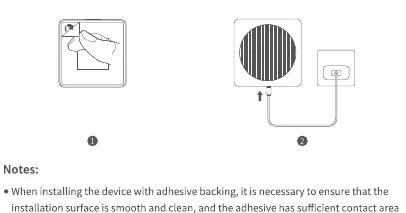
- Wired power: Connect 12-24V AC/DC power to the external power terminals on the back plate.
Mounting methods
- Adhesive fixing: Suitable for smooth, clean surfaces like glass, ceramic tile, or marble.
- Screw fixing: Use the provided wall bracket, drill 6mm holes, and secure with screws and anchors.
- Wedge bracket: Use the included 20-degree wedge bracket to adjust the camera angle if needed.
Setup and pairing
1. Power on the chime repeater first. 2. Open the Aqara Home app and tap the plus icon to add the device. 3. Follow the in-app instructions to connect the chime repeater to your 2.4GHz Wi-Fi network. 4. Once the chime is connected, install the batteries in the doorbell; it will automatically pair with the chime.
Indicator status
The indicator lights on both the doorbell and chime repeater provide status updates. For example, a flashing yellow light on the chime repeater indicates it is waiting to be connected to the network, while a solid blue light indicates successful operation.
Troubleshooting
If you encounter issues, ensure your Wi-Fi network is 2.4GHz (5GHz is not supported). Check that your router does not have AP Isolation or anti-squatter settings enabled. If binding fails, reset the device by holding the function button for 10 seconds until the indicator flashes yellow.
Technical specifications
The doorbell supports 1080p resolution with a 162-degree viewing angle. It operates in temperatures from -18°C to 50°C. The chime repeater supports MicroSD cards up to 512GB (Class 10 or above) for local storage.
Manufacturer information
Aqara
Practical help
Common problems
Chime repeater fails to connect to Wi-Fi
Ensure you are using a 2.4GHz Wi-Fi network (5GHz is not supported). Check that your router does not have AP Isolation or anti-squatter settings enabled.
HomeKit binding fails
Restart your iOS device and reset the Chime Repeater by holding the menu button for 10 seconds, then try adding it again.
Doorbell battery drains quickly
Battery life is directly related to wake-up frequency. Consider switching to power-saving mode or using a wired power supply for high-traffic areas.
Before use
- Download the Aqara Home app and register an account.
- Ensure you have a 2.4GHz Wi-Fi network available.
- Prepare 6x AA alkaline batteries or a 12-24V AC/DC power source.
- Check that the installation surface is smooth and clean if using adhesive.
- Have a Phillips screwdriver ready for installation.
Specs in practice
- Operating Temperature
- -18°C to 50°C for the doorbell; 0°C to 40°C for the chime repeater.
- Local Storage
- Requires a MicroSD card (Class 10 or above, up to 512GB) inserted into the chime repeater.
Images and diagrams
- Doorbell buttons: Doorbell button (trigger), Set button (reset), Forcible removal button (tamper alarm).
- Chime Repeater buttons: Menu button (mute, reset, factory restore).
Model compatibility
- Supports Apple HomeKit.
- Requires 2.4GHz Wi-Fi network.
- Not compatible with 5GHz Wi-Fi networks.

Manual page author
Emily Carter
User documentation editor
Prepares concise manual descriptions and highlights the most useful setup, operation, and maintenance information for readers.