Garden / Water Features
Aquascape 1-Watt 12 Volt LED Waterfall Light User Guide
Quick guide for the Aquascape 1-Watt 12 Volt LED Waterfall Light. Includes installation steps, bulb replacement instructions, and troubleshooting tips for your pond lighting.
Table of contents
Quick guide from the manual
The Aquascape 1-Watt 12 Volt LED Waterfall Light is designed for use in or out of water. For safety, always use a ground fault circuit interrupter (GFCI) when working near water. Ensure the light housing is kept tight at all times to prevent water leakage.
Installation
It is recommended to install and conceal the light before adding gravel to the pond or stream. Position the light facing away from the main viewing area to reduce glare.
- Placement: The light can be used with the included stand or placed between rocks. If used out of water, attach the light to the stand.
- Wiring: Plug the cord into a low voltage transformer. Alternatively, the light can be wired directly into an existing low voltage lighting system by cutting off the plug and splicing the wires directly.
- Security: Double-check that the ring nut is fastened tightly using the supplied lens key.
Replacing the Light Bulb
Follow these steps to replace the bulb:
- Ensure all power is shut off to the light. The housing must be above water to service the bulb.
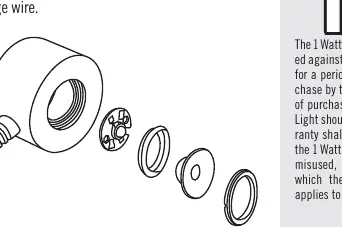
- Unscrew the ring nut from the front of the housing using the supplied lens key.
- Remove the glass lens and o-ring.
- Remove the old LED bulb and insert the new one.
- Ensure the lens, o-ring, and assembly are free of dirt or debris.
- Reinstall the o-ring and lens, then attach the ring nut.
- Test the light before placing it back into the pond.
Troubleshooting
- Light not working: Ensure the plug is fully inserted into the transformer. If hardwired, check that all connections are sound.
- Water ingress: Ensure the ring nut is tightened properly and the o-ring is clean.
- Bulb life: Bulb life can be extended by using a timer on the transformer to limit operation to desired times.
Replacement Parts
The following replacement bulbs are available:
- #98370 Red LED
- #98371 Blue LED
- #98372 Green LED
- #98373 Yellow LED
- #98452 White LED
Practical help
Common problems
Light does not turn on
Check that the plug is fully inserted into the transformer or that the low voltage wire splices are secure.
Water inside the light housing
Ensure the ring nut is tightened securely and the o-ring is free of debris.
Bulb failure
Replace with a compatible Aquascape LED bulb. Note that the bulb is not covered by the warranty.
Before use
- Ensure a GFCI outlet is installed by a licensed electrician.
- Verify the ring nut is tightened using the lens key.
- Ensure power is off before performing any maintenance.
- Check that the housing is above water before opening it.
Images and diagrams
- The assembly diagram illustrates the order of components: the light housing, the LED bulb, the o-ring, the glass lens, and the ring nut.
Model compatibility
- Compatible with Aquascape low voltage transformers.
- Can be spliced into existing low voltage lighting systems.

Manual page author
David Miller
Documentation analyst
Organizes user manual content into clear summaries, with attention to model details, product context, and everyday usability.