Automotive / Portable Coolers
User Manual for AstroAI 10L Portable Mini Refrigerator
Quick guide for the AstroAI 10L Portable Mini Refrigerator. Includes setup instructions for AC/DC power, operating modes (cooling/heating), maintenance, and troubleshooting tips.
Table of contents
Manual images
Click an image to enlargeQuick Guide from the Manual
The AstroAI 10L Portable Mini Refrigerator is designed for both cooling and heating. It can be powered via a 12V car outlet (DC) or a standard wall outlet (AC). Before connecting to power, ensure the unit is switched to the OFF position. Always maintain at least 5cm (2 inches) of space around the sides and back for proper ventilation.
Safety Information
- Connect to the correct voltage (110V AC or 12V DC) as specified on the product label.
- Do not connect directly to a 24V cigarette lighter socket in large vehicles.
- When using in a car, do not leave the refrigerator connected for long periods when the engine is off to prevent battery drain.
- Do not open or disassemble the cover.
- Keep away from rain, corrosive gases, and liquids.
- Do not sit on the refrigerator.
- Children should be supervised when using the device.
- Allow 30 minutes for the unit to return to room temperature when switching between cooling and heating modes.
Product Overview
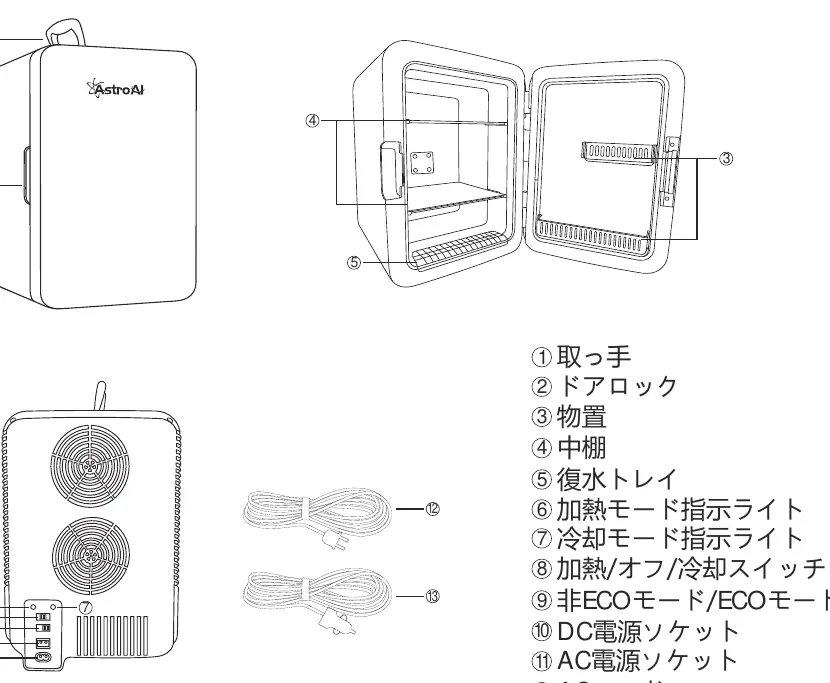
The unit features a handle, door lock, internal shelf, and a condensation tray. The back panel contains the power sockets (AC/DC), the cooling/heating/off switch, and the ECO/Normal mode switch.
Dimensions
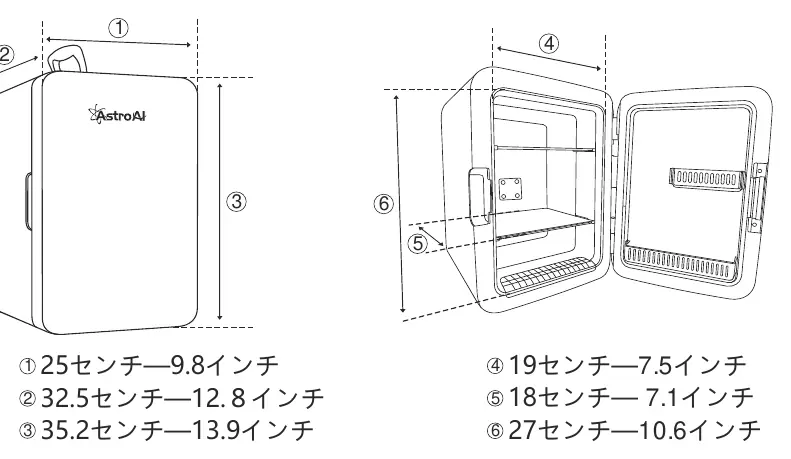
The unit measures approximately 25cm (9.8in) wide, 32.5cm (12.8in) deep, and 35.2cm (13.9in) high. The internal dimensions are approximately 19cm (7.5in) wide, 18cm (7.1in) deep, and 27cm (10.6in) high.
Operating Instructions
Car Usage (DC)
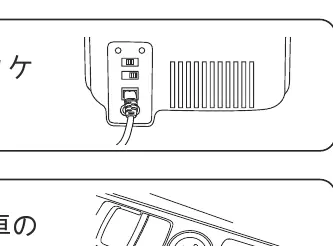
- Ensure the switch is in the OFF position.
- Plug the DC power cord into the DC socket on the back of the refrigerator.
- Place the unit in a stable position and plug the other end into the vehicle's power socket.
- Switch to the desired mode (Cooling or Heating).
Home Usage (AC)
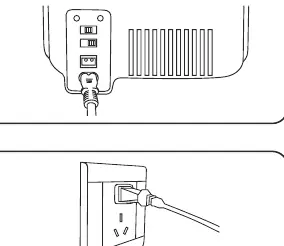
- Ensure the switch is in the OFF position.
- Plug the AC power cord into the AC socket on the back of the refrigerator.
- Place the unit in a stable position and plug the other end into a standard wall outlet.
- Switch to the desired mode (Cooling or Heating).
Modes and Settings
- ECO Mode: A low-noise, energy-saving mode. It has a slower cooling speed and higher minimum temperature compared to normal mode.
- Cooling Mode: For best results, place pre-chilled items inside. Cooling performance is affected by ambient temperature.
- Heating Mode: Designed to maintain the temperature of items. It is not intended to heat up cold items from scratch.
Maintenance and Storage
- Always unplug the unit before performing maintenance.
- Clean the exterior with a damp cloth and mild detergent.
- Ensure the interior is completely dry before storing the unit for long periods.
Troubleshooting
- Not working: Check the power connection, ensure the plug is clean and secure, and verify the power source (car battery or wall outlet).
- Not cooling: Ensure the switch is set to Cooling mode, check if the fan is running, and note that the unit cannot cool below 0°C (32°F).
- Water accumulation: Avoid frequent door opening and do not place hot items directly inside.
- Poor heat dissipation: Ensure 5cm (2 inches) of clearance, avoid high-temperature environments, and disable ECO mode if cooling performance is insufficient.
Specifications
- Capacity: 10L
- Input Voltage: DC 12V / AC 100-110V
- Cooling Power: 50W (DC) / 64W (AC)
- Heating Power: 40W (DC) / 50W (AC)
- Operating Temperature: Up to 20°C below ambient (cooling); up to 60°C (heating)
- Certifications: ETL, PSE, CE
Manufacturer information
AstroAI
Practical help
Common problems
Unit does not turn on
Check the power connection, ensure the plug is secure, and verify the power source (car battery or wall outlet). Check if the LED indicator is lit.
Unit is not cooling
Ensure the switch is set to Cooling mode. Check if the fan is operating. Note that cooling performance depends on ambient temperature and cannot go below 0°C (32°F).
Water accumulating inside
Avoid opening the door frequently and do not place hot items directly into the refrigerator.
Poor heat dissipation
Ensure at least 5cm (2 inches) of clearance around the unit. Disable ECO mode if cooling performance is insufficient.
Before use
- Ensure the power source matches the unit's requirements (110V AC or 12V DC).
- Ensure the unit is switched to OFF before connecting to power.
- Ensure the unit is placed in a stable location.
- Ensure there is at least 5cm (2 inches) of clearance around the unit for ventilation.
- Ensure the interior is dry.
Specs in practice
- Cooling Power
- 50W when using DC power; 64W when using AC power.
- Heating Power
- 40W when using DC power; 50W when using AC power.
- Operating Temperature
- Cooling: Up to 20°C below ambient temperature. Heating: Up to 60°C (140°F).
Images and diagrams
- Parts 1-5: Handle, door lock, shelf, and condensation tray.
- Parts 6-9: Indicators for heating/cooling modes, power switch, and ECO/Normal mode switch.
- Parts 10-11: DC and AC power sockets.
- Parts 12-13: AC and DC power cords.
Model compatibility
- Compatible with 12V DC vehicle outlets.
- Compatible with 100-110V AC wall outlets.
- Not compatible with 24V cigarette lighter sockets in large vehicles.

Manual page author
David Miller
Documentation analyst
Organizes user manual content into clear summaries, with attention to model details, product context, and everyday usability.