Automotive / Car Audio
User manual for Blaupunkt TWb 1000A active subwoofer
Quick guide for the Blaupunkt TWb 1000A active subwoofer. Learn about installation, wiring diagrams, audio settings, and troubleshooting.
Table of contents
Manual images
Click an image to enlargeQuick guide from the manual
The Blaupunkt TWb 1000A is an active subwoofer designed for automotive use. Professional installation is recommended. Key requirements include a fuse installed within 30 cm of the battery, a secure ground connection to bare chassis metal, and proper cable sizing (minimum 10 gauge). The unit supports both RCA (low-level) and speaker (high-level) inputs, but you must use only one method at a time.
Installation and safety
- Mounting: Install in a dry location with sufficient air circulation. Do not mount on rear shelves or seats where it could cause harm during an accident. Securely fasten the unit in the trunk.
- Power: Disconnect the negative battery terminal before starting. The power cable must be fused near the battery.
- Grounding: Connect to a noise-free ground point (chassis screw or metal). Scrape the contact surface until bright and apply graphite grease.
Wiring and connections
The unit features a harness for power, ground, remote, and audio signals.
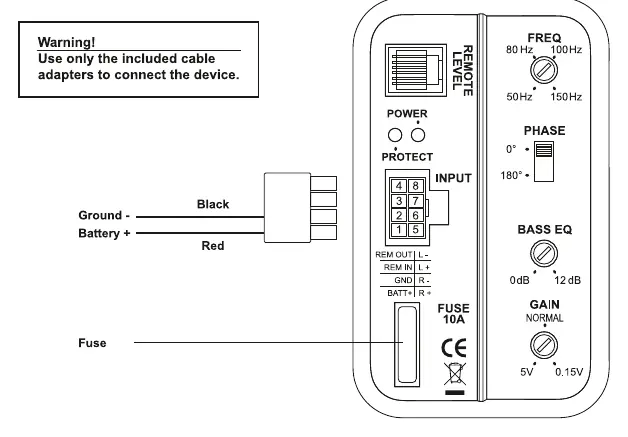
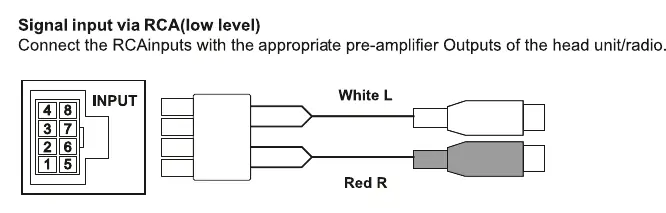
- Power/Remote: Connect the positive cable to the battery (via fuse) and the ground cable to the chassis. The remote-in connection requires a switchable 12V power supply from the car audio system.
- Audio Inputs: Choose either Cinch (RCA) or Hi-level (loudspeaker) inputs. Never use both simultaneously.
- Auto Turn-on: The unit features automatic switch-on via DC Offset (High-level input only) or remote signal. It automatically switches off if no music signal is received for 60 seconds.
Controls and adjustments
- GAIN control: Adjusts input sensitivity (0.15V to 5V). Turning clockwise increases volume sensitivity.
- Bass boost: Adjusts bass response from 0dB to +12dB at 45Hz. If the external bass controller is connected, the unit's knob is overridden.
- Phase Control: Select 0 or 180 degrees to sync the subwoofer with the main speakers.
- X-OVER frequency control: Sets the low-pass crossover frequency (50-150Hz). A setting of 80-90Hz is recommended.
Troubleshooting and indicators
- Power-on indicator: A green LED indicates regular operating status. A red LED indicates the output stage is switched off due to an error.
Manufacturer information
Blaupunkt
Practical help
Common problems
Red LED is illuminated
This indicates an error; the output stage has been electronically switched off. Check all wiring connections.
Bass boost control has no effect
If the external wired bass controller is connected, it overrides the Bass Boost knob on the unit.
Subwoofer does not turn on
Ensure the remote wire is connected to a switchable 12V source, or if using High-level inputs, ensure the music signal is strong enough to trigger the auto-on feature.
Before use
- Disconnect the negative battery terminal.
- Ensure the power cable has a fuse within 30cm of the battery.
- Use at least 10 gauge power cable.
- Scrape the ground point to bare metal.
- Select either RCA or High-level input (do not use both).
Specs in practice
- Low-pass Crossover
- Filters out high frequencies, allowing only bass (50-150Hz) to pass.
- Phase Control
- Aligns the subwoofer's sound wave with the main speakers (0 or 180 degrees).
Images and diagrams
- The wiring diagram illustrates the harness connections for power, ground, remote, and audio inputs.
- The control panel diagram shows the location of the frequency, phase, bass EQ, and gain knobs.
Model compatibility
- Compatible with both factory audio systems (via High-level input) and aftermarket head units (via RCA).

Manual page author
Emily Carter
User documentation editor
Prepares concise manual descriptions and highlights the most useful setup, operation, and maintenance information for readers.