Power / Batteries & Chargers
User Manual for Power Bank 10W
Quick guide for the 10W Power Bank. Learn how to use the solar charging, wireless charging, LED flashlight, and how to charge your devices safely.
Table of contents
Quick guide from the manual
This power bank is a portable, multi-function power supply. It features solar charging, wireless charging, and an integrated LED light. Before using it for the first time, or after long-term storage, ensure the device is fully charged.
Product Overview
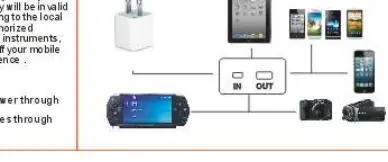
The power bank features a micro USB input for charging the unit itself and A-type USB interfaces for outputting power to other devices.
Using the Power Bank
- LED Light: Double-click the button to turn the light on. Click again for SOS flashing, again for strobe, and once more to turn it off.
- Solar Charging: The green indicator light shows when the device is solar charging.
- Wireless Charging: Press the button shortly to activate. The red indicator light on the back will turn on when wireless charging is active.
- Simultaneous Charging: The device can charge up to 3 devices at the same time.
Charging the Power Bank
Use the provided USB-DC03.5 output cable and a micro USB adapter to charge the power bank via a computer USB port or a wall adapter. The blue indicator lights show the current power level. When the battery is fully charged, the blue lights will remain on, and the charging process will be completed by the device itself.
Safety Precautions
- Charge the device fully before the first use.
- Use only specified chargers and approved accessories.
- Keep the device in a ventilated place; avoid extreme temperatures.
- Do not get the product wet or drenched.
- Do not throw, hit, or shake the product to avoid damaging internal components.
- Keep out of reach of children.
- The device may become slightly hot during charging, which is normal.
- Avoid contact with metal objects in the charging/discharging sockets to prevent short circuits.
- Do not place near fire or heat sources.
Technical Specifications
- Wireless Charging: 10W
- Solar Panel: Monocrystalline silicon
- Input: Micro USB DC 5V/2.1A
- Output: 2x USB DC 5V/2.1A
- Features: LED light, solar charging, wireless charging, hook
Practical help
Common problems
Power bank not charging devices
Ensure the device is connected properly to the USB output port and that the power bank has sufficient charge (check blue indicator lights).
Wireless charging not working
Ensure the device is placed correctly on the back of the power bank and press the button shortly to activate the wireless charging mode (red indicator should turn on).
LED light not turning on
Double-click the power button to cycle through the light modes (On, SOS, Strobe, Off).
Before use
- Charge the power bank fully before the first use.
- Use the provided USB-DC03.5 cable and a compatible adapter.
- Ensure the device is kept in a ventilated place during charging.
- Check that the power bank is not wet or damaged.
Specs in practice
- Wireless charging
- 10W output for compatible devices.
Images and diagrams
- The connection diagram illustrates the input port (Micro USB) for charging the power bank and the output ports (USB-A) for connecting external devices.
Model compatibility
- Compatible with most mobile phones and digital devices with DC 5V input.

Manual page author
David Miller
Documentation analyst
Organizes user manual content into clear summaries, with attention to model details, product context, and everyday usability.