Tools / Power Tools
Bosch 18V-15 Professional Cordless Angle Grinder User Manual
Quick guide for the Bosch 18V-15 Professional cordless angle grinder, covering safety instructions, assembly, operation, and maintenance.
Table of contents
Manual images
Jump to the sectionQuick guide from the manual
This manual provides essential safety and operating instructions for the Bosch 18V-15 Professional series cordless angle grinders (18V-15 C, 18V-15 SC, 18V-15 P, 18V-15 PSC). Always read the full safety instructions before use. Ensure the battery is removed before any maintenance or accessory changes.
Device description
The angle grinder is designed for cutting and brushing metal, stone, plastic, and composite materials, as well as roughing metal and drilling in stone with diamond core cutters without water. Models with 'SC' and 'PSC' include a user interface for speed preselection and status indication.
Assembly
Protective guard: Align the coding cams of the guard (15) with the holder on the tool. Press and hold the unlocking lever (1), press the guard onto the spindle collar until it clicks into place. Adjust the position by pressing the lever (1) and rotating the guard.
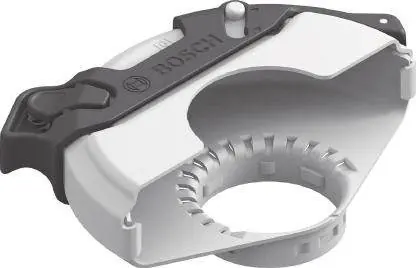
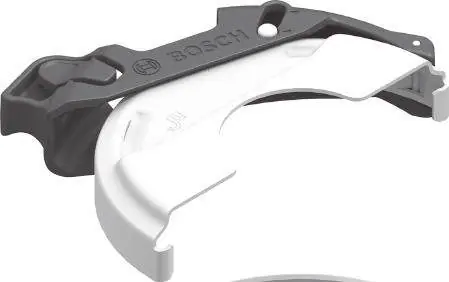
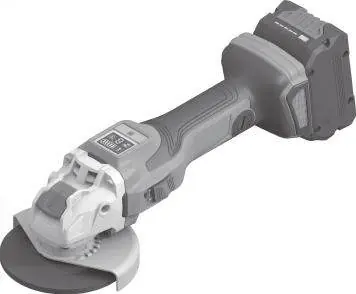
Auxiliary handle: Screw the handle (11/12) into the gear head on the left or right side. Do not operate the tool without the auxiliary handle.
Abrasive tools: Use only original X-LOCK tools. Ensure the tool and holder are free of dirt. Place the tool centrally on the X-LOCK holder and press until it clicks. To remove, open the lever (3) and remove the tool.
Operation
Switching on/off: For models 18V-15 C/SC, push the switch (5) forward. For models 18V-15 P/PSC, push the unlocking lever (10) forward and then push the switch (5) up.
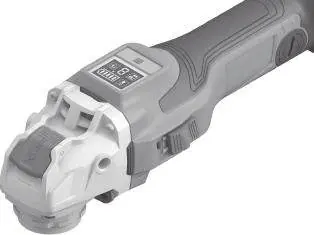
Speed preselection: On models with a user interface (4), use the speed preselection button (32) to adjust the speed. Default settings include 3 speed levels, which can be expanded to 6 via the Bosch Toolbox App.
Safety and maintenance
Safety: Always wear eye protection. Use the correct guard for the application (grinding vs. cutting). Do not use damaged accessories. Regularly clean the air vents. If the tool is electrostatically charged, the electronics will switch it off; restart by following the switching-on procedure.
Maintenance: Keep the tool and air vents clean. Store accessories in a dry, frost-free room. For repairs, contact Bosch customer service at www.bosch-pt.com.
Official resources from the manual
Manufacturer information
Bosch
Practical help
Common problems
Tool does not start or stops during operation
Check battery charge level. If the tool is overheated or the battery is empty, the status indicator (35) will show yellow or red. Allow the tool to cool down or replace/charge the battery.
Kickback shutdown triggered
If the tool suddenly kicks back, the power supply is interrupted. Set the on/off switch to the 'off' position and switch the tool on again.
Impact shutdown triggered
If the tool is dropped, it switches off automatically. Set the on/off switch to the 'off' position and switch the tool on again.
Before use
- Ensure the battery is fully charged.
- Check that the correct protective guard is mounted for the intended application.
- Verify that the abrasive tool is correctly mounted and rotates freely.
- Perform a test run of at least 1 minute without load.
- Ensure the auxiliary handle is securely attached.
Specs in practice
- Rated voltage
- 18V DC, compatible with Bosch GBA 18V and ProCORE18V batteries.
- Rated no-load speed
- 11,000 min⁻¹, the maximum speed of the tool without load.
- Max. grinding disc diameter
- 125 mm, the maximum size of the disc that can be used.
Images and diagrams
- Page 3: Assembly of the protective guard (A, B, C, D).
- Page 4: Overview of components and accessories.
- Page 5: User interface (E) and accessory mounting (F).
- Page 6: Rotating the gear head (G).
Model compatibility
- Compatible with all GBA 18V and ProCORE18V batteries.
- Bluetooth Low Energy Module GCY 42 is available as an accessory for connectivity features on SC and PSC models.

Manual page author
David Miller
Documentation analyst
Organizes user manual content into clear summaries, with attention to model details, product context, and everyday usability.