Tools / Caulking Guns
Bosch GCG 18V-310 Cordless Caulking Gun User Manual
Quick guide for the Bosch GCG 18V-310 Cordless Caulking Gun. Includes setup, operation, battery management, maintenance, and safety instructions.
Quick answers from the manual
Quick answer
- The Bosch GCG 18V-310 is a cordless caulking gun designed for applying sealants and adhesives from standard cartridges. It features adjustable feed rates and an automatic shut-off function to prevent material leakage. p. 6, 8, 13
Key actions
- Inserting the cartridge p. 8, 13
- Adjusting the feed rate p. 8, 13
- Switching on and off p. 8, 13
First start
- Charge the battery p. 7, 12
- Insert the battery p. 7, 12
- Insert the cartridge p. 8, 13
Problems and fixes
Tool shuts off automatically
If the permissible temperature is exceeded, the caulking gun switches off. Let the caulking gun cool down and then switch the caulking gun back on.
p. 8, 13
Battery charge indicator LEDs do not light up
If no LED lights up after pressing the button for the battery charge indicator, then the battery is defective and must be replaced.
p. 7, 13Technical specifications
| Parameter | Value | Meaning | Pages |
|---|---|---|---|
| Rated voltage | 18 V | Operating voltage of the tool | p. 6, 12 |
| Cartridge capacity | 310 ml | Maximum cartridge size | p. 6, 12 |
| Feed rate | 7 mm/s | Speed of the rack movement | p. 6, 12 |
| Extrusion force | 3.5 kN | Force applied to the cartridge | p. 6, 12 |
Where to find it in the PDF
- Table of Contents p. 2
- Diagrams p. 3
- Safety and Operation (Multi-language) p. 4, 176
- Declaration of Conformity p. 177, 181
Table of contents
Quick guide from the manual
The Bosch GCG 18V-310 is a cordless caulking gun designed for applying sealants and adhesives from standard 310 ml cartridges. Before use, ensure the battery is charged and the cartridge is correctly inserted into the holder.
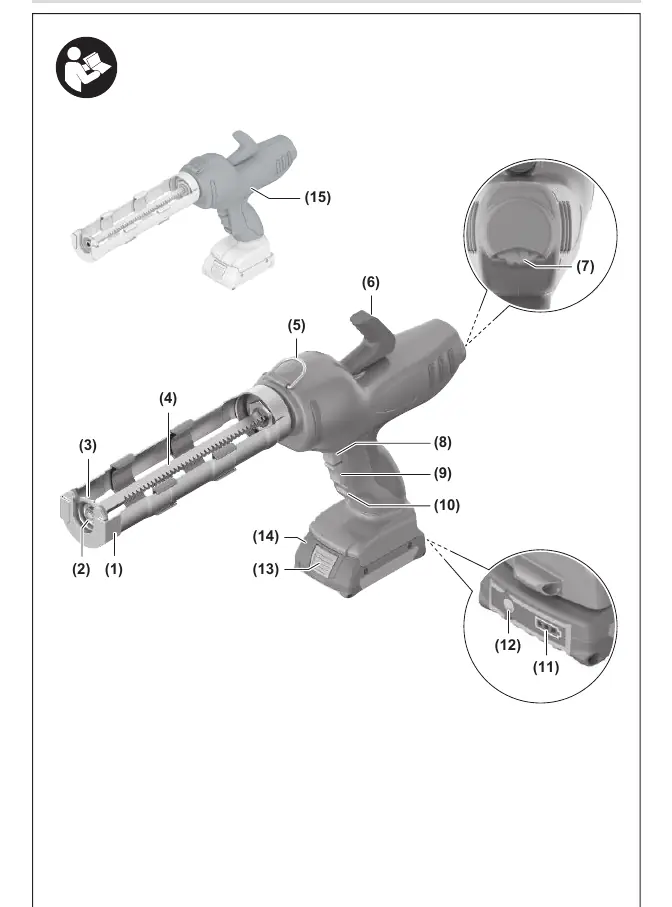
Product Description
The tool features a cartridge holder, a rack for dispensing, a feed rate thumbwheel, and an on/off switch. The rack can be retracted using the rack release button for easy cartridge replacement.
Assembly
Inserting the Cartridge:
- Remove the battery before performing any work on the tool.
- Unlock the rack (4) using the rack release (8) and pull it backwards.
- Cut open the front of the cartridge and screw on a dispensing nozzle.
- Insert the cartridge into the holder.
- Carefully slide the unlocked rack forward until the aluminium press (3) touches the cartridge.
- Cut the nozzle to the desired size if necessary.
Operation
Adjusting the Feed Rate: You can adjust the feed rate by varying the pressure on the on/off switch (9). The feed rate thumbwheel (7) allows you to preselect the maximum feed rate.
Switching On and Off: To switch on, push the lock (10) down and press the on/off switch (9). To switch off, release the on/off switch. The rack will immediately move to a park position to prevent further dispensing.
Overload Protection: If the tool exceeds the permissible temperature, it will switch off automatically. Allow the tool to cool down before switching it back on.
Battery Management
The tool is compatible with Bosch 18V batteries (GBA 18V and ProCORE18V). Check the charge level using the button on the battery. If no LEDs light up, the battery is defective and must be replaced.
Maintenance and Cleaning
Always remove the battery before maintenance or cleaning. Keep the tool and ventilation slots clean for safe operation. Clean the dispensing nozzle, cartridge holder, and rack thoroughly after each use according to the consumable manufacturer's instructions.
Manufacturer information
Bosch
Practical help
Common problems
Tool switches off automatically
Temperature-dependent overload protection triggered. Let the tool cool down before restarting.
Battery charge indicator not working
Not all battery types have a charge indicator. If no LEDs light up after pressing the button, the battery may be defective.
Material not dispensing
Check if the cartridge is blocked or incorrectly aligned in the holder.
Before use
- Ensure the battery is fully charged.
- Check that the cartridge size is correct (310 ml).
- Ensure the cartridge is securely in the holder.
- Verify the surface is clean, dry, and free from grease.
- Ensure the nozzle is cut to the appropriate size.
Specs in practice
- Extrusion force
- 3.5 kN.
Images and diagrams
- Page 3 shows the main components: (1) Cartridge holder, (4) Rack, (7) Feed rate thumbwheel, (9) On/Off switch, (10) Locking device.
Model compatibility
- Compatible with standard 310 ml cartridges.
- Compatible with Bosch 18V batteries (GBA 18V, ProCORE18V).

Manual page author
David Miller
Documentation analyst
Organizes user manual content into clear summaries, with attention to model details, product context, and everyday usability.