Tools / Power Tools
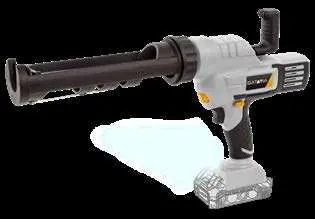
User Manual for Batavia MAXPACK 18V Cordless Caulking Gun
Quick guide for the Batavia MAXPACK 18V Cordless Caulking Gun (BT-CCG002). Learn how to load cartridges, adjust speed, operate the tool, and perform maintenance.
Table of contents
Quick guide from the manual
The Batavia MAXPACK 18V Cordless Caulking Gun is designed for dispensing caulking or filling material. Before use, ensure you have a compatible 18V battery (BT-CLB005 or BT-CLB006). To operate, press the release button to pull the rack rod back, insert the cartridge, push the rod forward until it touches the cartridge, and use the trigger to dispense. The tool features variable speed control via the trigger and an adjustable speed regulator.
Safety warnings
- Always wear eye protection when using the caulking gun to prevent sealant from falling into your eyes.
- Work in a well-ventilated area and use respiratory protection if necessary, as fumes from some adhesives can be noxious.
- Keep hands and clothing away from the rack rod and plunger area to avoid pinching.
- When working overhead, ensure the plunger rod is not pointing towards your eyes or head.
- Always switch off the tool before installing or removing the battery.
Operation
- Press the release button (6) to the left and pull the rack rod back by the handle (7) to the end of the cartridge holder (1).
- Place the cartridge onto the cartridge holder.
- Press the release button (6) to the left and push the rack rod (7) forward until it is against the back of the cartridge.
- Press the release button (6) to the right and press the trigger switch (3) until material comes out of the nozzle.
- Release the trigger switch (3) to turn off the tool. The rack rod will automatically move backward slightly to prevent overflow.
Speed control
The tool is equipped with a variable-speed trigger switch (3) and an infinitely adjustable speed regulator (2). For best results, start at the lowest setting (1) and increase the speed as needed for your application. Setting a high speed at the beginning may cause the sealant to drain too quickly.
Maintenance and cleaning
- Remove the battery before performing any maintenance or cleaning.
- Keep ventilation openings and the motor housing free from dirt and dust.
- Clean the tool immediately after each use with a clean cloth or low-pressure compressed air.
- Do not use solvents or harsh cleaning agents, as they can damage plastic components.
- Store the device indoors in a dry place protected from dust, dirt, and extreme temperatures.
Technical data
- Rated voltage: 18V DC
- Cartridge size: Max 300 ml
- Extrusion speed (no load): 0.8 – 9.3 mm/s
- Extrusion force: Max 2000 Nm
- Net weight (without battery): 1950 g
Manufacturer information
Batavia
Practical help
Common problems
Material continues to flow after releasing the trigger
The tool has an automatic retraction feature. If overflow persists, ensure the trigger is fully released.
Battery not locking into place
Ensure the red indicator on the battery button is not visible; push the battery until it clicks securely.
Before use
- Check the device for transport damage.
- Ensure the battery is fully charged.
- Verify the cartridge size is max 300ml.
- Wear eye protection.
- Ensure the work area is well-ventilated.
Specs in practice
- Rated voltage
- 18V DC
- Extrusion force
- Max 2000 Nm
- Extrusion speed
- 0.8 – 9.3 mm/s
Images and diagrams
- 1: Cartridge holder
- 2: Speed regulation
- 3: Trigger switch
- 4: LED worklight
- 6: Release button
Model compatibility
- Compatible with Batavia 18V batteries: BT-CLB005 (2.0Ah) or BT-CLB006 (4.0Ah).
- Requires compatible chargers: BT-CLC004, BT-CLC003, or BT-CLC005.

Manual page author
Emily Carter
User documentation editor
Prepares concise manual descriptions and highlights the most useful setup, operation, and maintenance information for readers.