Tools / Power Tools
User Manual for Bosch GLI 18V-800 Professional Cordless Worklight
Quick guide for the Bosch GLI 18V-800 Professional cordless worklight. Includes setup, brightness settings, battery usage, safety warnings, and maintenance instructions.
Table of contents
Manual images
Jump to the sectionQuick guide from the manual
The Bosch GLI 18V-800 Professional is a battery-powered worklight designed for mobile, temporary indoor illumination. It features adjustable brightness, a rotatable and tiltable lamp head, and multiple mounting options including a utility hook and a magnet.
Safety Information
- Eye Safety: Do not look directly into the light beam, even from a distance.
- Heat Warning: The lamp head becomes hot during operation. Do not cover it to prevent burns.
- Distance: Maintain a minimum distance of 0.1 m from illuminated surfaces to prevent overheating.
- Medical Implants: Keep the worklight away from medical implants (e.g., pacemakers, insulin pumps) as the internal magnet can interfere with their function.
Operation
Setup and Brightness
Place the worklight on a stable, level surface. Use the on/off button to cycle through brightness levels:
- 1x press: Low brightness
- 2x press: Medium brightness
- 3x press: Full brightness
- 4x press: Switch off
If the light has been on in dimmed mode for approximately 5 minutes, the next press will switch it off. Folding the lamp head toward the battery holder will also automatically switch it off.
Mounting
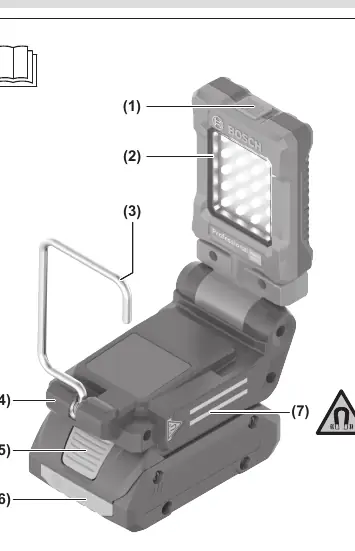
- Utility Hook: Use the hook to hang the light. Do not use it to pull objects.
- Magnetic Attachment: Use the magnet to attach the light to ferromagnetic surfaces. Keep fingers away from the rear of the battery holder when attaching to avoid pinching.
Battery Usage
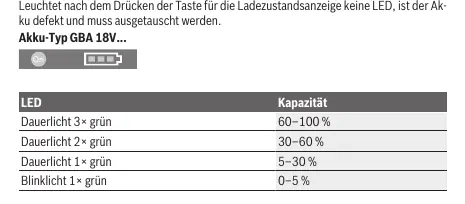
The worklight is compatible with Bosch 18V GBA and ProCORE18V batteries. To check the charge level, press the button on the battery. If no LEDs light up, the battery is defective.
Maintenance
The worklight is maintenance-free. Clean the plastic lens only with a dry, soft cloth. Do not use detergents or solvents. The light source is not replaceable; if it fails, the entire unit must be replaced.
Manufacturer information
Bosch
Practical help
Common problems
Light flashes 3 times and dims
The battery is nearly empty; charge the battery.
Light turns off automatically
Temperature-dependent overload protection has been triggered. Let the light cool down before switching it back on.
Battery indicator LEDs do not light up
The battery is defective and must be replaced.
Before use
- Ensure the battery is fully charged
- Check the worklight for any visible damage
- Ensure the surface for placement is stable
- Keep the light away from medical implants
Images and diagrams
- (1) On/off button
- (3) Utility hook
- (4) Battery holder
Model compatibility
- Compatible with Bosch 18V GBA and ProCORE18V batteries

Manual page author
Michael Turner
Technical manual editor
Reviews PDF manuals for structure, safety notes, and practical product details so readers can find the right information quickly.