Tools / Power Tools
Bosch GAL 12V-20 Professional Battery Charger User Manual
Quick guide for the Bosch GAL 12V-20 Professional battery charger, including charging instructions, troubleshooting, safety warnings, and technical specifications.
Table of contents
Quick guide from the manual
The Bosch GAL 12V-20 Professional is a battery charger designed for Bosch Li-ion batteries. The charging process begins automatically once the charger is connected to a power source and a battery is inserted into the charging bay. Charging is only possible when the battery temperature is within the permitted range of 0–45 °C.
Safety information
- Use the charger only in enclosed, dry spaces.
- Do not operate the charger on easily ignited surfaces (e.g., paper, textiles) or in flammable environments.
- Do not cover the ventilation slots to prevent overheating.
- Only charge Bosch Li-ion batteries with a capacity of 1.3 Ah or more.
- Always check the charger, cable, and plug for damage before use.
Charging process
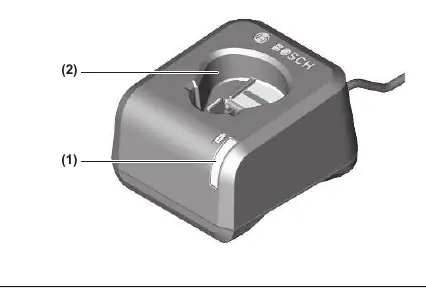
Ensure the mains voltage matches the specifications on the charger's rating plate. Insert the mains plug into a socket and place the battery into the charging bay (2). The charging process starts immediately.
Troubleshooting
- Battery is not being charged and the indicator (1) is lit continuously: The charger has detected an internal error. Ensure the battery is fully inserted. Unplug and replug the charger. If the error persists, have the charger checked by an authorized Bosch service center.
- Indicators do not light up: The socket, mains cable, or charger may be defective. Check the mains voltage and have the charger inspected by an authorized service center if necessary.
Maintenance and cleaning
If the power cord needs replacement, it must be performed by Bosch or an authorized service center to avoid safety hazards. Keep the charger clean to prevent electric shock risks.
Manufacturer information
Bosch
Practical help
Common problems
Battery is not charging and the green indicator (1) is lit continuously.
Ensure the battery is fully inserted. Unplug the charger from the mains and plug it back in. If the error persists, contact an authorized Bosch service center.
No indicators light up and the battery is not charging.
Check the mains voltage at the socket. If the issue remains, the charger or cable may be defective; have it checked by an authorized service center.
Before use
- Check the charger, cable, and plug for any visible damage.
- Ensure the mains voltage matches the rating plate specifications.
- Verify the battery capacity is at least 1.3 Ah.
- Ensure the battery temperature is between 0–45 °C.
Specs in practice
- Charging current
- 2.0 A
- Battery charging voltage
- 3.6–12 V (automatic detection)
- Protection class
- II
Images and diagrams
- (1) Green battery charge indicator
- (2) Charging bay
Model compatibility
- Compatible with Bosch Li-ion batteries with a capacity of 1.3 Ah or more.
- Not suitable for non-rechargeable batteries.

Manual page author
Emily Carter
User documentation editor
Prepares concise manual descriptions and highlights the most useful setup, operation, and maintenance information for readers.