Electronics / Routers
Bosch GOF 2000 CE Professional Router Instruction Manual
Comprehensive instruction manual for the Bosch GOF 2000 CE Professional plunge router, covering safety, assembly, operation, and maintenance.
Table of contents
Manual images
Jump to the sectionProduct Overview
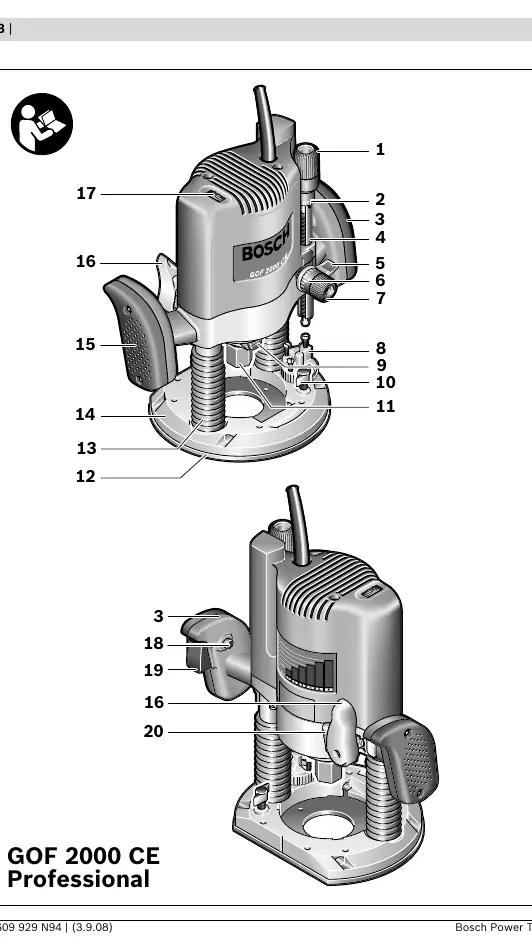
The Bosch GOF 2000 CE Professional is a high-performance plunge router designed for routing grooves, edges, profiles, and elongated holes in wood, plastic, and light building materials. With appropriate bits and reduced speed, it can also machine non-ferrous alloys. It features constant electronic control for uniform performance under load and adjustable speed preselection.
Safety Guidelines
Always wear eye protection and use dust extraction. Keep hands away from the cutting area and hold the tool firmly with both hands. Ensure the workpiece is securely clamped. Never use blunt or damaged router bits, as they increase friction and risk of kickback. Always disconnect the power plug before making adjustments or changing accessories.
Operation and Setup
Before starting, ensure the mains voltage matches the tool's nameplate. The speed can be preselected using the thumbwheel based on the material and bit diameter. Depth-of-cut adjustment must only be performed when the tool is switched off. The tool supports various accessories, including parallel guides, router compasses, guide rails, and guide bushings for template routing.
Maintenance
Keep the machine and ventilation slots clean for safe operation. In extreme conditions, such as when working with metal, conductive dust may accumulate; use a stationary extraction system and a residual current device (RCD). For repairs, contact an authorized Bosch service center. For technical support, visit www.bosch-pt.com or contact the regional service centers listed in the manual.
Official resources from the manual
Manufacturer information
Bosch
Practical help
Common problems
Router bit vibrates or causes loss of control
Ensure the bit fits exactly in the collet and is not blunt or damaged.
Kickback during operation
Always route against the rotation direction of the bit (up-cutting motion) and ensure the machine is switched on before applying it to the workpiece.
Dust accumulation in the motor
Use a stationary extraction system and frequently blow out ventilation slots, especially when working with metal.
Before use
- Check that the mains voltage matches the tool specifications.
- Ensure the router bit is clean, sharp, and in perfect condition.
- Verify the bit shank is inserted at least 20 mm into the collet.
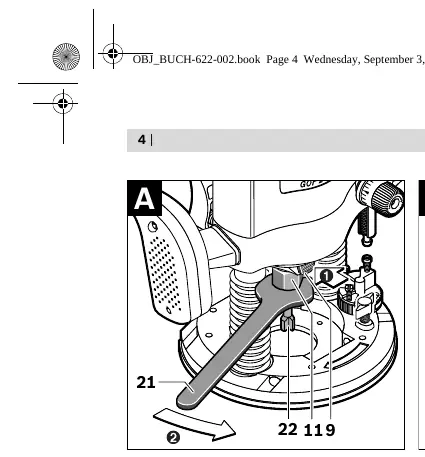
- Ensure the spindle lock button is released after tightening the nut.
- Check that the dust extraction adapter is securely mounted if needed.
- Ensure the workpiece is securely clamped.
Specs in practice
- Rated power input
- 2000 W, indicating the motor's power capacity.
- No-load speed
- 8000–21000 min-1, adjustable for different materials.
- Plunge depth
- 65 mm, the maximum vertical travel of the router.
Images and diagrams
- Figure A: Shows the spindle lock button and tightening nut for bit replacement.
- Figure B: Illustrates mounting the extraction adapter and connecting a vacuum hose.
- Figure C: Demonstrates the correct feed direction against the bit rotation.
- Figure E: Shows the setup for the parallel guide.
- Figure H-L: Details the installation and alignment of the guide bushing adapter.
Model compatibility
- Compatible with various router tables; follow the table manufacturer's specific instructions.
- Router bits larger than 50 mm diameter cannot be used without the guide bushing removed.
- Template thickness must be at least 8 mm when using guide bushings.

Manual page author
Michael Turner
Technical manual editor
Reviews PDF manuals for structure, safety notes, and practical product details so readers can find the right information quickly.