Tools / Power Tools
Bosch GPB 12V-10 Professional Jobsite Radio User Manual
Quick guide for the Bosch GPB 12V-10 Professional jobsite radio. Includes setup, battery installation, radio operation, sound settings, and troubleshooting.
Table of contents
Manual images
Jump to the sectionQuick guide from the manual
The Bosch GPB 12V-10 Professional is a jobsite radio designed for indoor use. It can be powered by a Bosch 12V Li-ion battery or the included power supply plug. It features an integrated equalizer for sound adjustment and allows for storing radio stations.
Device Description
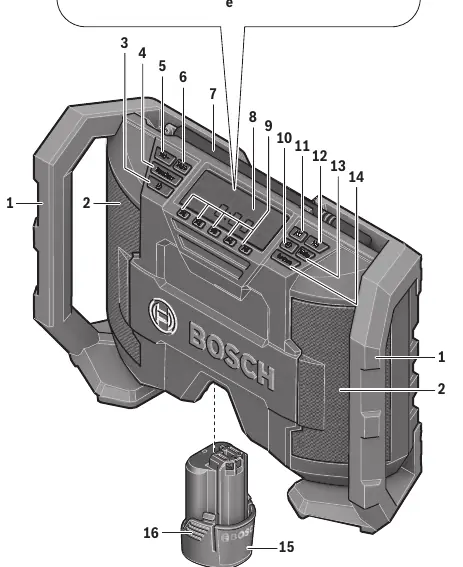
The radio features a carrying handle, speaker, rod antenna, and a display. Controls include buttons for power, volume/bass/treble adjustment, equalizer, station presets, time setting, and source selection. It also includes an AUX input for external audio sources.
Power Supply
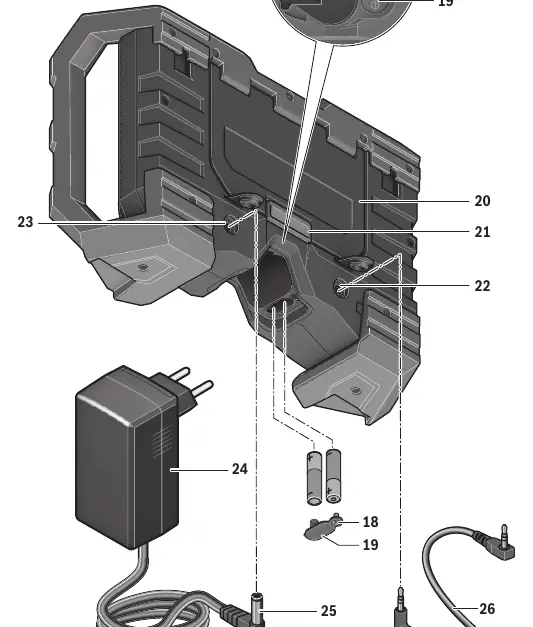
The radio can be powered by a 12V Li-ion battery or the provided power supply plug. To use the battery, insert it into the battery port until it clicks. The battery charge indicator on the display shows the current status. To use the power supply, open the protective cap on the 12V connection socket and insert the plug.
Operation
- Switching On/Off: Press the On/Off button. The radio will play the last selected audio source.
- Volume Adjustment: Use the Vol+ and Vol- buttons. The volume level (0-20) is displayed briefly.
- Sound Adjustment: Press the Equalizer button to adjust bass (BA) and treble (TR) levels between -5 and +5.
- Selecting Audio Source: Press the Source button to toggle between FM, AM, and AUX.
- Radio Stations: Use the seek buttons to find stations. Press and hold a preset button for 3 seconds to store a station.
- External Audio: Connect an external device via the 3.5mm AUX IN socket using the provided AUX cable.
Maintenance and Troubleshooting
Keep the radio clean by wiping it with a soft, moist cloth. Do not use cleaning agents or solvents. If the radio fails to operate, check the power supply connection or the battery charge status. If radio reception is poor, reposition the radio or move it away from other electronic devices.
Manufacturer information
Bosch
Practical help
Common problems
Radio does not work
Check power supply connection or ensure the battery is fully charged and properly inserted.
Radio does not work on AC power
Check the power supply plug and connection cable for damage; use only the original Bosch power supply.
Radio does not work on battery power
Clean battery contacts or replace the battery if defective.
Poor radio reception
Reposition the radio or move it further away from other electronic devices.
Before use
- Ensure the battery is fully charged before first use.
- Insert backup batteries (2 x 1.5V AAA) to save time settings.
- Check that the power supply voltage matches the local mains voltage.
- Ensure the rod antenna is properly positioned for the best reception.
Specs in practice
- Operating Voltage
- 12V for both battery and power supply operation.
- Reception Range
- FM: 87.5–108 MHz; AM: 531–1602 kHz.
- Amplifier Output
- 2 x 5W when operating with the power supply.
Images and diagrams
- The manual includes diagrams showing the location of all buttons, the battery port, the storage compartment, and the connection sockets.
- A specific diagram illustrates how to insert and remove the battery pack.
- Another diagram shows the correct way to connect the power supply plug and the AUX cable.
Model compatibility
- Compatible with Bosch 12V Li-ion batteries (GBA 10.8V/12V).
- Use only recommended Bosch chargers (AL 11.. CV, GAL 12.. CV).

Manual page author
Michael Turner
Technical manual editor
Reviews PDF manuals for structure, safety notes, and practical product details so readers can find the right information quickly.