Electronics / Cameras
Canon EOS Rebel T7 / EOS 1500D Instruction Manual
Comprehensive instruction manual for the Canon EOS Rebel T7 / EOS 1500D digital SLR camera, covering setup, shooting modes, playback, and maintenance.
Table of contents
Product Overview
The Canon EOS Rebel T7 (also known as the EOS 1500D) is a high-performance digital single-lens reflex camera featuring a 24.1-megapixel CMOS sensor and the DIGIC 4+ image processor. It offers high-precision 9-point autofocus, continuous shooting at approximately 3.0 shots/sec, Full HD movie recording, and integrated Wi-Fi/NFC connectivity for easy image sharing.
Getting Started
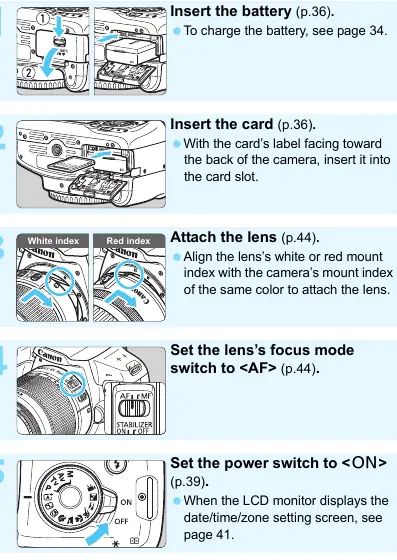
Before using the camera, ensure all items are present: the camera body, battery pack LP-E10, battery charger LC-E10/LC-E10E, and strap. Charge the battery fully before first use. Insert the battery and a compatible SD, SDHC, or SDXC memory card into the camera. Attach a compatible Canon EF or EF-S lens by aligning the mount index and turning until it clicks. Set the power switch to ON and configure the date, time, and language settings as prompted.
Shooting Basics
For beginners, the Scene Intelligent Auto mode (A) automatically analyzes the scene and applies optimal settings. To take a picture, look through the viewfinder, aim the center AF point at your subject, press the shutter button halfway to focus, and press it completely to capture the image. The camera also supports Live View shooting, allowing you to compose and shoot using the LCD monitor.
Advanced Features
Creative Zone modes (P, Tv, Av, M) provide greater control over exposure settings. Use Shutter-priority AE (Tv) to control motion blur or freezing, and Aperture-priority AE (Av) to manage depth of field. Manual exposure (M) allows full control over both shutter speed and aperture. You can also customize image characteristics using Picture Styles and adjust white balance to match lighting conditions.
Maintenance and Safety
Handle the camera with care as it is a precision instrument. Keep it away from water, strong magnetic fields, and extreme temperatures. If the camera is brought from a cold environment into a warm room, allow it to adjust to the temperature in a sealed plastic bag to prevent condensation. Clean the sensor only with a dedicated blower; for stubborn dirt, consult a Canon Service Center. Always turn off the camera and remove the battery before storage for extended periods.
Troubleshooting and Disposal
If you encounter issues, consult the troubleshooting guide for solutions to common problems like battery exhaustion, focus errors, or flash malfunctions. For error codes, follow the on-screen instructions or contact a service center. When disposing of the camera or its battery, follow local regulations for electronic waste and battery recycling.
Related manuals
Related manuals from the same brand or category.
Electronics / Cameras
Canon RF 14-35mm F/4.0 L IS USM Wide Zoom Lens Instructions
CanonElectronics / Cameras
Canon RF-S 14-30mm f/4-6.3 IS STM PZ Lens Instructions
CanonElectronics / Cameras
Canon RF 135mm F1.8 L IS USM Lens Instructions
CanonElectronics / Cameras
Canon EOS Rebel T6 / EOS 1300D Camera Instruction Manual
CanonElectronics / Cameras