Automotive / Lighting Accessories
User Manual for Cell2 6LED Single Colour Lighthead 150629M60
Quick guide for the Cell2 6LED Single Colour Lighthead (150629M60). Learn how to wire, synchronize, group, and change flash patterns for this surface-mount LED light.
Table of contents
Quick guide from the manual
This document provides installation and configuration instructions for the Cell2 6LED Single Colour Lighthead. The device is designed for surface mounting and supports synchronization, grouping (simultaneous or alternating flash), and multiple flash patterns.
Wiring and Installation
Proper wiring is essential for the correct operation of the lighthead. Follow these connections:
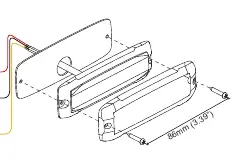
- Red Wire: Connect to +VDC power source. A 3A fuse must be installed on this line.
- Black Wire: Connect to Chassis Ground.
- Yellow Wire: Used for synchronization and changing flash patterns.
Synchronization
To synchronize multiple lightheads so they flash together:
- Connect the Yellow wires of all lightheads together.
- Ensure all lightheads are set to the same Flash Pattern.
Grouping Modes (Simultaneous or Alternating)
You can configure lightheads to flash simultaneously or alternate between groups:
- Enter Grouping Mode: Apply +VDC to both the Red and Yellow wires simultaneously. The lighthead will display short flashes to indicate the current group:
- Single flash = Group 1
- Double flash = Group 2
- Change Groups: Remove the Yellow wire from +VDC, then momentarily apply it to +VDC to toggle the group.
- Result: Heads in the same group flash together; Group 1 heads will alternate with Group 2 heads.
Flash Pattern Selection
To change the flash pattern, momentarily apply +VDC to the Yellow wire:
- Apply once to advance to the next pattern.
- Apply quickly three times to reset the pattern to FP#1.
Flash Patterns Chart
The device supports 16 distinct flash patterns:
- 1: Double (R65)
- 2: Single (2Hz)
- 3: Triple (2Hz)
- 4: Quad (2Hz)
- 5: Random
- 6: Steady
- 7: Single (SAE)(CA13)
- 8: Mega
- 9: Double (SAE)
- 10: Triple (SAE)
- 11: Quad (SAE)
- 12: Quint (SAE)
- 13: Ultra (SAE)
- 14: Single-Quad
- 15: Single H/L
- 16: Singe-Triple-Quint
Manufacturer information
Cell2
Practical help
Common problems
Lights are not flashing in sync
Ensure all Yellow wires are connected together and all lightheads are set to the same flash pattern.
Lights are not alternating correctly
Verify that the lightheads are assigned to different groups (Group 1 and Group 2) using the grouping mode procedure.
Before use
- Verify the power source is +VDC.
- Install a 3A fuse on the Red wire connection.
- Ensure the mounting surface is suitable for surface mounting.
- Connect the Black wire to a reliable Chassis Ground.
Images and diagrams
- The wiring diagram illustrates the connection of the Red, Black, and Yellow wires.
- The flash pattern chart provides a reference for the 16 available light sequences.
Model compatibility
- All lightheads must be set to the same flash pattern for proper synchronization.

Manual page author
David Miller
Documentation analyst
Organizes user manual content into clear summaries, with attention to model details, product context, and everyday usability.