Lighting / Fixtures
User Manual for Chauvet Maverick Storm 4 SoloWash
Quick reference guide for the Chauvet Maverick Storm 4 SoloWash. Includes safety notes, mounting instructions, power connection details, and control panel operation.
Table of contents
Manual images
Click an image to enlargeQuick Guide from the Manual
The Maverick Storm 4 SoloWash is a professional-grade luminaire. This guide provides essential information for safe installation, power connection, and basic operation. Always refer to the full user manual for advanced configuration and detailed technical specifications.
Safety Notes
Read these safety instructions carefully before operating the product:
- Professional Use Only: This luminaire is intended for professional use only.
- Eye Safety: Position the luminaire so that prolonged staring into the light at a distance closer than 10 meters (32.8 ft) is not expected.
- Temperature Limits: Maximum ambient temperature is 45°C (113°F). Minimum startup temperature is -10°C (14°F). Do not operate outside these ranges.
- IP65 Rating: The product is IP65-rated. Ensure all IP-rated protective covers are secured on unused ports. Use IP65-rated power and data cables in outdoor environments.
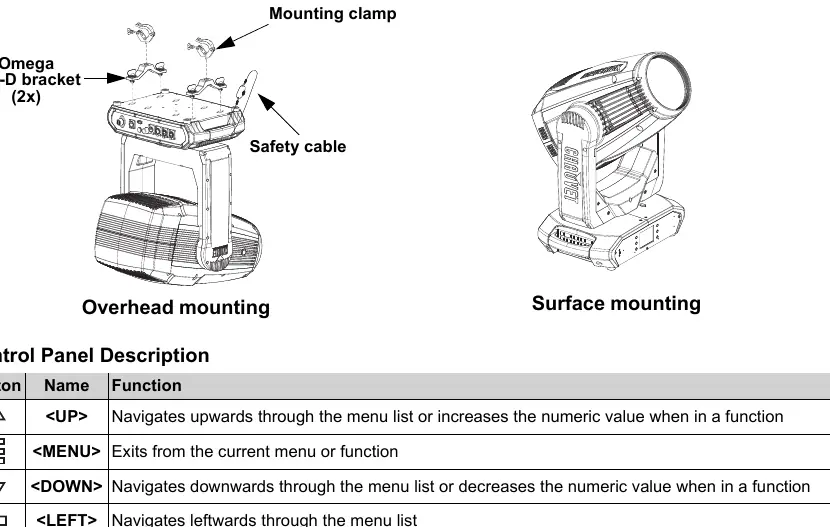
- Mounting: Use a safety cable when mounting overhead. Ensure mounting clamps can support the product weight.
- Prohibited Actions: Do not open the product, connect to a dimmer or rheostat, or submerge in liquid. Do not leave flammable materials within 300 cm of the unit.
- Maintenance: Disconnect from power before cleaning or replacing the fuse.
AC Power and Linking
The product features an auto-ranging power supply (100–240 VAC, 50/60 Hz). You can power link multiple units, but never exceed 12A on a single circuit.
Current Draw by Voltage:
- 100 V, 60 Hz: 16.9 A
- 120 V, 60 Hz: 14.67 A
- 208 V, 60 Hz: 8.35 A
- 230 V, 50 Hz: 7.48 A
- 240 V, 60 Hz: 7.20 A
Mounting
The unit can be mounted overhead or on a surface. Use at least two mounting points per product. Attach the provided Omega 140-D brackets to the base of the unit and secure with appropriate mounting clamps.
Control Panel Operation
The control panel allows for menu navigation and setting adjustments:
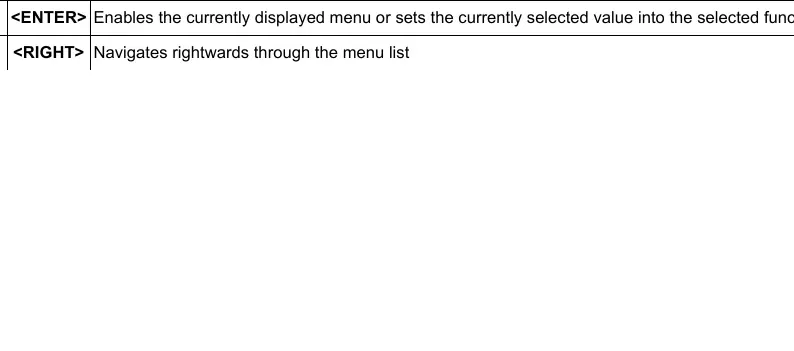
- <UP>: Navigates upwards through the menu list or increases numeric values.
- <MENU>: Exits the current menu or function.
- <DOWN>: Navigates downwards through the menu list or decreases numeric values.
- <LEFT>: Navigates leftwards through the menu list.
- <ENTER>: Enables the currently displayed menu or sets the selected value.
- <RIGHT>: Navigates rightwards through the menu list.
Contact Information
For technical support or general information, contact Chauvet World Headquarters or the regional office corresponding to your location (UK, Benelux, France, Germany, or Mexico). Visit www.chauvetprofessional.com for the latest contact details and support instructions.
Official resources from the manual
Practical help
Common problems
Condensation on internal electronics
Allow the product to fully acclimate to the surrounding environment before connecting to power when moving between extreme temperature environments.
Serious operating problem
Stop using the product immediately.
Damaged housing, lenses, or cables
Do not operate the product if any components appear damaged.
Before use
- Ensure the product is connected to a grounded and protected circuit.
- Verify the ambient temperature is between -10°C and 45°C.
- Check that all IP-rated protective covers are secured on unused ports.
- Ensure mounting clamps are capable of supporting the product weight.
- Use a safety cable for overhead mounting.
Specs in practice
- Power Linking
- Allows daisy-chaining multiple units; do not exceed 12A on a single circuit.
- Auto-ranging power supply
- Automatically detects input voltage between 100–240 VAC.
Images and diagrams
- Mounting Diagram: Shows the attachment of Omega 140-D brackets and safety cable for overhead or surface mounting.
- Control Panel: Illustrates the six buttons (UP, MENU, DOWN, LEFT, ENTER, RIGHT) used for menu navigation.
Model compatibility
- Do not connect to a dimmer or rheostat.
- Use only IP65-rated power and data cables in outdoor environments.

Manual page author
Michael Turner
Technical manual editor
Reviews PDF manuals for structure, safety notes, and practical product details so readers can find the right information quickly.