General / Other Manuals
Preserve 802.1Q Tagging with 802.1P Marking over ATM PVCs for xDSL Uplinks
Configuration guide for preserving 802.1Q VLAN tags and implementing 802.1P marking over ATM PVCs for ADSL2+ uplinks in Cisco IOS XE environments.
Table of contents
Overview
The Preserve 802.1Q Tagging with 802.1P Marking over ATM PVCs for xDSL Uplinks feature enables the transport of 802.1Q VLAN tags over ATM permanent virtual circuits (PVC) specifically for ADSL2+ uplinks. This functionality allows service providers to implement VLAN-based service differentiation, supporting both real-time applications like VoIP and best-effort internet traffic.
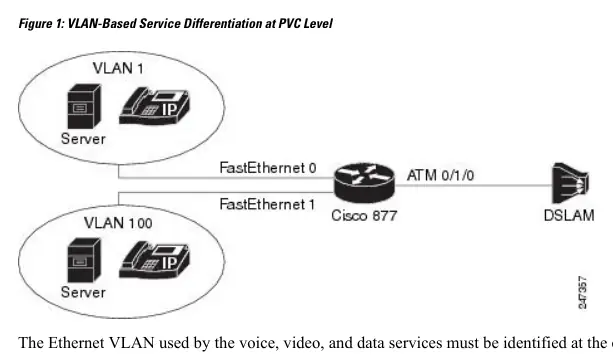
Benefits and Requirements
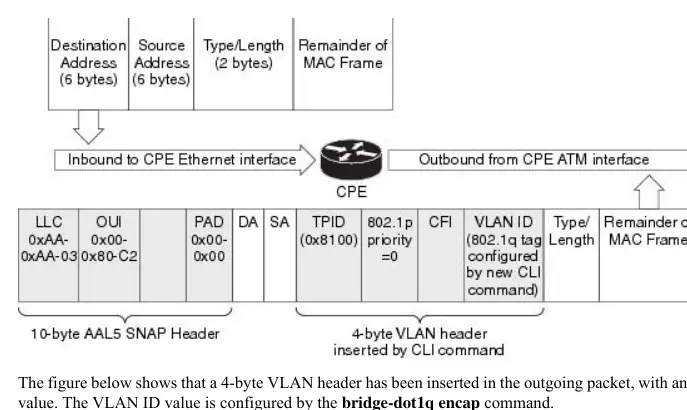
This feature allows Customer Premises Equipment (CPE) to carry traffic with provider-specific 802.1Q tags. By using 802.1P marking, traffic can be prioritized to ensure quality of service (QoS) across the network. Before configuration, users must have a foundational understanding of ATM, bridging, DHCP, and VLANs. The feature is restricted to a single bridged 802.1Q VLAN and must be configured on a point-to-point ATM subinterface using AAL5SNAP encapsulation.
Configuration
Configuration involves defining class maps and policy maps to classify traffic and set CoS values. Key steps include:
- Defining egress and ingress class maps to match traffic based on QoS groups or interfaces.
- Creating policy maps to set CoS values and inner VLAN IDs.
- Applying these policies to the ATM PVC interface.
- Using the bridge-dot1q encap command to specify the provider-assigned VLAN ID.
- Configuring PPPoE clients if dynamic IP addressing is required.
Troubleshooting
To troubleshoot PPP session establishment, administrators can use debug commands such as debug ppp authentication and debug ppp negotiation. Additionally, for RADIUS or TACACS authentication issues, debug aaa authentication and debug aaa authorization are available. Caution is advised when using debug commands as they are CPU-intensive and may impact network performance.
Related manuals
Related manuals from the same brand or category.
General / Other Manuals
Cisco IOS XE 17.x Routing Information Protocol (RIP) Configuration Guide
CiscoGeneral / Other Manuals
Cisco 17.X NAT IP Address Conservation User Guide
CiscoGeneral / Other Manuals
Cisco IOS XE Cupertino 17.9.x Release Notes for Catalyst 9200 Series Switches
CiscoGeneral / Other Manuals
System Message Guide for Cisco IOS XE 17.15.x
CiscoElectronics / Monitors
Cisco IOS XE IP SLAs HTTPS Operations Configuration Guide
CiscoDocuments / Warranty Safety
Programmability Configuration Guide for Cisco IOS XE Cupertino 17.9.x
Cisco
Manual page author
Emily Carter
User documentation editor
Prepares concise manual descriptions and highlights the most useful setup, operation, and maintenance information for readers.