General / Other Manuals
System Message Guide for Cisco IOS XE 17.15.x
Comprehensive guide for understanding, interpreting, and troubleshooting system error messages in Cisco IOS XE 17.15.x software releases.
Table of contents
Overview of Cisco System Messages
This guide provides detailed information on system messages generated by Cisco software releases. These messages are sent to the console or a logging server during operation. While some messages are purely informational, others are critical for diagnosing issues with internal hardware, communications lines, or the system software itself.
How to Read System Error Messages
System error messages follow a structured format starting with a percent sign (%). The general structure is: %FACILITY-SUBFACILITY-SEVERITY-MNEMONIC: Message-text.
- FACILITY: Indicates the system module, protocol, or hardware device reporting the message.
- SEVERITY: A single-digit code (0-7) representing the urgency of the condition. Lower numbers indicate higher severity.
- MNEMONIC: A unique code identifying the specific error.
- Message-text: A descriptive string detailing the event, often containing variable fields in square brackets like [dec] for decimal numbers or [chars] for character strings.
Some messages include card and slot information, structured as: %CARD-SEVERITY-MSG:SLOT %FACILITY-SEVERITY-MNEMONIC: Message-text.
Error Message Severity Levels
Severity levels define the urgency of the message:
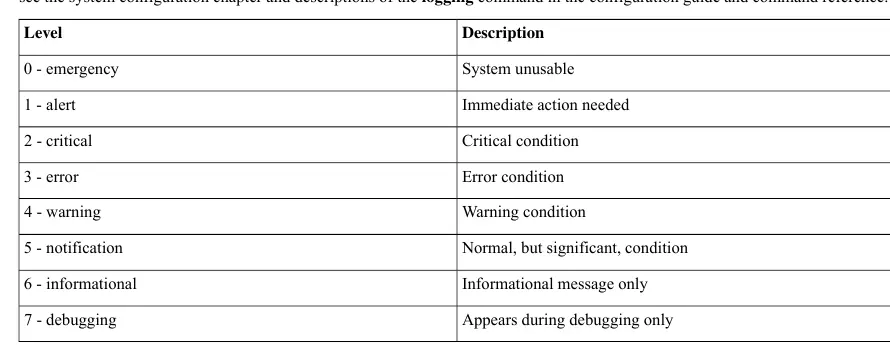
- 0 - Emergency: System unusable.
- 1 - Alert: Immediate action needed.
- 2 - Critical: Critical condition.
- 3 - Error: Error condition.
- 4 - Warning: Warning condition.
- 5 - Notification: Normal, but significant condition.
- 6 - Informational: Informational message only.
- 7 - Debugging: Appears during debugging only.
Troubleshooting and Support
When encountering error messages, review the provided recommendation actions. Some messages include traceback information, which is essential for technical support analysis. If a problem persists, collect the exact error message, relevant system logs, and output from show tech-support commands before contacting Cisco Technical Assistance Center (TAC).
Related manuals
Related manuals from the same brand or category.
General / Other Manuals
Cisco IOS XE 17.x Routing Information Protocol (RIP) Configuration Guide
CiscoGeneral / Other Manuals
Preserve 802.1Q Tagging with 802.1P Marking over ATM PVCs for xDSL Uplinks
CiscoGeneral / Other Manuals
Cisco 17.X NAT IP Address Conservation User Guide
CiscoGeneral / Other Manuals
Cisco IOS XE Cupertino 17.9.x Release Notes for Catalyst 9200 Series Switches
CiscoElectronics / Monitors
Cisco IOS XE IP SLAs HTTPS Operations Configuration Guide
Cisco
Manual page author
David Miller
Documentation analyst
Organizes user manual content into clear summaries, with attention to model details, product context, and everyday usability.