Furniture / Beds & Mattresses
Assembly Instructions for Conforama ACSD222 Cabinet
Complete assembly guide for the Conforama ACSD222 cabinet. Includes parts list, step-by-step installation instructions, wall mounting safety procedures, and furniture care guidelines.
Quick answers from the manual
Quick answer
- This document is an assembly manual for the Conforama ACSD222 cabinet. It contains a parts list, hardware identification, step-by-step assembly instructions, and mandatory wall-mounting safety procedures. p. 1, 4, 5, 13
Key actions
- Assemble on a soft surface p. 2
- Mount to wall to prevent tipping p. 13, 14, 15
Maintenance and reset
- Wait 72 hours before cleaning high gloss elements p. 25, 26
Technical specifications
| Parameter | Value | Meaning | Pages |
|---|---|---|---|
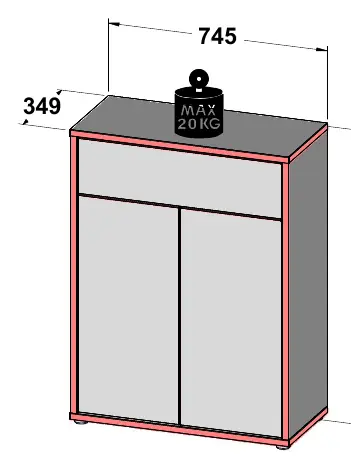
| Dimensions | 745 x 349 x 991 mm | Overall product dimensions | p. 1 |
Where to find it in the PDF
- Overview and Dimensions p. 1
- Parts List p. 4
- Hardware List p. 5
- Assembly Steps p. 6, 22
- Wall Mounting Instructions p. 13, 14, 15
Table of contents
Manual images
Click an image to enlargeQuick guide from the manual
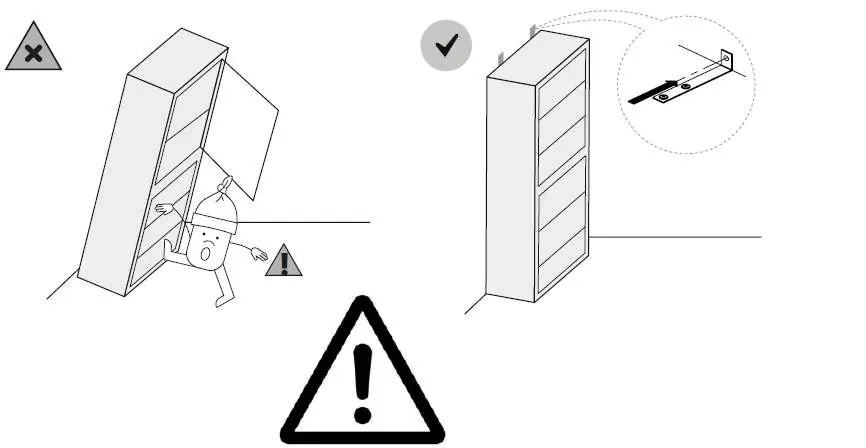
This document provides assembly instructions for the Conforama ACSD222 cabinet. Before beginning, ensure you have a clear, soft surface (like a carpet) to assemble the furniture on to prevent damage. The assembly requires basic tools including a hammer, drill, screwdriver, and a spirit level. Crucially, the product must be permanently attached to the wall to prevent tipping.
Parts and hardware
The manual includes a detailed parts list on page 4, identifying panels by number (1-12) and their dimensions. Page 5 provides a comprehensive list of hardware (screws, dowels, hinges, etc.) required for assembly. Verify all parts are present before starting.
Assembly instructions
The assembly process is broken down into 22 steps. Key procedures include:
- Preparing panels with dowels and screws.
- Installing drawer slides (S300132) and hinges (S3-S34611).
- Connecting the main frame panels.
- Installing the back panel.
- Mounting the cabinet to the wall using the provided hardware (S36628-80).
- Adjusting hinges and drawer alignment.
Wall mounting safety
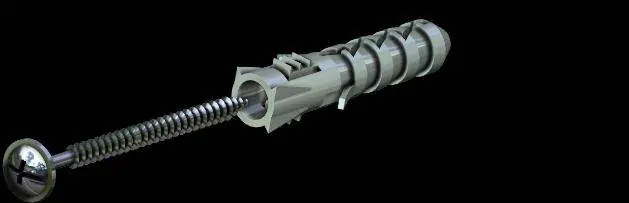
To prevent the furniture from tipping over, it must be permanently fixed to the wall. Check the type and strength of your wall before installation. Use wall plugs and screws appropriate for your specific wall type. If the product includes rawlplugs and screws, they are intended only for walls made of solid and homogeneous materials.
Furniture care and maintenance
For daily cleaning, use a clean, dry, soft fabric. For thorough cleaning, you may slightly moisten the cloth with water or a furniture-specific cleaning agent. Metal and glass parts should be cleaned with commercially available agents designed for those materials. Warning: High gloss elements, from which the protective foil has been removed, must not be cleaned or used for 72 hours.
Manufacturer information
Conforama
Practical help
Common problems
Furniture tipping over
The product must be permanently attached to the wall to ensure safety.
Cleaning high gloss surfaces
Wait 72 hours after removing the protective foil before cleaning or using these elements.
Before use
- Check the type and strength of the wall before mounting.
- Use appropriate wall plugs and screws for your wall type.
- Assemble on a soft surface like a carpet to prevent scratches.
- Verify all parts and hardware are present using the lists on pages 4 and 5.
- Ensure the assembly is performed by a competent person.
Images and diagrams
- The manual uses standard icons: a checkmark for correct actions and an 'X' for incorrect actions.
- Steps 1-22 show the sequential assembly of panels and hardware.
- Page 13-15 specifically details the wall mounting procedure.
Model compatibility
- Included wall plugs and screws are only for solid and homogeneous walls.

Manual page author
Emily Carter
User documentation editor
Prepares concise manual descriptions and highlights the most useful setup, operation, and maintenance information for readers.