Furniture / Furniture Hardware
Installation Guide for Corston Cabinet Handles
A comprehensive installation guide for Corston cabinet knobs, cup handles, and pull handles. Includes step-by-step instructions for drilling, sizing screws, and mounting hardware safely.
Table of contents
Quick Guide from the Manual
This document provides installation instructions for various Corston cabinet hardware, including knobs, Oxford extra-small handles, Elm cup handles, and cabinet pull handles. The process generally involves marking the hole position, drilling, sizing the screw to your cabinet thickness, and mounting the handle.
Tools Required
- Drill
- Drill bit (5mm or 7mm depending on the product)
- Two pairs of pliers
- 4mm hex key
General Installation Steps
- Marking and Drilling: Mark the desired location for the handle. Drill a clearance hole using the appropriate drill bit size (5mm or 7mm).
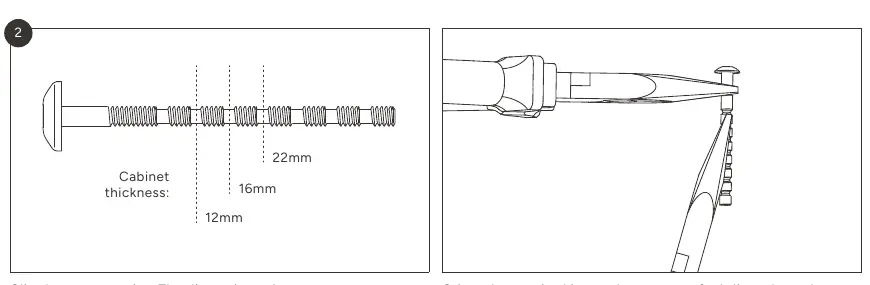
- Sizing the Screw: Measure your cabinet thickness. Use pliers to crimp the screw at the required interval to create a fault line, then snap the screw to the correct length. Ensure the screw protrudes by approximately 8mm.
- Applying Threadlock: Apply a small amount of the provided threadlock to the screw.
- Mounting: Screw the handle into position. Important: Do not use an impact driver, as it may irreparably damage the product.
- Adjustment: If the handle is not straight, loosen the screw, straighten the handle, and retighten.
Cabinet Knobs Installation
For cabinet knobs, use a 5mm drill bit. If provided, stick the double-sided sticker onto the back of the knob before installation.
Oxford Extra-Small Handle Installation
For Oxford extra-small handles, use a 7mm drill bit to drill the holes.
Elm Cup Handles Installation
Use the template provided on page 8 to mark hole positions. Use a 5mm drill bit for installation.
Cabinet Pull Handles Installation
For pull handles, mark the horizontal line based on the screw-spacing distance: 128mm (small), 224mm (medium), or 384mm (large). Use a 5mm drill bit for the clearance holes.
Important Warnings
Do not use an impact driver to install any Corston cabinet hardware. Always ensure the screw is cut to the correct length for your specific cabinet thickness to avoid damage or improper fit.
Practical help
Common problems
The knob or handle is not straight after installation.
Loosen the screw, straighten the handle, and retighten.
The screw is too long for the cabinet thickness.
Use two pairs of pliers to crimp the screw at the required interval to create a fault line, then snap the screw to the correct size.
Before use
- Verify your cabinet thickness (common sizes: 12mm, 16mm, 18mm, 22mm).
- Ensure you have a drill and the correct drill bit (5mm or 7mm).
- Have two pairs of pliers ready for snapping screws.
- Check that you have the provided threadlock.
- For pull handles, confirm the screw-spacing distance (128mm, 224mm, or 384mm).
Specs in practice
- 5mm drill bit
- Standard drill bit size for most Corston cabinet knobs, cup handles, and pull handles.
- 7mm drill bit
- Required specifically for Oxford extra-small handles.
Images and diagrams
- The screw sizing diagram illustrates how to cut the screw to match your cabinet thickness by snapping it at pre-marked fault lines.
Model compatibility
- Do not use an impact driver; it may irreparably damage the product.

Manual page author
Michael Turner
Technical manual editor
Reviews PDF manuals for structure, safety notes, and practical product details so readers can find the right information quickly.