General / Other Manuals
Danfoss EKA 163A / 164A Display Instructions
Installation and connection guide for Danfoss EKA 163A universal display and EKA 164A universal setting display for ADAP-KOOL controllers.
Table of contents
Product Overview
The Danfoss EKA 163A and EKA 164A are specialized display units designed for use with ADAP-KOOL controllers. The EKA 163A serves as a universal display, while the EKA 164A functions as a universal setting display, allowing for configuration and monitoring of refrigeration systems.
Technical Specifications and Installation
The units are designed for panel mounting. Ensure the installation environment meets the following temperature requirements:
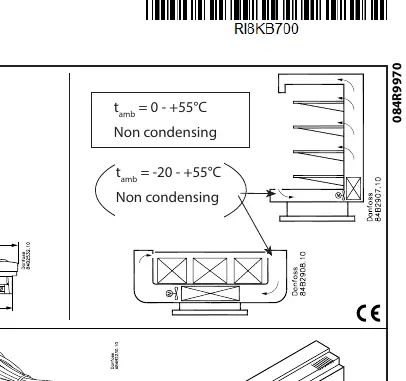
- EKA 163A: Ambient temperature range of 0 to +55°C (non-condensing).
- EKA 164A: Ambient temperature range of -20 to +55°C (non-condensing).
The displays are connected to controllers using specific cables. For EKC 4xx, EKC 5xx, and AK series controllers, the maximum cable length is 15 meters. For other compatible controllers such as EKC 202D, 204A1, AK-CC 210/260, AK-CC 450/550, and EKD 316, the maximum cable length is 1000 meters.
Wiring and Communication
When connecting the displays to controllers, ensure correct wiring according to the specific controller model. Data communication settings must be configured as per the relevant literature (RC8AC). For network-based connections, ensure the address parameter (o03) is set to a value greater than 0. Proper termination is required for data communication lines to ensure signal integrity over long distances.
Maintenance and Disposal
The units do not require specific routine maintenance. However, ensure that the display surface remains clean and free of obstructions. This product contains electrical components and must not be disposed of with domestic waste. It must be collected separately as electrical and electronic waste in accordance with local and currently valid legislation.
Related manuals
Related manuals from the same brand or category.
General / Other Manuals
Danfoss 160P Refrigeration Oil Safety Data
DanfossFurniture / Home Furnishing
Danfoss Series 51 160cc Variable Displacement Motors Parts Manual
DanfossGeneral / Other Manuals
Danfoss RA 15/6T and RA 15/6TB Conversion Valve Instructions
DanfossGeneral / Other Manuals
Danfoss Intelligent Purging System (IPS 8) Ammonia User Guide
DanfossHome Appliances / Refrigerators
Danfoss DEVIreg Plug-In Electronic Thermostat
DanfossGeneral / Other Manuals
Danfoss VLT HVAC Basic Drive Decoupling Plate Mounting Instructions (H7 and H8)
DanfossGeneral / Other Manuals
Danfoss VLT HVAC Basic Drive IP21 Kit Installation Guide
DanfossGeneral / Other Manuals
Danfoss VLT HVAC Basic Drive Type 1 Kit Mounting Instructions
DanfossHvac / Heat Pumps
Danfoss VLT HVAC Basic Drive Cascade Controller Instructions
Danfoss
Manual page author
David Miller
Documentation analyst
Organizes user manual content into clear summaries, with attention to model details, product context, and everyday usability.