Power / Batteries & Chargers
User Manual for Dr. Prepare DSAPMHBT Battery Charging Hub
Quick guide for the Dr. Prepare DSAPMHBT Battery Charging Hub. Learn how to use the charging ports, understand LED indicators, and follow safety maintenance instructions.
Table of contents
Quick guide from the manual
The Dr. Prepare DSAPMHBT is a battery charging hub designed for 12V LiFePO4 batteries. It supports simultaneous charging and discharging. Key operational notes include:
- Power Control: Press the power button to turn the output on or off.
- Auto-Shutoff: The unit automatically shuts down after 2 hours if there is no load or if the output current is consistently below 100mA.
- Port Limitations: Do not use the USB-C port and USB-A (1) port simultaneously if you require fast charging, as it will not work.
- Anderson Port: This port lacks reverse connection protection. Ensure the positive (red) and negative (black) poles are connected correctly.
Identifying Parts
The device features the following components:
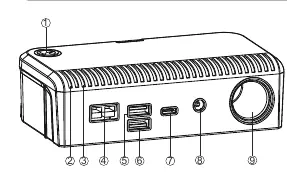
- Power Button
- Charging Indicator Light (Green)
- Discharging Indicator Light (Blue)
- DC IN Port
- USB-A (1) Port (Output)
- USB-A (2) Port (Output)
- USB-C Port (Output)
- DC Port (Output)
- Cigarette Lighter Port (Output)
Using Your Charging Hub
The hub is designed for versatility. When using the DC IN port, it supports 11V-25V input, including 100W solar panel charging. The cigarette lighter port can power devices under 120W, such as car refrigerators or camping lights. Warning: Check the specifications of your devices before plugging them in. The cigarette lighter port may become hot during high-power usage; do not touch it.
LED Indicators
- Charging: The green indicator will light up.
- Discharging: The blue indicator will light up.
Maintenance and Safety
- Keep the product away from extreme ambient temperatures, flammable substances, or damp places.
- Do not strike, penetrate, dismantle, or modify the product.
- Avoid working at full load for long periods, as the unit may become hot. Do not touch the device if the full-load temperature is high.
- The unit features under-voltage protection (below 11V) and over-voltage protection (above 25V) for the DC IN port.
Practical help
Common problems
Fast charging is not working
Do not use the USB-C port and USB-A (1) port at the same time.
Unit shuts down unexpectedly
The unit automatically shuts down after 2 hours if there is no load or if the output current is consistently below 100mA.
Anderson port connection issues
The Anderson port has no reverse connection protection. Ensure the positive (red) and negative (black) poles are correctly connected.
Before use
- Check the specifications of your devices before plugging them into the hub.
- Ensure the Anderson port polarity is correct (red to positive, black to negative).
- Verify that the input voltage for the DC IN port is between 11V and 25V.
- Ensure the device is kept away from flammable substances and damp places.
Specs in practice
- Cigarette Lighter Port
- 12V/10A output, suitable for devices under 120W.
Images and diagrams
- The diagram identifies the power button, charging/discharging indicators, and all output ports (USB, DC, Cigarette Lighter).
Model compatibility
- Designed for 12V LiFePO4 batteries.
- Not recommended to work at full load for long periods.

Manual page author
David Miller
Documentation analyst
Organizes user manual content into clear summaries, with attention to model details, product context, and everyday usability.