Furniture / Home Furnishing
Dual 1008A Dual Turntable Instruction Manual
Comprehensive operating instructions for the Dual 1008A record changer, covering setup, power adjustment, operation, and maintenance.
Table of contents
Manual images
Jump to the sectionProduct Overview
The Dual 1008A is a versatile record changer designed for high-quality audio reproduction. It functions as both an automatic record changer and a manual turntable, offering flexibility for various record types and sizes. The unit is engineered for reliable performance, featuring an automatic record changing mechanism that can handle up to 10 records of the same speed and groove type.
Power and Setup
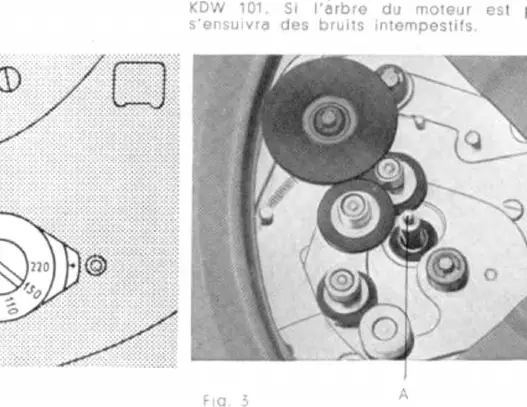
Before operating the unit, it is essential to ensure it is configured for your local power supply. The voltage selector switch is accessible by lifting the rubber turntable mat and using one of the holes in the turntable. The unit can be adapted for 110/150 or 220 volts AC. Additionally, the motor pulley can be adjusted to match local power frequencies (40, 50, or 60 c/s) by a qualified technician using the appropriate pulley.
Important: Before initial operation, the two transit screws must be removed to release the suspension springs. Failure to do so may result in poor performance or damage to the unit.
Operation
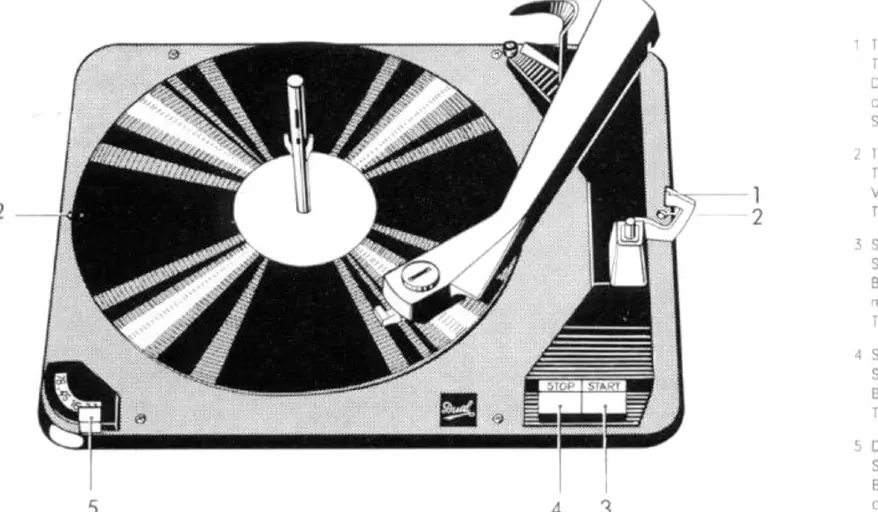
To operate as an automatic record changer, insert the changing spindle into the center hole and lock it with a slight clockwise turn. Stack up to ten records of the same speed. Use the speed selector to set the desired RPM (16, 33, 45, or 78). Place the stylus selector in the correct position for the record type (33-45 for LP/stereo, 78 for standard records). Unlock the tone arm and press the Start key to begin playback. The unit will automatically return the tone arm to its rest position and shut off after the last record is played.
Maintenance and Care
Proper maintenance is crucial for longevity and sound quality. The Dual 1008A comes equipped with the CDS 620 stereo cartridge. It is highly recommended to replace worn styli promptly to prevent damage to record grooves. Use only original Dual replacement styli. For long-term use, diamond styli are recommended as they last significantly longer than sapphire styli. Always handle the tone arm and cartridge with care when performing replacements or adjustments.
Manufacturer information
Dual
Practical help
Common problems
Humming noise during playback
If using banana plugs, reverse the two plugs at the connection point.
Incorrect speed or record indexing
Ensure the correct spindle is used and the speed selector is set properly for the record type.
Before use
- Remove the two transit screws to release the suspension springs.
- Verify the voltage selector is set to your local power supply (110/150V or 220V).
- Ensure the motor pulley matches your local power frequency (40, 50, or 60 c/s).
- Unlock the tone arm.
- Select the correct speed and stylus position for the record being played.
Specs in practice
- Speed Selector
- Adjusts the turntable rotation speed to 16, 33, 45, or 78 RPM.
- Stylus Selector
- Configures the cartridge for different groove types (LP/stereo vs. standard 78 RPM).
- Transit Screws
- Secures the changer during transport; must be removed for operation.
Images and diagrams
- Figure 1: Identifies the tone arm lock, transit screws, start/stop keys, and speed selector.
- Figure 2: Shows the location of the voltage selector switch under the turntable mat.
- Figure 3: Illustrates the motor pulley assembly for frequency adjustment.
- Figure 10: Demonstrates how to set the stylus selector for different record types.
Model compatibility
- The unit is equipped with a CDS 620 stereo cartridge.
- For 45 RPM records with large center holes, use the optional AS 6 changing spindle.
- When connecting to radio sets, specific adapters like the Hirschmann ZW 3 or ZW 4 may be required.

Manual page author
David Miller
Documentation analyst
Organizes user manual content into clear summaries, with attention to model details, product context, and everyday usability.