Garden / Outdoor Cooking
Installation Manual for DUCO Pre-Heater DucoBox Energy Comfort (Plus) / Sky 1150W
Comprehensive installation and setup guide for the DUCO Pre-Heater 1150W. Includes safety instructions, technical specifications, mounting procedures, and electrical wiring diagrams for the DucoBox Energy Comfort (Plus) / Sky ventilation...
Table of contents
Manual images
Click an image to enlargeQuick Guide from the Manual
The Pre-Heater is a frost protection device based on an electrical resistance of up to 1150W. It is designed to be installed in the ODA (Outside Air) duct connection of the DucoBox Energy Comfort (Plus) / Sky ventilation units. Installation and maintenance must be performed by a qualified installer.
Safety Instructions
- Keep the Pre-Heater, its parts, and packaging out of reach of children.
- Only connect the device if the mains voltage matches the product specifications (230VAC).
- Do not expose the device to extreme temperatures, direct sunlight, intense vibrations, mechanical pressure, moisture, or flammable gases.
- Never touch electrical components with wet or damp hands.
- If the device is moved from a cold to a warm environment, wait until it reaches room temperature before connecting to avoid condensation damage.
- Do not modify the device.
- Keep away from open flames and hot surfaces.
- Disconnect power when not in use, during cleaning, in case of defects, or during storms.
- Do not submerge in water or other liquids.
- If the device is visibly damaged or defective, do not use it. Do not open the housing; contact a qualified expert for repairs.
Technical Specifications
- Supply: 230VAC
- Max. Power: 1150W
- Communication: Wired, direct to DucoBox Energy Comfort (Plus) / Sky
- IP-Class: IP40
Installation
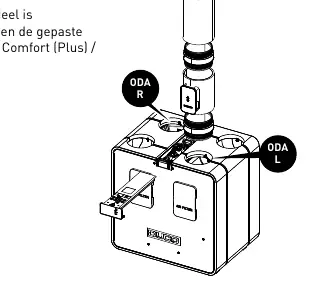
The Pre-Heater is mounted in the outside air supply (ODA) ducts. The unit is equipped with two connection openings (Ø180 F). Depending on the duct diameter used, appropriate adapters must be applied to connect the Pre-Heater to the DucoBox and the ducts.
Electrical Connections
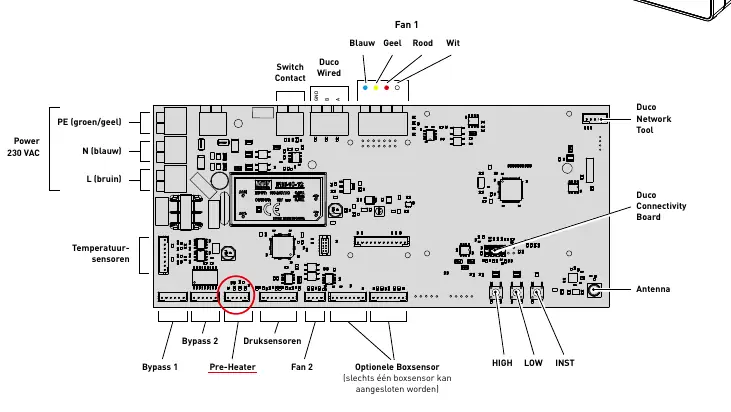
The Pre-Heater communicates via a pre-assembled communication cable that must be connected to the unit's control board. A power cable (230VAC) with a grounded plug is also included.
- Ensure the DucoBox Energy Comfort (Plus) / Sky is disconnected from the power supply.
- Open the top cover of the DucoBox Energy Comfort (Plus) / Sky.
- Connect the communication cable to the control board. The cable can be routed through the back of the unit.
- Close the top cover of the DucoBox.
- Plug the Pre-Heater power plug into a wall outlet.
- Plug the DucoBox power plug into a wall outlet and follow the instructions on the display.
Manufacturer information
Duco Ventilation & Sun Control NV
Practical help
Common problems
Condensation on electrical components
If the device was moved from a cold to a warm environment, wait until it reaches room temperature before connecting.
Visible damage or defect
Do not use the device. Do not open the housing yourself; contact a qualified expert for repairs.
Device fell into water
Immediately disconnect the mains power supply. Do not attempt to retrieve it while connected.
Before use
- Verify that the mains voltage matches the product specifications (230VAC).
- Ensure the device is not visibly damaged.
- Ensure the DucoBox is powered off before starting installation.
- Ensure the installation is performed by a qualified installer.
Images and diagrams
- The installation diagram shows the Pre-Heater unit inserted into the ODA (Outside Air) ducting system.
- The wiring diagram illustrates the PCB connections, specifically identifying the 'Pre-Heater' terminal and the communication cable routing.
Model compatibility
- Compatible with DucoBox Energy Comfort, DucoBox Energy Comfort Plus, and DucoBox Sky models.

Manual page author
David Miller
Documentation analyst
Organizes user manual content into clear summaries, with attention to model details, product context, and everyday usability.