Hvac / Air Conditioners
EcoFlow 10000mAh Rapid Magnetic Power Bank User Guide
Comprehensive user guide for the EcoFlow 10000mAh Rapid Magnetic Power Bank, covering operation, safety instructions, and device maintenance.
Table of contents
Product Overview
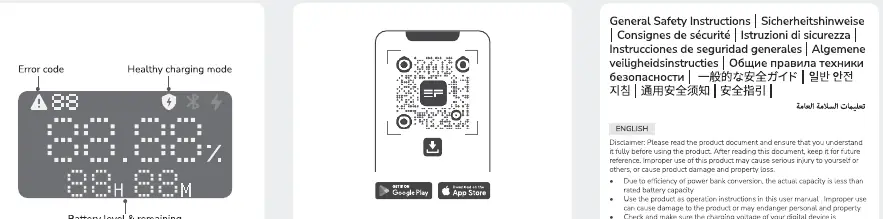
The EcoFlow 10000mAh Rapid Magnetic Power Bank is a portable charging solution designed for efficiency and convenience. It features magnetic attachment capabilities for compatible devices, allowing for seamless wireless charging. The device is equipped with an integrated display that provides real-time information regarding battery levels, charging status, and potential error codes, ensuring you are always aware of the power bank's operational state.
Getting Started
To begin using your power bank, ensure it is fully charged. The device supports both wired and wireless charging modes. For magnetic wireless charging, simply align your compatible device with the magnetic surface of the power bank. The power bank includes intuitive controls: a single press typically activates the device, while longer presses may be used for specific functions like resetting the unit. Always use the provided or high-quality charging cables to maintain the integrity of the battery and ensure optimal charging speeds.
Safety and Handling
Safety is paramount when using lithium-ion battery products. Do not expose the power bank to extreme temperatures, fire, or direct sunlight for extended periods. Avoid dropping, disassembling, or puncturing the unit, as this can lead to internal damage or hazardous leaks. Keep the device away from water and high-humidity environments to prevent short circuits. If you notice any swelling, deformation, or unusual odors, discontinue use immediately and contact customer support. This product is not a toy and should be kept out of the reach of children.
Maintenance and Storage
To prolong the lifespan of your EcoFlow power bank, it is recommended to charge it at least once every three months if it is not in regular use. Store the device in a cool, dry place. Avoid leaving the power bank in a discharged state for long periods, as this can negatively impact battery health. When cleaning, use a soft, dry cloth; do not use harsh chemicals or abrasive materials that could damage the exterior casing.
Troubleshooting and Disposal
If the power bank fails to charge or does not provide power to your device, check the connection points for debris and ensure the cables are functional. If the display indicates an error code, refer to the status indicators to identify the issue. When the device reaches the end of its service life, do not dispose of it in household waste. Follow local environmental regulations regarding the recycling of electronic waste and lithium-ion batteries to ensure safe and responsible disposal.
Manufacturer information
EcoFlow
Practical help
Common problems
Device not charging
Check cable connections and ensure the power bank has sufficient charge.
Magnetic charging not working
Ensure the device is properly aligned with the magnetic area and no obstructions are present.
Before use
- Inspect the power bank for physical damage.
- Ensure the device is fully charged before first use.
- Verify compatibility with your mobile device.
- Keep the device away from water and heat sources.
Images and diagrams
- The display shows battery percentage and charging status.
- Magnetic surface is used for wireless charging.
- Buttons control power on/off and reset functions.
Model compatibility
- Compatible with devices supporting magnetic wireless charging.
- Use certified cables for wired charging.

Manual page author
David Miller
Documentation analyst
Organizes user manual content into clear summaries, with attention to model details, product context, and everyday usability.