Health / Mobility Aids
User Manual for ETA 138890010EN American Fridge
Quick guide and user manual for the ETA 138890010EN American refrigerator. Includes installation, daily use, temperature settings, and troubleshooting.
Table of contents
Quick guide from the manual
This refrigerator is designed for household use. Before first use, ensure the appliance is unpacked and checked for damage. Important: Wait at least four hours after installation before connecting the appliance to the power supply to allow the oil to flow back into the compressor. Ensure adequate air circulation around the appliance to prevent overheating.
Safety Information
This appliance can be used by children aged 8 years and above and persons with reduced physical, sensory, or mental capabilities if supervised. Do not store explosive substances like aerosol cans with flammable propellant in the appliance. The refrigerant circuit contains isobutane (R600a), which is flammable; ensure no components are damaged during transport or installation.
Overview
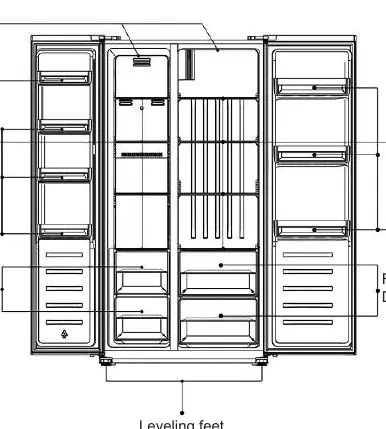
The appliance features an LED light, freezer shelves, freezer balconies, freezer drawers, fridge shelves, fridge balconies, and fridge drawers. It is equipped with leveling feet for stability.
Installation
Ensure there is enough space for the doors to open and maintain at least a 50mm gap on both sides. The appliance should be installed away from heat sources like radiators or direct sunlight. If positioned below an overhanging wall unit, maintain a minimum distance of 100mm from the top of the cabinet.
Daily Use
The control panel allows for separate temperature regulation of the fridge and freezer compartments. Modes:
- SMART: Automatically sets temperatures based on internal and ambient conditions.
- ECO: Runs in the lowest energy consumption setting.
- SUPER COOLING: Cools the fridge to the lowest temperature for approx. 2 hours.
- SUPER FREEZING: Cools the freezer to the lowest temperature for approx. 6 hours.
If a door is left open for more than 90 seconds, an alarm will sound.
Cleaning and Maintenance
Before maintenance, disconnect the power plug. Do not use metal objects or sharp tools to remove frost. Use a plastic scraper. Regularly clean the drain in the refrigerator to prevent water accumulation. The appliance features NO FROST technology, so manual defrosting is not required.
Troubleshooting
If the appliance does not work, check if the temperature knob is set to "0", if the plug is loose, or if a fuse has blown. If the appliance is too warm, check the temperature settings or if the door was left open. Unusual noises may be caused by the appliance not being level or touching a wall.
Technical Data and Customer Care
Technical information is available on the rating plate inside the appliance. For service or spare parts, contact the authorized service center and have the model name and serial number ready.
Practical help
Common problems
Appliance does not work
Check if the temperature knob is set to '0', ensure the plug is inserted correctly, or check the fuse/circuit breaker.
Food is too warm
Check temperature settings, ensure the door is not left open, or check if a large quantity of warm food was recently added.
Unusual noises
Ensure the appliance is level, move it slightly away from walls, or carefully bend any pipes at the rear that might be touching the wall.
Water on the floor
The water drain hole is likely blocked; clean it according to the cleaning section.
Before use
- Unpack the appliance and check for damage.
- Wait at least four hours before plugging in to allow oil to settle.
- Ensure adequate air circulation around the appliance.
- Level the appliance using the adjustable feet.
- Clean the interior with lukewarm water and neutral soap.
Specs in practice
- Climate Class (SN, N, ST, T)
- Indicates the ambient temperature range the appliance is designed to operate in (10°C to 43°C).
Images and diagrams
- Buttons A-D: Used for temperature adjustment, mode selection, and locking the panel.
- Display 1-7: Shows active modes (SMART, ECO, SUPER), lock status, and current temperature settings for both compartments.
Model compatibility
- Not intended for use as a built-in appliance.
- Not intended for use at altitudes exceeding 2000m.

Manual page author
David Miller
Documentation analyst
Organizes user manual content into clear summaries, with attention to model details, product context, and everyday usability.