Documents / Warranty Safety
User Guide for Costway FP10269US Portable Air Conditioner
Quick guide for the Costway FP10269US portable air conditioner, covering installation, operation, maintenance, and troubleshooting.
Table of contents
Manual images
Jump to the sectionQuick guide from the manual
This document provides essential safety and operational information for the Costway FP10269US portable air conditioner. The unit uses R32 refrigerant, which is flammable; therefore, strict adherence to safety protocols regarding ventilation and ignition sources is required. The unit is designed for cooling, dehumidifying, and ventilation, and it must be installed in a room larger than 4 square meters (43 sq.ft).
Product Overview
The unit features a control panel, adjustable air outlet, air inlet with filter, recessed handles, air exhaust, and a drain opening. It is equipped with casters for mobility.
Installation
Before starting, ensure the unit has been upright for at least 24 hours if it was tilted more than 45 degrees. Place the unit on a flat, stable surface with at least 50cm of clearance for proper airflow. Avoid heat sources, direct sunlight, and excessive dust.
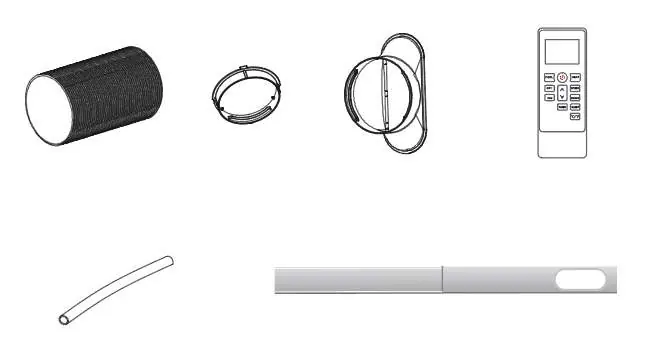
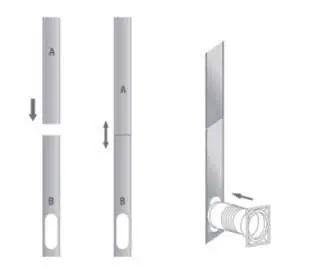

Exhaust Hose Installation
- Connect the hose connector to one end of the exhaust hose.
- Connect the window kit adapter to the other end.
- Extend the window kit to fit your window and connect the hose.
- Secure the window kit in place.
- Attach the hose connector to the unit's exhaust outlet.
- Ensure the hose is not bent and the unit is near an electrical outlet.
Operation
The unit offers Cool, Dry, Fan, Heat (optional), and Sleep modes. Use the control panel or remote to select the mode, adjust temperature (16°C-32°C), and set fan speeds. The unit features an automatic restart after power outages and a 3-minute compressor delay for protection.
Drainage
The unit uses a self-evaporating system. For manual drainage, place a container under the drain outlet and remove the plug. For continuous drainage, connect the provided drain hose to the outlet and ensure it is tilted downward toward a drain or bucket.
Cleaning and Maintenance
Clean the air filter every two weeks. Remove the filter, vacuum dust, and rinse under running water. Allow it to dry completely before reinstalling. Do not touch the evaporator surface with bare hands.

Troubleshooting
If the unit fails to operate, check the power connection, water level indicator, and room temperature. If the unit has reduced capacity, check for blocked air ducts, open windows, or a detached exhaust hose. Error codes (00/E0, E1, E2, Ft) indicate specific sensor or drainage issues that may require professional service.
WIFI Connection
The unit can be controlled via the Smart Life app. Activate WIFI on the unit, ensure it is within 5m of your router, and follow the app instructions to pair via Bluetooth or manual network configuration.
Official resources from the manual
Practical help
Common problems
Unit not operating
Check power connection, ensure the water tank is not full, and verify room temperature is within 5-35°C.
Reduced cooling capacity
Clean air filter, clear air duct obstructions, close doors/windows, and ensure the exhaust hose is securely attached.
Water leakage
Empty the water tank before moving the unit and ensure the drain hose is not kinked.
Excessive noise
Ensure the unit is on a firm, level surface and tighten any loose parts.
Before use
- Keep the unit upright for 24 hours if it was tilted.
- Ensure at least 50cm of clearance around the unit.
- Verify the room size is at least 4 square meters.
- Check that the exhaust hose is properly installed.
- Ensure the power outlet is grounded.
Specs in practice
- R32 Refrigerant
- Flammable refrigerant; requires special handling and ventilation.
- Cooling Temperature Range
- 16°C to 32°C (61°F to 90°F).
- Heating Temperature Range
- 5°C to 27°C (41°F to 81°F) (if applicable).
Images and diagrams
- 1: Control panel
- 2: Air outlet with louver
- 4: Air inlet with filter
- 7: Drain opening
Model compatibility
- Requires a 2.4GHz WIFI network for app connectivity.
- Smart Life app is compatible with Android and iOS.

Manual page author
David Miller
Documentation analyst
Organizes user manual content into clear summaries, with attention to model details, product context, and everyday usability.