Documents / Warranty Safety
Fellowes 12C Powershred Cross-Cut Shredder User Guide
Quick user guide for the Fellowes 12C Powershred cross-cut shredder, covering key features, technical specifications, safety lock operation, and maintenance requirements.
Table of contents
Manual images
Jump to the sectionQuick guide from the manual
The Fellowes 12C Powershred is a personal cross-cut shredder designed for home office or deskside use. This document outlines the device's capabilities, including its shredding capacity, safety features, and operational limits. Please refer to this guide for essential usage and maintenance information.
Device Features
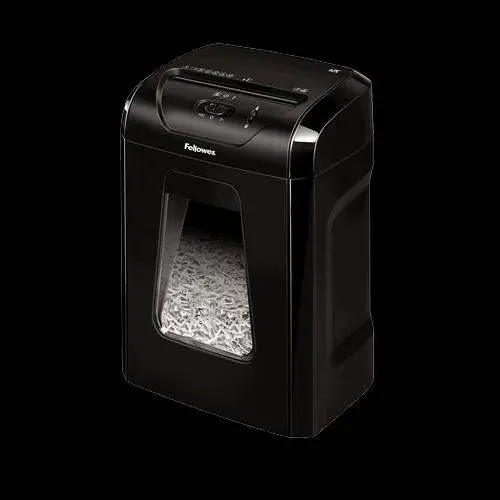
- Shredding Capacity: Handles up to 12 sheets of 70gsm paper per pass.
- Cross-Cut Performance: Shreds paper into 4x40mm particles, achieving Security Level P-4 (approx. 390 particles per A4 sheet).
- Versatility: Capable of shredding staples, paper clips, and credit cards.
- Safety Lock: A manual feature that disables the shredder to prevent accidental activation.
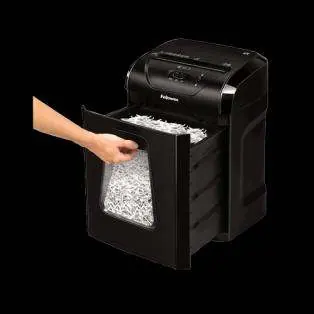
- Bin Capacity: Features a 19-litre pull-out bin, holding approximately 250 sheets of shredded paper.
Operation and Runtime
The device is designed for manual feeding. It supports continuous operation for up to 20 minutes, followed by a mandatory 30-minute cool-down period to prevent overheating.
Technical Specifications
- Throat Width: 224mm
- Product Dimensions: 470 x 341 x 246 mm
- Weight: 6.6 kg
- Warranty: 2-year machine warranty and 5-year cutter warranty.
Maintenance
To ensure optimal performance, it is recommended to use Fellowes-approved oil sheets or oil bottles (120ml or 355ml) for regular maintenance of the cutting blades.
Manufacturer information
Fellowes
Practical help
Common problems
Device stops working during use
The shredder has a 20-minute continuous runtime limit. If reached, allow a 30-minute cool-down period.
Accidental activation
Engage the manual Safety Lock feature to disable the shredder when not in use.
Before use
- Ensure the pull-out bin is correctly inserted.
- Check that the Safety Lock is in the unlocked position.
- Verify that the paper stack does not exceed 12 sheets (70gsm).
- Remove any non-shreddable items from documents.
Specs in practice
- Security Level P-4
- Indicates high-security cross-cut shredding, resulting in approximately 390 particles per A4 sheet.
- Runtime: 20 on / 30 off
- The motor can run for 20 minutes continuously before requiring a 30-minute rest period.
- Throat width: 224mm
- The maximum width of paper or material that can be inserted into the shredder slot.
Images and diagrams
- The pull-out bin is located at the front of the unit and can be accessed by pulling the handle.
- The Safety Lock switch is located on the top control panel.
Model compatibility
- Shreds staples, paper clips, and credit cards.
- Recommended to use Fellowes oil products (3608601, 3608501, or 4025601) for maintenance.

Manual page author
Emily Carter
User documentation editor
Prepares concise manual descriptions and highlights the most useful setup, operation, and maintenance information for readers.