Tools / Drills
Festool RG 130 ECI Surface-Restoration Grinder User Manual
Quick guide for the Festool RG 130 ECI surface-restoration grinder, covering setup, operation, safety, maintenance, and troubleshooting.
Table of contents
Quick guide from the manual
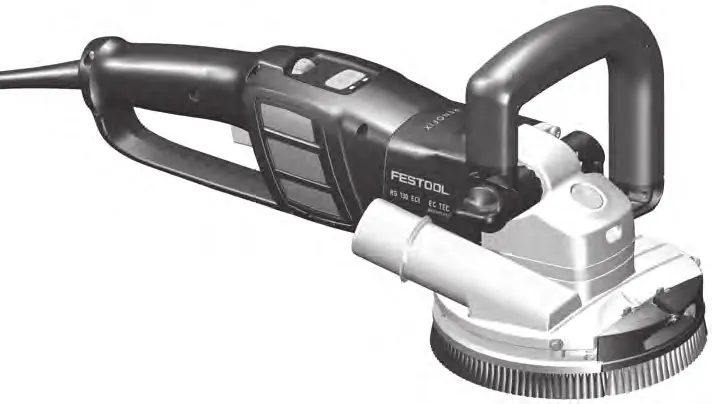
The Festool RG 130 ECI is a surface-restoration grinder designed for surface sanding on concrete, removing plaster, paint, adhesive residue, coatings, and rust, as well as cleaning concrete and wooden surfaces. It must be used with a compatible mobile dust extractor for dry sanding.
Device components
Key elements include the handle [1-1], speed control [1-2], Bluetooth button [1-3], LED indicator [1-4], auxiliary handle [1-6], spindle lock [1-7], brush [1-9], extraction attachment [1-10], and dust screen [1-13].
Commissioning and operation
Ensure the mains voltage matches the nameplate specifications. Connect a mobile dust extractor with a 36 mm hose to the extraction attachment [1-10]. The tool can be connected to a mobile dust extractor via Bluetooth for automatic operation.
Sanding discs
Use only Festool-recommended sanding discs (e.g., DIA STONE-D130, DIA HARD-D130, DIA ABRASIV-D130, DIA PAINT-D130, DIA THERMO-D130). To mount: clean the flange [2-1] and fastening nut [2-4], mount the disc, press the spindle lock [2-3], and tighten the nut with the key [2-5].
Maintenance
Regularly clean the dust screen [6-1] on both sides to prevent overheating. If the brush [4-2] is worn, replace it by unscrewing the screws with washers [4-1], removing the brush and springs [4-3], and installing a new brush.
Safety
Always wear personal protective equipment (ear protection, safety goggles, dust mask). Do not work overhead. Ensure the workpiece is secured. Always guide the power cable to the rear. Do not use the tool in wet or explosive environments.
Manufacturer information
Festool
Practical help
Common problems
Tool overheats
Clean the dust screen [6-1] on both sides. Ensure cooling air openings are free of blockages.
Tool does not start after power interruption
The restart protection is active. Switch the tool off and then on again.
LED flashes red
Tool is overheated. Continue working without load to allow it to cool.
LED lights up red
Electronics failure. Contact an authorized service workshop.
Before use
- Check the tool, mains plug, and cable for damage.
- Ensure the sanding disc is not damaged or worn.
- Verify the sanding disc is correctly mounted and rotates freely.
- Connect a suitable mobile dust extractor.
- Ensure the dust screen is clean.
- Wear appropriate personal protective equipment.
Specs in practice
- Power consumption
- 1600 W, indicates the power draw of the motor.
- Speed (no-load)
- 2200-6500 rpm, adjustable via the speed control.
- Sanding disc diameter
- 130 mm, the size of the compatible sanding discs.
- Dust extraction connection
- 36 mm, diameter required for the suction hose.
Images and diagrams
- Figure 1: Overview of device controls and components.
- Figure 2: Assembly of the sanding disc, flange, and nut.
- Figure 3: Lifting the front brush segment for wall work.
- Figure 4: Replacing the brush and springs.
- Figure 5: Adjusting the depth stop.
Model compatibility
- Use only original Festool sanding discs and accessories.
- Must be used with a mobile dust extractor (dust class L).
- Not suitable for sanding with sandpaper, wire brushing, polishing, or cutting-off.

Manual page author
David Miller
Documentation analyst
Organizes user manual content into clear summaries, with attention to model details, product context, and everyday usability.