Tools / Power Tools
Festool CXS 12 and TXS 12 Cordless Drill/Screwdriver Instruction Manual
Quick guide for the Festool CXS 12 and TXS 12 cordless drill/screwdriver, covering setup, operation, torque settings, maintenance, and troubleshooting.
Table of contents
Manual images
Jump to the sectionQuick guide from the manual
This manual provides essential operating instructions for the Festool CXS 12 and TXS 12 cordless drill/screwdrivers. It covers safety, setup, operation, and maintenance. Always ensure the battery is removed before performing any maintenance or changing tools.
Device description
The drill features a battery release button, capacity indicator, LED light, on/off switch, gear switch, rotational direction/transport lock, handle, torque/drilling adjustment wheel, belt clip, and bit storage.
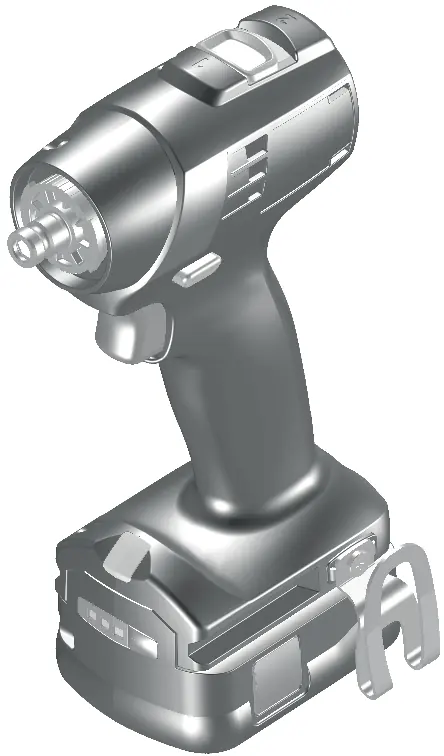
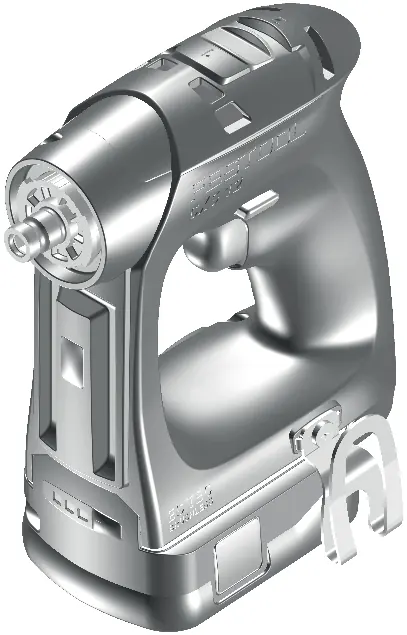
First use and setup
Before initial use, apply a small amount of multi-purpose grease to the drill spindle. To install the battery, slide it into the base until it clicks into place. The belt clip can be attached to either the left or right side of the tool using the provided screw.
Operation and settings
The tool features a variable speed trigger. Use the rotational direction switch to select clockwise or counter-clockwise rotation, or set it to the center position to lock the trigger. The gear switch allows for two-speed operation. Torque can be adjusted using the thumbwheel; position 1 provides low torque, while position 13 provides high torque. The drill symbol on the thumbwheel selects maximum torque for drilling.
Lighting configuration
The LED light can be configured via the thumbwheel. It can be set to turn on/off automatically with the tool, to stay on permanently (for 10 minutes), or to be permanently off.
Tool holders and attachments
The tool supports CENTROTEC chucks for fast tool changes, standard drill chucks for bits up to 10mm, and angle attachments for right-angle work. Bits can also be inserted directly into the hexagon socket of the drill spindle.
Maintenance and safety
Keep cooling air openings clean to ensure proper air circulation. Do not clean the tool with compressed air. Regularly clean the bit storage area to remove metal shavings. If the tool overheats, allow it to cool down before restarting. For repairs, use only original Festool spare parts.
Manufacturer information
Festool
Practical help
Common problems
Tool beeps once
Battery is empty/incompatible (charge/replace) or tool is overloaded (reduce load).
Tool beeps twice
The set torque has been reached.
Tool beeps continuously
The tool is faulty; contact the manufacturer.
Tool overheated
Allow the tool to cool down before restarting.
Before use
- Check that the battery interface is clean.
- Apply multi-purpose grease to the drill spindle.
- Ensure the tool is switched off before changing settings or tools.
- Wear appropriate personal protective equipment (ear protection, safety goggles, dust mask).
Specs in practice
- Motor voltage
- 10.8 V DC.
- No-load speed
- 0-470 rpm (1st gear) and 0-1600 rpm (2nd gear).
- Chuck clamping range
- 1.0 - 10 mm.
Images and diagrams
- Page 3: Overview of device components [1-1] to [1-12].
- Page 4: Battery installation/removal, belt clip mounting, and CENTROTEC chuck usage.
- Page 5: Using the drill chuck [6] and angle attachment [7].
Model compatibility
- Suitable for use with Festool battery pack BP 12.
- Can also use Festool 13 mm drill chucks.

Manual page author
Michael Turner
Technical manual editor
Reviews PDF manuals for structure, safety notes, and practical product details so readers can find the right information quickly.