Tools / Power Tools
User Manual for FLEX SE 125 18.0-EC Cordless Surface Sander
Quick guide for the FLEX SE 125 18.0-EC cordless surface sander. Includes setup, operation, maintenance, and safety instructions.
Quick answers from the manual
Quick answer
- This manual provides instructions for the safe and proper operation, maintenance, and care of the FLEX SE 125 18.0-EC cordless surface sander. p. 16, 17, 22
Key actions
- Inserting/replacing the battery p. 22
- Attaching the auxiliary handle p. 22
- Connecting an extraction system p. 23
- Attaching/changing the Velcro sandpaper p. 23
- Working with flap sanding discs p. 23
First start
- Unpack the power tool and accessories, check for completeness and transport damage, and fully charge the batteries before initial operation. p. 22
Problems and fixes
Machine switches off during use.
The machine has triggered its overload protection or temperature monitoring system.
p. 25Maintenance and reset
- Regularly clean the power tool and ventilation slots, blow out the housing interior and motor with dry compressed air, and clean the filter cover. p. 26
Technical specifications
| Parameter | Value | Meaning | Pages |
|---|---|---|---|
| Nominal voltage | 18 V | Battery voltage | p. 20 |
| Idling speed | 1-660, 2-930, 3-1195, 4-1500 min-1 | No-load speed settings | p. 20 |
| Max. grinding tool Ø | 125 mm | Maximum diameter of the grinding tool | p. 20 |
Where to find it in the PDF
- English section p. 16, 27
Table of contents
Manual images
Click an image to enlargeQuick guide from the manual
This manual provides essential instructions for the safe and efficient operation of the FLEX SE 125 18.0-EC cordless surface sander. Always read the safety instructions before use.
Overview
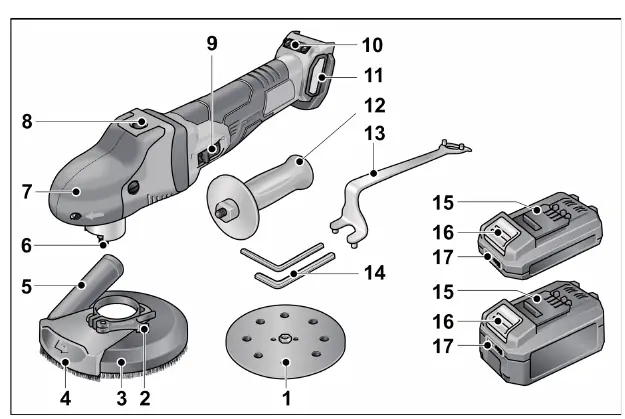
The device features a switch rocker for operation, a speed control button with 4 levels, and a spindle lock for tool changes. The guard hood includes a brush ring and a pivoted edge segment for corner sanding.
Instructions for use
Battery and Handle
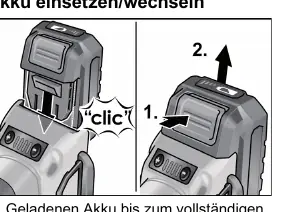
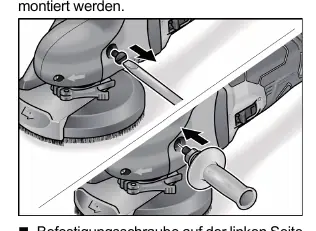
Insert the charged battery until it clicks into place. To remove, press the release button. The auxiliary handle can be attached to the left side of the grip hood for better control.
Connecting an extraction system
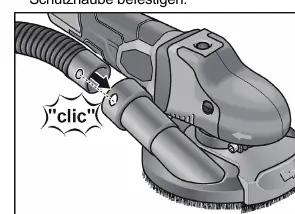
It is recommended to use the FLEX special extractor VCE 44 M AC. Attach the suction hose to the connection on the protective hood and connect it to your dust extraction system.
Sanding tools
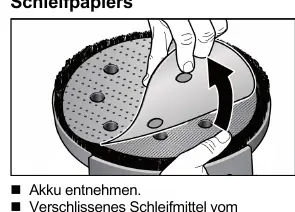
Velcro sandpaper: Remove the battery, pull off the worn sanding tool, and center the new sandpaper on the backing pad. Ensure the holes align for dust extraction.
Flap sanding discs: Remove the battery, press and hold the spindle lock, and use the provided wrench to secure the disc onto the spindle.
Operation
Push the switch rocker forward to turn the tool on. For continuous operation, press the front end of the switch rocker. To turn off, press the rear end. Use the speed control button to select one of the 4 speed levels.
Maintenance and care
Remove the battery before any work on the tool. Regularly clean the ventilation slots and the filter cover using dry compressed air. Do not use water or liquid detergents. Repairs must be performed by an authorized customer service center.
Manufacturer information
FLEX
Practical help
Common problems
Machine switches off during use
Overload protection or temperature monitoring has been triggered. Allow the machine to cool down or reduce the load.
Sanding tool is not centered
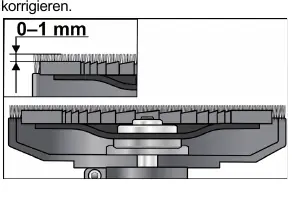
Perform a test run to ensure the sanding tool is clamped correctly in the center.
Clamping force of the guard hood decreases
Tighten the hexagon socket screw on the clamping lever to adjust the clamping force.
Before use
- Unpack the tool and check for missing or damaged parts
- Charge the battery fully before first use
- Ensure the correct sanding tool is attached
- Check the position of the guard hood
- Connect the dust extraction system
Images and diagrams
- 1: Velcro sanding disc
- 3: Guard hood with brush ring
- 8: Spindle lock
- 9: Switch rocker
- 10: Speed control button
Model compatibility
- Use only FLEX-approved accessories
- Connect a Class M dust extractor for safe operation

Manual page author
David Miller
Documentation analyst
Organizes user manual content into clear summaries, with attention to model details, product context, and everyday usability.