Tools / Drills
User Manual for FLEX GPS 35 18-EC Pruning Shear
Quick guide and user manual for the FLEX GPS 35 18-EC pruning shear. Includes setup, operation, blade tension adjustment, lubrication, and maintenance instructions.
Table of contents
Quick guide from the manual
The FLEX GPS 35 18-EC is a professional-grade cordless pruning shear designed for commercial use in industry and trade for cutting and pruning small limbs and branches. This guide provides essential information for safe and efficient operation.
Overview
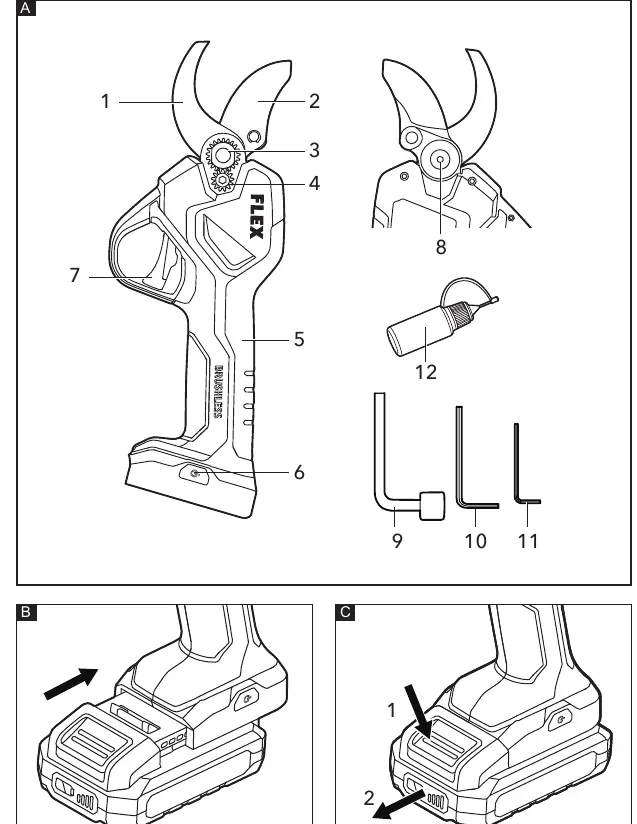
The pruning shear consists of the following main components: fixed blade, movable blade, tension-adjusting nut, locking screw, handle, power button, trigger button, and lubricating hole. The tool is supplied with a socket wrench and two hex keys (3mm and 4mm) for maintenance.
Operation
Inserting/replacing the battery
Press the charged battery into the power tool until it clicks into place. To remove, press the release button and pull out the battery.
Switching on and off
Press and hold the power button on the base of the tool to turn on the power; the blades will open. Pull the trigger button to close the blades. Press and hold the power button on the base of the tool to cut off the power. The tool will automatically power off if the trigger is not operated for approximately 3 minutes.
Blade maintenance
Adjusting the blade tension
After a certain number of hours of operation, the blade tension may deteriorate. To adjust:
- Power off the tool and detach the battery pack.
- Loosen the locking screw with the provided hex key.
- Rotate the tension-adjusting nut with the provided socket wrench to achieve the perfect tension.
- Tighten the locking screw with the hex key.
Lubricating the pruning shear
The blades must be lubricated with liquid lubricant before use or after working when the blades are dry:
- Power off the tool and detach the battery pack.
- With the blades open, add lubricating oil into the lubricating hole on the back of the pruning shear.
- Perform a no-load cut to help uniformly distribute the oil.
Safety and maintenance
Always remove the battery before performing any work on the tool. Keep hands away from the blades at all times. The tool features a supporting warning device that emits an audible signal if the cutting edges and the switch have skin contact with a person simultaneously, causing the blades to stop and open. Note that wearing gloves or having dry skin may prevent this function. Regularly clean the tool and vent slots, and blow out the housing interior and motor with dry compressed air.
Manufacturer information
FLEX
Practical help
Common problems
Tool stops automatically
The tool powers off automatically if the trigger is not operated for approximately 3 minutes.
Blades do not cut accurately
Blade tension (gap between blades) may need adjustment using the tension-adjusting nut.
Warning signal sounds
The cutting edges and the switch have skin contact with a person; the blades will stop and open automatically.
Before use
- Unpack the tool and check for missing or damaged parts.
- Charge the batteries fully before initial operation.
- Pull the trigger several times to check if no-load operation is normal.
- Ensure blades are lubricated if dry.
Specs in practice
- Rated voltage
- 18V
- Cutting capacity
- 35 mm
Images and diagrams
- A: Overview of product features (blades, buttons, tools).
- B: Battery insertion procedure.
- C: Battery removal procedure.
- D: Switching on and off procedure.
- E: Adjusting blade tension.
Model compatibility
- Compatible with FLEX 18V battery packs (AP 18.0/2.5, AP 18.0/5.0, AP 18.0/8.0).

Manual page author
David Miller
Documentation analyst
Organizes user manual content into clear summaries, with attention to model details, product context, and everyday usability.