Automotive / Remote Starters
Installation Guide for Fortin EVO-ONE Remote Starter
Complete installation and programming guide for the Fortin EVO-ONE remote starter system. Includes wiring diagrams, pinout configurations, and step-by-step setup instructions for Toyota Corolla vehicles.
Table of contents
Manual images
Click an image to enlargeQuick Guide and Important Information
The Fortin EVO-ONE is a remote starter system designed for specific vehicle applications, including the Toyota Corolla (2024-2025). This module must be installed by a qualified technician. Incorrect connections can cause permanent damage to the vehicle.
Mandatory Safety Requirements:
- The hood pin switch (included) must be installed.
- The security sticker must be applied.
- If the vehicle can be remote started with the hood open, function A11 must be set to OFF.
Required Tools:
- Flash Link Updater or Flash Link Mobile tool (sold separately).
- Computer with Internet connection or Smartphone with the Flash Link Mobile App.
Wiring Configuration
The installation requires connecting the EVO-ONE module to the vehicle's electrical system. Refer to the wiring diagram for specific pin assignments. Key connection points include:
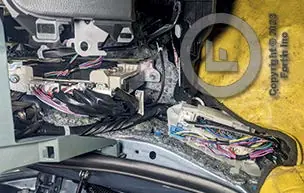
- Steering Column: Connections for Ignition, 12V, Accessory, and Starter.
- ECU (Driver's side): Connections for Doorlocks Data, CAN High, CAN Low, and TPMS (if equipped).
- Driver Kick Panel: Connections for IMI/IMO signals.
Ensure all wiring is verified against the provided diagram before finalizing connections.
Programming Procedures
Before programming, configure the unit options using the Flash Link software and save the settings.
DCryptor Programming:
- Press and hold the programming button while connecting the 6-pin main harness.
- Release the button when the LED turns blue.
- Insert remaining connectors.
- Turn the key to the Ignition ON/RUN position. The blue LED will flash rapidly, then turn solid.
- Turn the key to OFF.
- Start the vehicle. The blue LED will turn off and the red LED will turn on.
Key Bypass Programming:
- Turn the key to OFF and remove it.
- Start the vehicle. The red LED will turn off and the yellow LED will turn on.
- Wait for the red and yellow LEDs to alternate.
- Turn the key to OFF.
- Disconnect all connectors, then reconnect the 6-pin main harness or 4-pin data-link connector, followed by all other connectors.
Remote Starter Functionality
Once installed and programmed, the remote starter operates as follows:
- Ensure all doors are closed.
- Use the remote-starter remote or the OEM remote to start the vehicle.
- To drive, unlock the doors, insert the key, turn to the Ignition ON/RUN position, and press the brake pedal.
Practical help
Common problems
Blue LED is not solid during programming
Disconnect the 6-pin main connector and restart the programming procedure from step 1.
Remote start not functioning
Ensure all doors are closed and the hood pin switch is properly installed and functional.
Vehicle does not start
Verify that the programming procedure was completed successfully and the module is programmed.
Before use
- Ensure installation is performed by a qualified technician.
- Verify all wiring connections against the provided diagram.
- Install the mandatory hood pin switch.
- Have the Flash Link Updater or Flash Link Mobile tool ready.
- Check vehicle compatibility (Toyota Corolla 2024-2025).
Images and diagrams
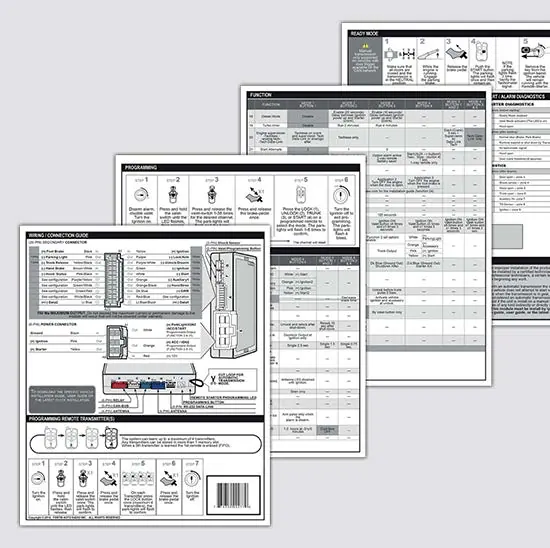
- Wiring diagrams show connections to the steering column, ECU, and driver kick panel.
- Connector views are provided for the 8-pin, 30-pin, 43-pin, and 63-pin connectors.
Model compatibility
- Compatible with Toyota Corolla 2024-2025 (H-Key).
- Requires firmware update via Flash Link Updater or Mobile.

Manual page author
Emily Carter
User documentation editor
Prepares concise manual descriptions and highlights the most useful setup, operation, and maintenance information for readers.