Tools / Generators
Owner's Manual for Generac 100-200A Automatic Transfer Switch
Comprehensive owner's manual for the Generac 100-200A Automatic Transfer Switch. Includes detailed installation instructions, wiring diagrams, manual operation procedures, and overload prevention control board (OPCB) setup.
Table of contents
Manual images
Click an image to enlargeQuick Guide
This manual provides essential information for the installation, operation, and maintenance of the Generac 100-200A Automatic Transfer Switch (ATS). Safety First: Always turn off all power supplies before working on the unit. This equipment must be installed by competent, qualified personnel in accordance with local, state, and national electrical codes.
Equipment Description
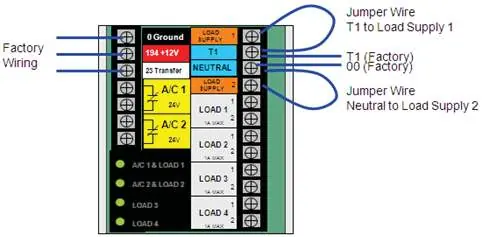
The ATS is designed to transfer electrical loads from a utility power source to a generator standby source automatically. It includes a transfer mechanism, a utility service disconnect circuit breaker, and an Overload Prevention Control Board (OPCB). The OPCB manages up to six loads (two air conditioners and four other loads) by shedding them if the generator frequency drops, preventing overload.
Installation
The ATS is housed in a NEMA 3R enclosure suitable for indoor or outdoor use. Mounting: Mount the switch vertically to a rigid structure. Wiring: Connect utility power to the service disconnect breaker and generator/load lines to the transfer mechanism terminals. Ensure proper wire gauge based on the length of the run. OPCB Connections: The OPCB can control air conditioners directly or via separate contactors. Use Class 2 wiring methods for control circuits.
Operation
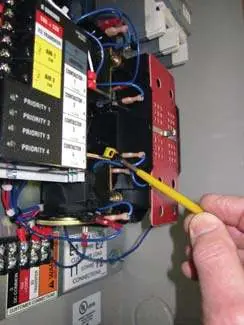
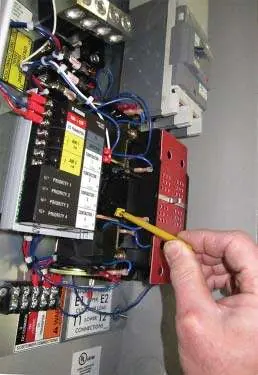
Manual Operation: A manual handle is provided for testing. Warning: Do not manually transfer under load. Disconnect all power sources before using the manual handle. The handle position indicates the connection: UP for Utility, DOWN for Generator. Voltage Checks: Before automatic operation, verify voltage and frequency at the ATS terminals using an accurate voltmeter and frequency meter.
Testing and Maintenance
OPCB Testing: Use the Test button on the OPCB to verify that loads are shed correctly. Automatic Operation: Once installed, the system can be set to automatic mode. The generator will start after a utility power failure (default 10-second delay) and transfer loads after a 5-second delay. Shutdown: To turn off the generator during prolonged outages, follow the specific sequence: turn off utility disconnect, turn off generator main line circuit breaker, then turn off the generator.
Manufacturer information
Generac Power Systems, Inc.
Practical help
Common problems
Generator engine cranks and starts unexpectedly
Disable the automatic start circuit before working on or around the generator or transfer switch.
Overload condition
The OPCB sheds loads based on generator frequency. Ensure total load does not exceed generator capacity.
Loose electrical connections
Use a torque wrench to tighten conductors to specified values. Overtightening can damage the switch base.
Before use
- Ensure the generator is in OFF mode.
- Turn OFF both utility and generator power supplies.
- Verify all packing material is removed from the switch.
- Check that installation complies with local electrical codes.
- Ensure proper electrical clearance between live metal parts.
Specs in practice
- 150/200A Model
- Type 225AF, 2-pole, 120/240VAC, 50/60Hz.
- OPCB Load Shedding
- Manages up to 6 loads (2 A/C, 4 others) based on generator frequency.
Images and diagrams
- Figure 1.1: Typical ATS transfer mechanism showing utility and generator lugs.
- Figure 1.2: Overload Prevention Control Board (OPCB) layout.
- Figure 3.1: Manual operation handle usage.
Model compatibility
- Suitable for single-phase systems.
- UL listed for optional standby systems (NEC article 702).

Manual page author
Emily Carter
User documentation editor
Prepares concise manual descriptions and highlights the most useful setup, operation, and maintenance information for readers.