Furniture / Storage Cabinets
Acrylic Stand Keyholder Design Guide (100x130mm)
A comprehensive design guide for the 100x130mm Acrylic Stand Keyholder. Learn about layout specifications, cut lines, color modes, and the submission checklist to ensure your custom design is print-ready.
Table of contents
Manual images
Click an image to enlargeDesign Specifications and Guidelines
This guide provides the necessary technical requirements for designing a custom 100x130mm Acrylic Stand Keyholder. Adhering to these specifications ensures that your design is compatible with the manufacturing process and results in a high-quality product.
Layout Requirements
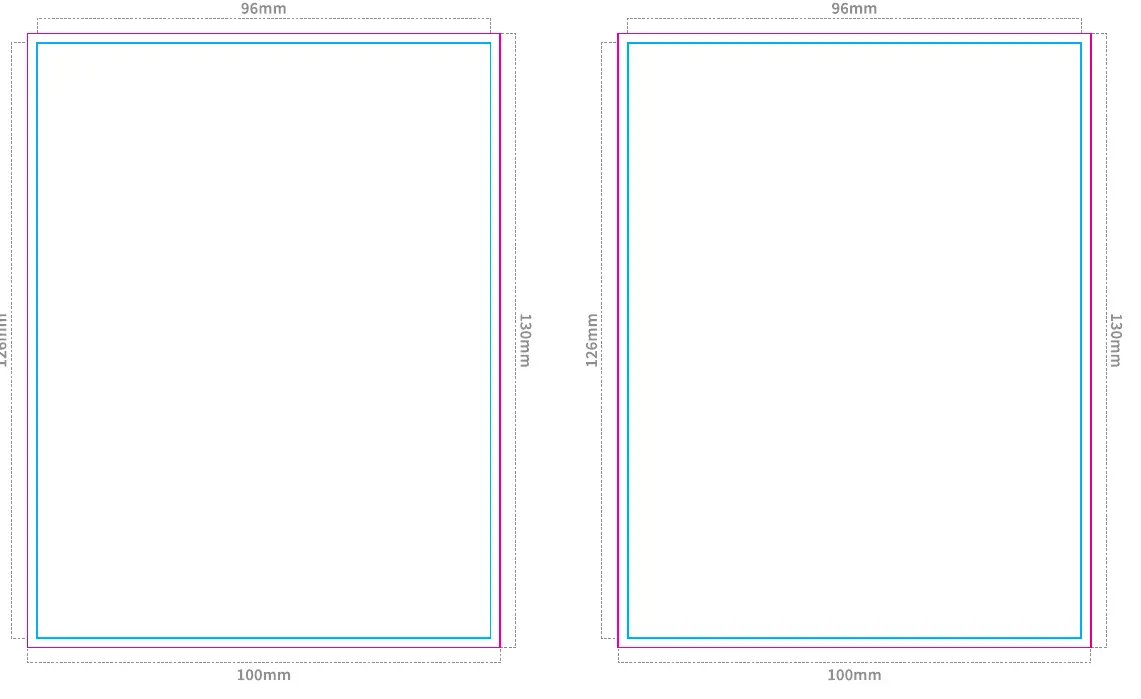
- Design Area: All design elements must be placed within the blue frame, which represents the original size.
- Cut Lines: Ensure cut lines are included in your design file. If specific cut line instructions are not provided, the design will be centered automatically.
- Margins: A 2mm margin is required around the metal hole area to prevent printing defects or damage to the design.
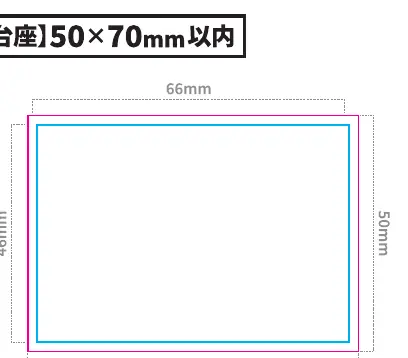
- Base Dimensions: The base must be designed within the 50x70mm area. Ensure the base is proportional to the body to maintain stability.
Submission Checklist
Before submitting your design file, verify the following requirements:
- Text: All text must be converted to outlines.
- Images: All images must be embedded in the file.
- Color Mode: The file must be set to CMYK color mode.
- White Layer: The white layer must be set to K100%.
- Base Tabs: Ensure base tabs are correctly placed and configured.
Printing and Finishing Options
When submitting your order, ensure you have selected the appropriate options on the submission form, including:
- Printing: Specify single-sided or double-sided printing.
- Base Shape: Choose the desired shape for the base (e.g., oval, square, rectangle, heart, star, or original).
- Metal Parts: Select the type of metal attachment (e.g., ball chain, lobster clasp) and color.
- Packaging: Indicate your preferred packaging method (e.g., OPP bag).
Practical help
Common problems
Design elements outside the blue frame
Ensure all artwork is contained within the blue frame (original size) to avoid cropping issues.
Unstable stand
Ensure the base size is appropriate for the body; if the base is too small, the stand may be unstable.
Printing defects near metal holes
Ensure a 2mm margin is maintained around the metal hole area.
Before use
- Outline all text in the design file.
- Embed all images.
- Set color mode to CMYK.
- Set white layer to K100%.
- Place base tabs correctly.
- Include a 2mm margin for metal hole parts.
Specs in practice
- Metal Hole Margin
- A 2mm buffer zone around the hole is required to prevent printing issues.
Images and diagrams
- Blue Frame: Indicates the original size for the design.
- Cut Line: The path where the acrylic will be cut.

Manual page author
David Miller
Documentation analyst
Organizes user manual content into clear summaries, with attention to model details, product context, and everyday usability.