Power / Batteries & Chargers
User Manual for GoGEN ACHPD 120W Charging Adapter
Quick guide for the GoGEN ACHPD 120W charging adapter. Includes technical specifications, safety instructions, usage guidelines, and disposal information.
Table of contents
Quick guide from the manual
This document provides essential safety and operational information for the GoGEN ACHPD 120W charging adapter. Always verify that your device's power requirements match the adapter's output specifications before connecting.
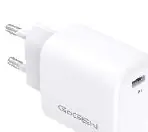
Technical Specifications
The adapter operates within the following parameters:
- Input Voltage: 100-240 V (AC), 50/60 Hz
- Output Voltage: 5.0 / 9.0 / 12.0 V (DC)
- Output Current: 3.0 / 2.22 / 1.67 A
- Output Power: 20.0 W
- Efficiency: 82.3% (active mode), 76.6% (low load)
- No-load Power Consumption: 0.04 W
Safety Instructions
To ensure safe operation, please adhere to the following warnings:
- Qualified Personnel Only: Only skilled and trained electricians may disassemble or assemble the product housing.
- Electrical Safety: Avoid contact with mains voltages. Do not touch electrically live parts if the product is damaged.
- Overheating Prevention: Do not cover ventilation slots or insert foreign objects into ports. Do not bridge contacts.
- Environment: Use only in dry, indoor environments. Do not use in wet or humid conditions, near heat sources, or expose to rain.
- Children: Keep out of reach of children.
Usage and Maintenance
The adapter is designed for charging compatible devices. Always compare your device's specifications with the adapter's output before use. Clean the device only with a dry cloth. Do not leave the device unattended while in use.
Warranty and Disposal
The manufacturer's warranty applies only to the product itself and does not cover damages caused by improper installation, maintenance, or operation. Do not modify the product. Dispose of the device at designated collection points for electrical and electronic equipment; do not treat it as household waste.
Practical help
Common problems
Device not charging
Verify that the device's input voltage and current requirements match the adapter's output (5V/9V/12V). Ensure the cable connection is secure.
Overheating or burning smell
Immediately disconnect the adapter from the power source. Do not use the product if it shows signs of damage.
Before use
- Check the adapter for physical damage.
- Ensure the environment is dry and indoors.
- Verify device compatibility with 5V/9V/12V DC output.
- Ensure ventilation slots are not blocked.
Specs in practice
- Input Voltage
- 100-240V AC, compatible with standard wall outlets.
- Output Power
- 20.0W maximum power delivery.
- Output Voltage
- Supports 5.0V, 9.0V, and 12.0V DC.
Model compatibility
- Compatible with devices requiring 5V, 9V, or 12V DC input.
- Always check device specifications before connecting.

Manual page author
David Miller
Documentation analyst
Organizes user manual content into clear summaries, with attention to model details, product context, and everyday usability.