Computers / Laptops
Hama 155x155cm Projection Screen with Tripod
Comprehensive setup and usage guide for the Hama 155x155cm projection screen with tripod, including mounting, adjustment, and maintenance instructions.
Table of contents
Product Overview
The Hama 155x155cm projection screen is a high-quality, portable solution designed for home cinema, presentations, and educational purposes. It features a stable tripod base and a retractable screen mechanism, ensuring easy setup and storage. The screen surface is optimized for clear image projection, providing a balanced viewing experience.
Technical Specifications
- Screen Size: 155 x 155 cm
- Total Height: Up to 2400 mm
- Base Width: 740 mm
- Design: Tripod-mounted with detachable screen capability
Setup and Operation
To set up the screen, place the tripod on a flat, stable surface. Extend the tripod legs fully to ensure maximum stability. Once the base is secure, pull the screen housing upwards to the desired height. The locking mechanism will hold the screen in place. To retract, gently pull the screen slightly to release the lock and slowly guide it back into the housing to prevent damage to the fabric.
Detaching the Screen
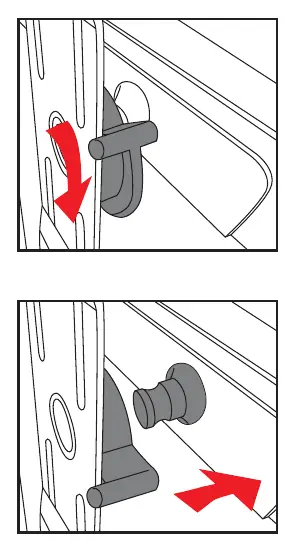
The screen can be removed from the tripod for wall mounting or alternative storage. Locate the locking mechanism on the rear of the screen housing. Rotate the locking lever to release the screen from the tripod mount. Ensure you have a firm grip on the screen housing before releasing it to prevent it from falling.
Safety and Maintenance
Always ensure the tripod is placed on a level surface to prevent tipping. Do not force the retraction mechanism; if the screen does not retract smoothly, check for obstructions. Clean the screen surface only with a soft, dry, or slightly damp cloth. Avoid using harsh chemicals or abrasive materials, as these can damage the reflective coating. Store the unit in a cool, dry place when not in use to maintain the integrity of the screen material.
Troubleshooting and Disposal
If the screen fails to lock at the desired height, check the tension mechanism for debris. If the tripod becomes unstable, inspect the leg joints for loose screws. When the product reaches the end of its service life, please dispose of it according to local environmental regulations, ensuring that metal and plastic components are recycled appropriately.
Related manuals
Related manuals from the same brand or category.
Power / Batteries Chargers