Health / Weighing Scales
User Manual for Health o meter 160KL Mechanical Floor Scale
Quick guide for the Health o meter 160KL, 160KG, and 160LB mechanical floor scales. Includes setup, zero adjustment, weighing tips, maintenance, and troubleshooting.
Table of contents
Quick guide from the manual
This mechanical floor scale is factory-calibrated and does not require user calibration. For accurate results, always place the scale on a hard, flat, and stable surface. Avoid using it on deep pile carpets or rugs. Before weighing, ensure the scale is at zero; if not, use the adjustment knob located at the bottom of the unit.
Safety Warnings
- Do not transport the scale while the platform is loaded.
- Do not use the scale in the presence of flammable materials.
- Patients should wear socks or lightweight foot coverings during the weighing event.
- Do not drop, kick, or jump on the scale.
- Do not store the scale near chemicals, heaters, or radiators.
Operating Instructions
Preparing the scale for use:
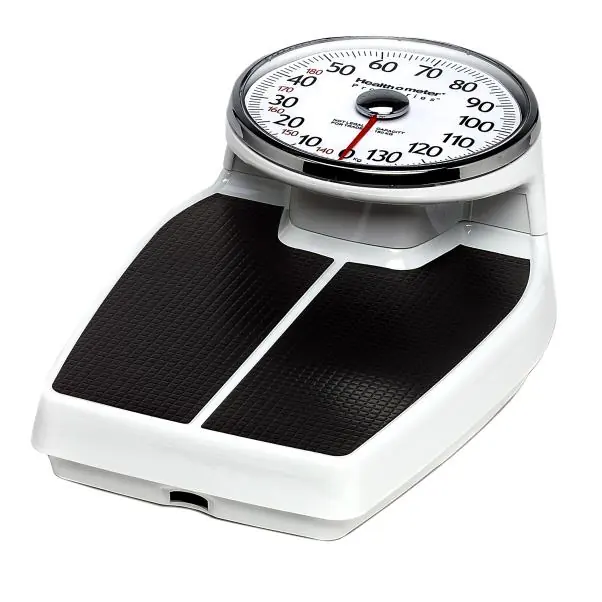
- Place the scale on a hard, flat surface.
- Ensure the platform is clear of all objects.
- Step on and off the scale a few times to align the internal mechanism.
- If the pointer is not at zero, turn the zero adjustment knob at the bottom of the scale to align it.
- Step on the scale with weight equally distributed on both feet and stand still.
- Once the weight is recorded, have the patient step off.
Weighing Hints:
- Weigh yourself at approximately the same time each day.
- For the most realistic results, weigh yourself without clothing.
- Always verify the indicator is at zero before stepping on the platform.
Maintenance and Cleaning
The scale features permanently lubricated bearings and working parts; do not use oil or lubricants. To clean and disinfect, use a soft cloth or disposable wipe with one of the following solutions:
- Mild soap and water solution
- 70% isopropyl alcohol
- Solution with 1-5% hydrogen peroxide concentration
After cleaning, wipe with a cloth dampened with water and then with a clean, dry cloth. Ensure all parts are completely dry. Never use rough or abrasive materials, do not submerge the scale in liquid, and do not pour or spray fluids directly on the scale.
Troubleshooting
If the scale does not zero or provides questionable weight, check for external objects interfering with the platform, ensure the scale is on a level surface, and adjust the zero knob. If the weighing process takes too long to stabilize, ensure the patient is standing still.
Practical help
Common problems
Scale does not zero or weight is questionable
Remove any objects interfering with the platform, ensure the scale is on a level surface, and use the zero adjustment knob to align the pointer.
Weighing process takes too long to stabilize
Ensure the patient is standing still on the platform.
Before use
- Place the scale on a hard, flat surface.
- Remove all objects from the platform.
- Step on and off the scale a few times to align the internal mechanism.
- Check if the pointer is at zero before weighing.
- Adjust the zero knob if the pointer is off-center.
Images and diagrams
- Pointer: The indicator on the dial showing the weight.
- Adjustment Knob: Located at the bottom of the scale, used to set the pointer to zero.
Model compatibility
- The scale is factory calibrated and cannot be calibrated by the user.
- Not for trade use.
- Operating temperature: 10°C to 40°C (50°F to 104°F).

Manual page author
Emily Carter
User documentation editor
Prepares concise manual descriptions and highlights the most useful setup, operation, and maintenance information for readers.