Health / Weighing Scales
User Manual for Health o meter 1100KL Digital Platform Scale
Comprehensive user guide for the Health o meter 1100KL digital platform scale. Includes assembly instructions, operation procedures, BMI calculation, tare functions, calibration, and troubleshooting.
Table of contents
Manual images
Click an image to enlargeQuick guide from the manual
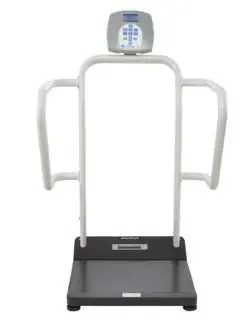
The Health o meter 1100KL is a professional digital platform scale designed for medical environments. Before first use, inspect the unit for shipping damage and ensure it is placed on a flat, stable surface. The scale can be powered by the included ADPT30 AC adapter or 6 D batteries.
Assembly Instructions
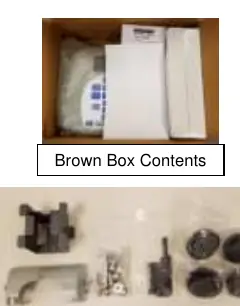
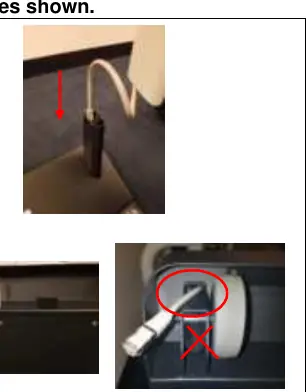
- Preparation: Inspect the carton for damage. Do not use sharp objects to open inner packaging.
- Cable Routing: Feed the load cell cable from the platform through the right handrail support and out the hole behind the wheel. Ensure the cable is routed towards the top of the wheel, not through the channel next to it.
- Connection: Feed the cable through the protective metal shield and plug it into the load cell port on the bottom of the platform.
- Handrail Assembly: Position the center handrail onto the supports. Secure using M8 bolts and washers. Align side handrails with the center handrail and secure with M10 bolts.
- Leveling: Tip the scale to access the underside. Thread the four feet into the platform. Tighten fully by hand, then back out 1-1/2 turns to allow for proper load cell operation.
- Display Head: Align the display head with the silver display support and slide it onto the tabs. Secure with M4 screws.
- Final Steps: Attach the plastic bracket cover and plug the load cell cable into the rear of the display head. Attach display support covers.
Operating Instructions
Weighing a Patient: Ensure the platform is clear and reads 0.0. Ask the patient to step on. The scale will display "PROCESSING" and then "LOCKED" when the weight is stable.
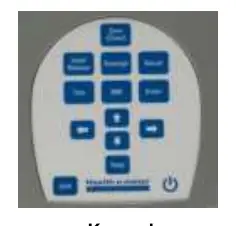
BMI Function: After obtaining the patient's weight, press the BMI button. Use arrow keys to enter height (inches for LB mode, centimeters for KG mode) and press Enter. The display will show the BMI.
Tare Function: To subtract the weight of an object (e.g., oxygen tank), place the object on the scale and press Tare. The scale will zero. Place the patient on the scale; the display will show the patient's weight minus the tare value.
Parent/Child Function: Weigh the parent, press Tare, then have the parent hold the child. The scale will display only the child's weight.
Settings and Configuration
Access the Help menu to configure settings:
- Units Lock: Lock the scale to LB or KG (not available on KG models).
- Everlock: A permanent unit lock feature (requires factory reset to change).
- Auto Zero: Enable or disable automatic zeroing on power-up.
- Auto Off: Configure inactivity timers for battery or AC power.
Cleaning and Maintenance
Disconnect the AC adapter before cleaning. Use a soft cloth with mild soap and water, 70% isopropyl alcohol, or a 1-5% hydrogen peroxide solution. Never submerge the scale or spray fluids directly onto it.
Troubleshooting
If the scale does not power on, check the batteries or AC adapter. If the weight is questionable, ensure the scale is on a level surface and the feet are properly adjusted. If "Load Cell Cable Not Detected" appears, inspect the cable connections at the display head and platform.
Practical help
Common problems
Scale does not power on
Check for dead batteries, faulty electrical outlet, or replace the AC adapter.
Questionable weight or scale does not zero
Remove interfering objects, ensure the scale is on a level floor, and verify feet are balanced (tighten fully, then back out 1-1/2 turns).
Weighing process takes too long
Ensure the patient is standing still on the platform.
Scale displays 'Load Cell Cable Not Detected'
Inspect the load cell cable connections at the back of the display head and the back of the platform. Unplug and re-plug until it clicks.
Before use
- Inspect carton for shipping damage
- Place scale on a flat, stable surface
- Check AC adapter cord for cracking or fraying
- Ensure batteries are fresh (if not using AC adapter)
- Verify feet are properly leveled
Specs in practice
- Capacity (1100KL)
- 1000 lb x 0.2 lb (454 kg x 0.1 kg)
- Power Requirements
- ADPT30 AC adapter (included) or 6 D batteries (not included)
- Operating Temperature
- 50°F to 95°F (10°C to 35°C)
Images and diagrams
- Assembly steps detail cable routing through the handrail support
- Keypad layout defines function buttons like Tare, BMI, and Hold
- Display screen indicates weight, date, time, and battery status
Model compatibility
- 1100KL displays weight in lb or kg; 1100KG displays kg only
- Everlock feature is permanent and cannot be reversed by the user

Manual page author
Michael Turner
Technical manual editor
Reviews PDF manuals for structure, safety notes, and practical product details so readers can find the right information quickly.