Tools / Power Tools
User Manual for Hercules 12V Ratchet
Quick guide for the Hercules 12V Ratchet. Includes setup, operating instructions, safety warnings, maintenance tips, and troubleshooting steps for models HD031B, HD032B, HD034B, and HD033B.
Table of contents
Quick Guide from the Manual
This manual provides essential safety and operating instructions for the Hercules 12V Ratchet. Before using the tool, ensure the battery is fully charged and the work area is clear. Always wear ANSI-approved eye protection and use only impact-rated accessories. Disconnect the battery pack before making any adjustments or when the tool is not in use.
Product Overview
The tool consists of the following main components:
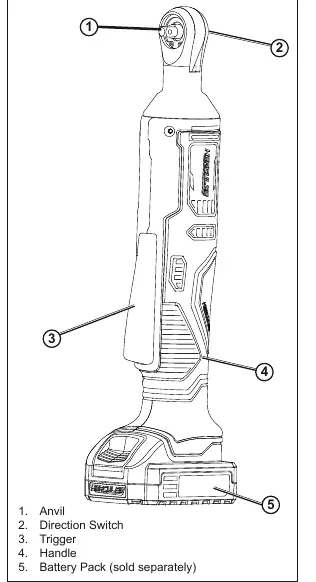
- Anvil: The attachment point for sockets.
- Direction Switch: Used to change the rotation direction.
- Trigger: Activates the tool.
- Handle: The gripping area.
- Battery Pack: The power source (sold separately).
Setup and Charging
Charge the battery pack after unpacking and before the first use. Follow the instructions included with your specific battery charger. Ensure the battery clicks securely into the base of the tool before operation.
Operating Instructions
Follow these steps for safe operation:
- Socket Installation: Connect an appropriate, impact-rated square drive socket onto the anvil. Do not use non-impact accessories as they may shatter.
- Testing: With the trigger in the off-position, insert the battery. Press the trigger and test run the tool for at least 30 seconds. If abnormal noise or vibration occurs, stop use immediately.
- General Use: Set the direction switch to the desired rotation. Use two hands to hold the tool. Push the socket over the fastener and squeeze the trigger slowly.
- Important: Do not change the direction of rotation while the anvil is rotating. Wait until it comes to a complete stop.
Maintenance and Cleaning
Regular maintenance ensures safe operation:
- Before Each Use: Inspect the tool for leaking or cracked battery packs, loose hardware, misalignment, or binding parts.
- After Use: Wipe external surfaces with a clean cloth.
- Storage: Disconnect the battery pack and store the tool in a dry, indoor area out of reach of children. Keep away from metal objects to prevent shorting.
- Battery Disposal: Recycle or dispose of Li-Ion batteries properly. Do not incinerate or open.
Troubleshooting
If the tool fails to operate, check the following:
- Tool will not start: Ensure the battery is properly connected and charged. If the battery is burnt out, replace it.
- Tool operates slowly: Do not force the tool; allow it to work at its own rate. Check if the battery is wearing out.
- Overheating: Ensure motor housing vents are not blocked. Allow the tool to cool down.
Practical help
Common problems
Tool will not start
Check battery connection, ensure it is charged, or replace if burnt out.
Tool operates slowly
Do not force the tool; allow it to work at its own rate. Check battery health.
Overheating
Allow tool to work at its own rate and clear blocked motor housing vents.
Excessive noise or rattling
Internal damage or wear; have a technician service the tool.
Before use
- Inspect tool for damage (cracked battery, loose hardware, binding parts).
- Ensure battery is fully charged.
- Ensure socket is impact-rated.
- Clear work area of children and pets.
- Wear ANSI-approved eye protection.
- Ensure trigger is in the off-position before inserting battery.
Specs in practice
- No Load Speed
- 0-275/min
- Max Manual Torque
- Max 100 lb-ft
Images and diagrams
- 2: Direction Switch
- 5: Battery Pack
Model compatibility
- Use only Hercules 12V Li-Ion batteries (57367).
- Use only impact-rated accessories.
- Do not use extension cords with the charger.

Manual page author
Emily Carter
User documentation editor
Prepares concise manual descriptions and highlights the most useful setup, operation, and maintenance information for readers.