Tools / Power Tools
User Manual for Hercules 3-Inch 12mm Long-Throw Random Orbit Dual-Action Polisher HE108
Quick guide for the Hercules HE108 3-inch long-throw random orbit polisher. Includes setup, operating instructions, maintenance, and troubleshooting tips.
Table of contents
Manual images
Click an image to enlargeQuick Guide from the Manual
This manual provides essential safety and operating instructions for the Hercules HE108 3-inch long-throw random orbit polisher. Before use, ensure the tool is inspected for damage, the workpiece is clean, and the polishing pad is properly centered. Always start the tool at the lowest speed setting and increase as needed. Never force the tool; let it work at its own rate to prevent overheating and damage.
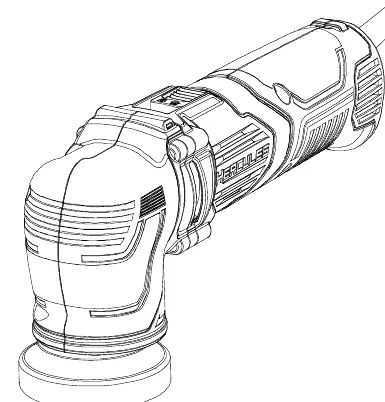
Product Overview
The polisher features the following main components:
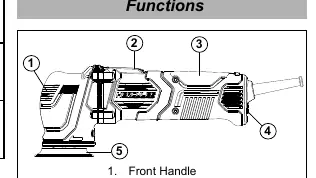
- Front Handle: For gripping and control.
- Power Switch: To turn the tool on and off.
- Back Handle: For gripping and control.
- Speed Dial: To adjust the operating speed.
- Backing Pad: Where the polishing pad is attached.
Specifications
- Electrical Rating: 120VAC / 60Hz / 4.5A
- No Load Speed: 2000-5500 RPM
- Max Accessory Diameter: 3 inches (76mm)
Operating Instructions

Workpiece and Work Area Set Up
Ensure the work area is clean and well-lit. The workpiece must be free of foreign objects. If working on panels not attached to a vehicle, secure them with clamps. Route the power cord safely to avoid tripping hazards.
General Instructions for Use
- Wash the workpiece thoroughly to remove dust, dirt, oil, and grease.
- Press a clean polishing pad (sold separately) firmly onto the Backing Pad, ensuring it is centered to reduce vibration.
- Set the speed dial to the minimum setting.
- Apply an X-shape of product (compound, polish, or wax) across the face of the pad for the first application.
- Plug the tool into a grounded 120VAC outlet.
- Position the pad flat on the surface and slide the Power Switch to the On position.
- For initial application (priming), run the tool for 30 seconds, then turn it off and remove the pad from the surface. Clean the pad with compressed air or a brush.
- For subsequent applications, apply 3 drops of product around the outer edge of the pad.
- Use broad, sweeping strokes in a crisscross pattern for even coverage.
Maintenance and Troubleshooting
Maintenance: Before each use, inspect the tool for loose hardware, damaged cords, or binding parts. After use, wipe the external surfaces with a clean cloth. If the plug or cord is damaged, it must be replaced by a qualified technician.
Troubleshooting:
- Tool will not start: Check if the cord is plugged in, the outlet has power, or if the thermal reset breaker has tripped.
- Tool operates slowly: Do not force the tool; ensure you are not using an undersized extension cord.
- Overheating: Ensure vents are not blocked, do not force the tool, and avoid using long or small-diameter extension cords.
Practical help
Common problems
Tool will not start
Check power connection, circuit breaker, or if the thermal reset breaker has tripped. Allow the tool to cool if necessary.
Tool operates slowly
Do not force the tool to work too fast. Eliminate or upgrade the extension cord if it is too long or has too small a diameter.
Overheating
Ensure motor vents are not blocked. Clean vents with compressed air. Do not force the tool.
Before use
- Inspect tool for loose hardware or cracked parts.
- Check power cord and wiring for damage.
- Ensure workpiece is clean and free of debris.
- Ensure polishing pad is centered on the backing pad.
- Set speed dial to minimum before starting.
- Ensure the power switch is in the off position before plugging in.
Specs in practice
- Electrical Rating
- 120VAC / 60Hz / 4.5A power requirement.
- No Load Speed
- Operating range of 2000-5500 RPM.
- Max Accessory Diameter
- Supports accessories up to 3 inches (76mm).
Images and diagrams
- The functions diagram identifies the front handle, power switch, back handle, speed dial, and backing pad.
- The polishing technique diagram illustrates using a crisscross pattern for even coverage.
Model compatibility
- Requires a grounded 120VAC outlet.
- Use only 3-inch accessories.
- If using an extension cord, ensure it is the correct gauge for the length and load.

Manual page author
Michael Turner
Technical manual editor
Reviews PDF manuals for structure, safety notes, and practical product details so readers can find the right information quickly.