Home Appliances / Cooktops Hobs
Hobbywing Platinum 120A/80A V4 Electronic Speed Controller User Manual
Quick guide for the Hobbywing Platinum 120A/80A V4 brushless ESC, covering installation, throttle calibration, programming parameters, and safety warnings.
Table of contents
Manual images
Jump to the sectionQuick guide from the manual
This document provides essential instructions for the Hobbywing Platinum 120A/80A V4 brushless electronic speed controller (ESC). It covers initial setup, throttle calibration, and advanced programming using the LCD Program Box. Always ensure all components are compatible and connections are properly insulated before operation.
Installation and Connection
The ESC features three main connection types:
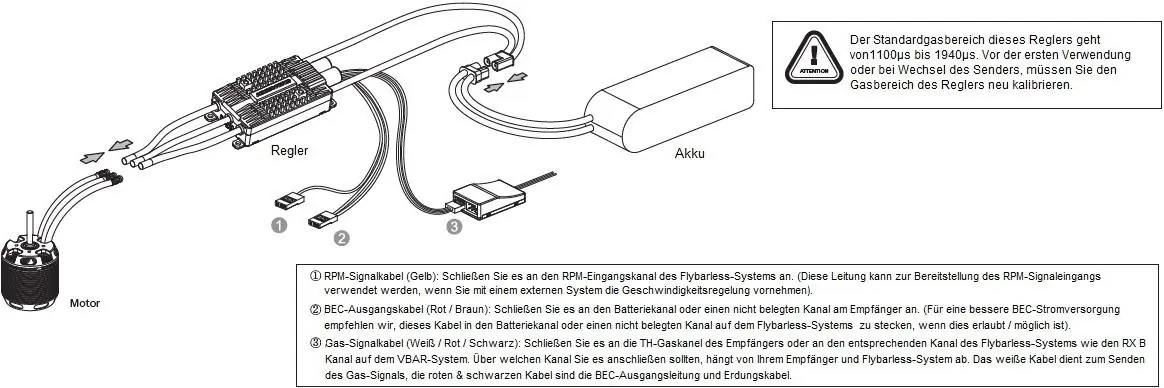
- RPM Signal Cable (Yellow): Connects to the RPM input channel of your flybarless system.
- BEC Output Cable (Red/Brown): Connects to the battery channel or an unused receiver channel for power.
- Throttle Signal Cable (White/Red/Black): Connects to the throttle channel of the receiver or the corresponding flybarless system channel.
Throttle Calibration
Calibration is required before the first use or when changing the transmitter:
- Turn on the transmitter and set the throttle stick to the maximum position.
- Connect the battery; the motor will emit a musical tone indicating it is powered on.
- After 5 seconds, the motor will emit two short tones confirming the full-throttle position.
- Move the throttle stick to the minimum position after hearing the tones.
- The motor will emit tones indicating the number of battery cells, followed by a long tone confirming calibration is complete.
Programming
Parameters can be adjusted using the Multifunction LCD Program Box:
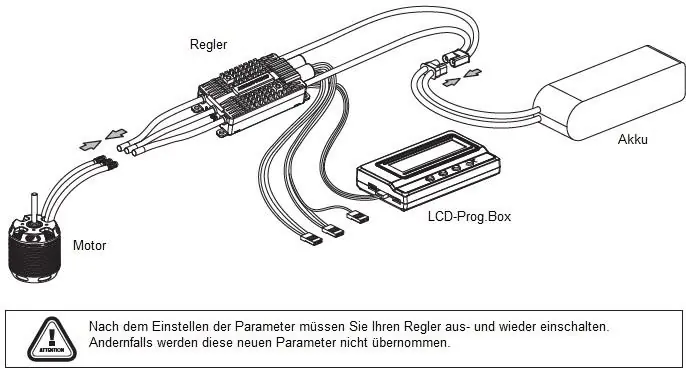
- Connect the LCD Program Box and battery to the ESC.
- Press the OK button to link the box to the ESC.
- Use the ITEM button to navigate parameters and the VALUE button to change settings.
- Press OK to save changes.
- Important: You must power cycle the ESC after changing parameters for them to take effect.
Safety and Maintenance
Always disconnect the battery after use to prevent deep discharge. Avoid operating in extreme heat or wet conditions. Regularly inspect cables and connectors for damage. If the motor is blocked, move the throttle to the bottom position or disconnect the battery immediately to prevent damage to the ESC.
Manufacturer information
Hobbywing
Practical help
Common problems
Motor beeps 'BB, BB, BB' at startup
Input voltage is outside the normal range. Check your battery voltage.
Motor beeps 'B-, B-, B-'
The ESC does not detect a throttle signal. Check the throttle cable connection.
Motor beeps 'B-B-B-B-B-'
Throttle stick is not in the bottom position at startup.
Motor beeps 'BBBBB-'
The throttle range is set too narrow. Re-calibrate the throttle range.
Before use
- Ensure all cables and connections are properly insulated.
- Verify that all components are securely connected.
- Use a soldering iron of at least 60W for all cable connections.
- Ensure the throttle stick is at the bottom position before connecting the battery.
- Check that the battery is fully charged and compatible with the ESC.
Specs in practice
- Governor Mode
- Maintains a constant rotor speed for helicopters regardless of load changes.
- DEO Technology
- Improves throttle response and efficiency while reducing ESC temperature.
Images and diagrams
- The connection diagram shows the ESC linked to the motor, battery, and receiver/flybarless system.
- The LCD Program Box connects to the ESC via the separate programming port.
Model compatibility
- Platinum 80A V4 is intended for 450-500 class helicopters.
- Platinum 120A V4 is intended for 500-550 class helicopters.
- Both models support 3-6S LiPo batteries.

Manual page author
Emily Carter
User documentation editor
Prepares concise manual descriptions and highlights the most useful setup, operation, and maintenance information for readers.