Power / Batteries & Chargers
User Manual for Hypergear Solar 10000mAh Wireless Power Bank
Quick start guide and user manual for the Hypergear Solar 10000mAh Wireless Power Bank. Learn how to charge devices, use solar power, operate the flashlight, and maintain your power bank safely.
Table of contents
Manual images
Click an image to enlargeQuick Guide
The Hypergear Solar 10000mAh Wireless Power Bank is designed for portable charging. Please note that solar charging is intended for emergency use only and requires direct sunlight; it is not a primary charging method. Ensure your phone is Qi-compatible for wireless charging. Keep the protective flap tightly closed to maintain the IPX5 water-resistant rating.
Device Overview
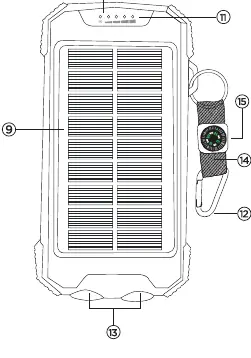
The device features the following components:
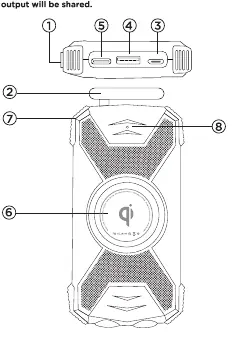
- 1. Power Button
- 2. Protective Flap
- 3. Micro USB Input
- 4. USB Output
- 5. USB-C IN/OUT
- 6. Wireless Charging Surface
- 7. Anti-Slip Grip
- 8. Wireless Charging Indicator
- 9. Solar Panel
- 10. Solar Charging Indicator
- 11. Battery Level Indicators
- 12. Carabiner Ring
- 13. Dual LED Flashlight
- 14. Carabiner Strap
- 15. Compass
Specifications
Input: Micro USB (5V/2.1A), USB-C (5V/2.1A).
Output: Total 5V/2.4A (shared). Qi (5V/1A), USB (5V/2.1A), USB-C (5V/2.1A).
Note: When charging 3 devices simultaneously, the total output is shared.
Charging the Power Bank
Via Micro USB or USB-C: Connect to a USB power source using the included cable or a certified 3rd party cable and a 2A charger. The power indicators will flash while charging and turn solid when fully charged (approximately 6 hours). The power bank cannot charge other devices while it is being recharged via these ports.
Via Solar Panel: Position the battery for maximum sun exposure. The Solar LED indicator will turn green. Solar charging takes approximately 67 hours for a full charge in direct sunlight. The power bank can charge connected devices while solar charging, but total charging time will increase.
Charging Your Mobile Device
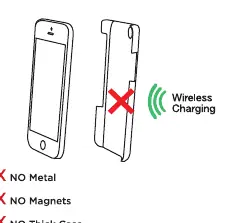
Wireless Charging: Press the Power button; the Wireless Charging Indicator will turn green. Place your phone on the designated charging area. Ensure your phone case does not contain metal, magnets, or exceed 3mm in thickness, as these will interfere with charging.
USB Charging: Connect your device to the USB or USB-C port using a compatible charging cable. Charging will start immediately.
Using the Flashlight
To turn the flashlight on or off, perform a long press (3 seconds) on the power button.
Safety and Maintenance
Water Resistance: The unit is IPX5 waterproof, meaning it is resistant to rainfall and water spray but cannot be submerged. Ensure the protective flap is closed before exposure to wet environments.
General Safety: Do not store the unit in a depleted state; charge at least once every 3 months. Avoid extreme temperatures (below 40°F or above 90°F). Do not use near flammable liquids, gases, or heat sources. If the device shows signs of damage, such as punctures or deformities, discontinue use immediately.
Manufacturer information
HyperGear
Practical help
Common problems
Wireless charging not working
Ensure your phone is Qi-compatible. Remove any phone cases that contain metal, magnets, or are thicker than 3mm.
Slow charging speed
Use a 2A charger for the power bank. Solar charging is for emergency use only and is significantly slower than wall charging.
Water resistance failure
Ensure the protective flap is tightly closed before exposing the unit to rain or water spray.
Before use
- Fully charge the unit before first use
- Verify your device is Qi-compatible for wireless charging
- Ensure the protective flap is closed for water resistance
- Remove metal or magnetic objects from your phone case
Specs in practice
- Total Output
- 5V/2.4A shared capacity when charging multiple devices simultaneously.
- Solar Charging
- Emergency use only; requires direct sunlight and takes approximately 67 hours for a full charge.
- IPX5 Waterproof
- Resistant to rainfall and water spray; do not submerge the unit.
Images and diagrams
- 1-8: Ports, buttons, and indicators located on the top edge and surface
- 9-15: Solar panel, battery level indicators, flashlight, and carabiner location
Model compatibility
- Wireless charging requires Qi-compatible devices
- Phone cases must be non-metallic and under 3mm thick

Manual page author
Michael Turner
Technical manual editor
Reviews PDF manuals for structure, safety notes, and practical product details so readers can find the right information quickly.